
DotCraft App
This page targets app integrators and client authors. A DotCraft App uses App Binding for authority and a binding-scoped Streamable HTTP MCP server for tools.
For the Desktop workflow, see Connected Apps.
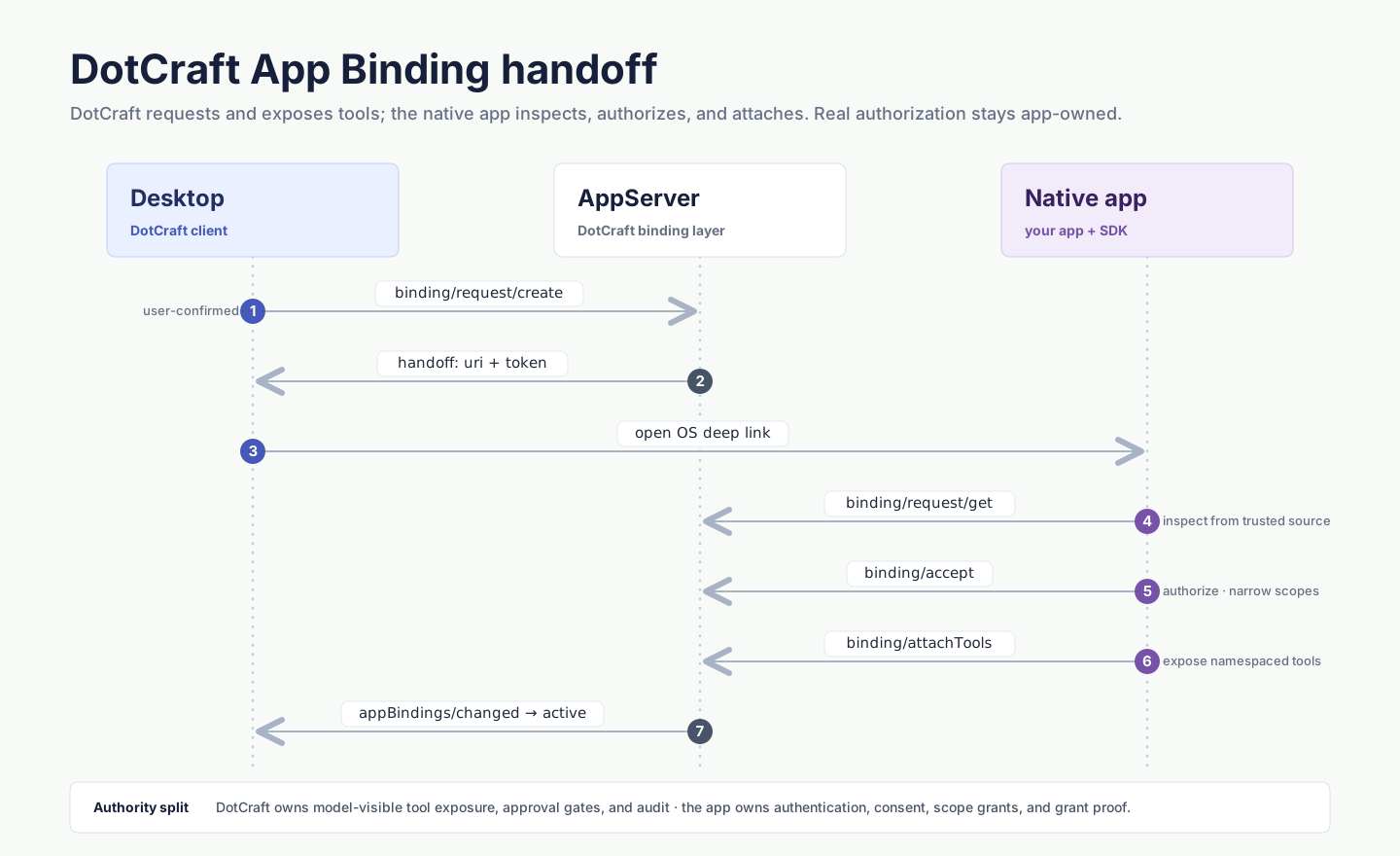
Connection and binding
| Scope | Purpose | Control plane |
|---|---|---|
| App connection | Authenticates one app principal for the workspace | app/connection/* |
| Thread binding | Grants one thread access to that app | thread/appBindings/*, app/binding/* |
An app can have one workspace connection and multiple thread bindings. Turning the app off in one thread revokes only that binding. Disconnecting the app principal revokes every binding owned by that connection.
Use the typed SDK from a trusted client
A trusted DotCraft client discovers an app, starts its connection handoff, inspects connection state, and manages thread bindings through the high-level SDK. Keep requestToken, principal credentials, and binding bearers out of logs.
const apps = await dotcraft.appBindings.listApps({ threadId: thread.id });
const app = await dotcraft.appBindings.viewApp(appId, { threadId: thread.id });
const handoff = await dotcraft.appBindings.startConnection(appId);

// The app principal completes the handoff described below.
const connection = await dotcraft.appBindings.connectionStatus(appId);
const enabled = await dotcraft.appBindings.enable(thread.id, appId);
const bindings = await dotcraft.appBindings.listThreadBindings(thread.id);
await dotcraft.appBindings.revokeThreadBinding(thread.id, bindingId, "user disconnected app");using DotCraft.Protocol.AppServer;
var apps = await client.AppBindings.ListAppsAsync(new AppListParams { ThreadId = thread.Id });
var app = await client.AppBindings.ViewAppAsync(new AppViewParams { AppId = appId, ThreadId = thread.Id });
var handoff = await client.AppBindings.StartConnectionAsync(new AppConnectionStartParams { AppId = appId });
// The app principal completes the handoff described below.
var connection = await client.AppBindings.GetConnectionStatusAsync(new AppConnectionStatusParams { AppId = appId });
var enabled = await client.AppBindings.EnableBindingAsync(new ThreadAppBindingEnableParams { ThreadId = thread.Id, AppId = appId });
var bindings = await client.AppBindings.ListThreadBindingsAsync(new ThreadAppBindingsListParams { ThreadId = thread.Id });
await client.AppBindings.RevokeThreadBindingAsync(new ThreadAppBindingRevokeParams
{
ThreadId = thread.Id,
BindingId = bindingId,
Reason = "user disconnected app"
});Starting the connection request does not authenticate the app. Enable a thread binding only after the app connection is ready. Use the returned handoff in your UI; do not send its token through an agent prompt.
Connect the app principal
- A trusted client calls
app/connection/startwith the app ID. - The app reads the handoff with
app/connection/request/get. - The app calls
app/connection/connect. - The server returns the principal credential once.
- The app immediately calls
app/connection/authenticateon its initialized AppServer connection. - Later connections authenticate with the stored credential.
The principal credential expires after 30 days. app/connection/refresh rotates it, and rotation invalidates the previous credential immediately.
app/connection/revoke removes the workspace connection and revokes all of its thread bindings.
Activate a thread binding
A trusted client starts the binding with thread/appBindings/enable. The server creates a ten-minute binding request.
An online app principal receives app/binding/requested with the bindingRequestId. If the app is offline, the trusted client receives a request-specific handoff from thread/appBindings/enable and passes it to the app. The authenticated app reads the request with app/binding/request/get, then activates it:
{
  "jsonrpc": "2.0",
  "id": 1,
  "method": "app/binding/activate",
  "params": {
    "bindingRequestId": "appbindreq_...",
    "endpoint": "https://app.example/mcp/binding/123",
    "bearer": "one-time-binding-secret"
  }
}
The endpoint must expose a Streamable HTTP MCP server. DotCraft creates a binding-scoped MCP session and reads its tool snapshot before the binding becomes ready.
DotCraft starts binding MCP sessions with initialize at protocol version 2025-06-18 and never sends the experimental server/discover probe. Implement initialize-era negotiation.
thread/appBindings/revoke removes the binding from one thread without disconnecting the app principal.
New-thread selection
A client may stage app selections before creating a thread. After thread/start, enable the selected apps and wait for them to become ready before submitting the first turn.
Capability changes
The first valid tool snapshot is approved by the original enable action. After that, only a provably narrower capability set is accepted automatically. Everything below requires confirmation:
- a new tool, or an input schema that cannot be proven to be a subset of the approved one
- a tool visibility audience that was not approved before
- relaxed risk annotations —
requiresApprovalremoved, ordestructiveoropenWorldadded - a changed UI resource, an added CSP domain, or an added browser permission
A trusted client calls thread/appBindings/confirmCapabilities to accept the new baseline or retain the previous one. Accepting makes the new baseline active. Retaining the previous baseline rejects the expansion, removes the live MCP session, and leaves the binding offline until the app rebinds with a compatible capability set.
Offline and rebind behavior
An offline binding retains stable tool schemas, but tool calls fail with AppBindingOffline.
After a process restart, the authenticated app calls app/bindings/list — client.AppBindings.ListBindingsAsync() in the .NET SDK — then app/binding/rebind with the current authorityRevision, a trusted endpoint, and a new bearer.
Each binding keeps its own MCP session and bearer. Live MCP clients and binding bearer values are not persisted.
Endpoint rules
- Only Streamable HTTP endpoints are accepted.
- Remote endpoints must use HTTPS.
- Loopback endpoints may use HTTP.
- App Binding does not accept command, arguments, environment, working-directory, or stdio configuration.
- Redirects or trust-boundary changes require activation again.
Social channels
Social conversation bindings use the social binding methods and native plugin tools instead of MCP tools. DotCraft injects the bound delivery target on the server.
Channel tools must not declare target, chatId, groupId, conversationId, deliveryTarget, or aliases of those fields.
Security boundary
An authenticated app connection can call only App Binding app-role methods. It cannot read threads, start turns, inspect the workspace, or control another app.
DotCraft persists salted credential verifiers and normalized non-sensitive capability snapshots. It does not persist principal credentials, binding bearers, live MCP clients, or UI resource bodies.
Related docs
- MCP Apps — attach an interactive view to a tool result served from the same binding.
- AppServer protocol — wire definitions for the
app/*andthread/appBindings/*methods used here.