
Hub local coordination
This page targets integrators and contributors; most users never touch Hub directly. Hub is DotCraft's local runtime coordinator. It runs per OS user and discovers, starts, reuses, and stops the AppServer process for each workspace. Desktop and CLI use Hub by default.
NOTE
Remote, CI, bots, or explicit AppServer protocol debugging go through AppServer mode.
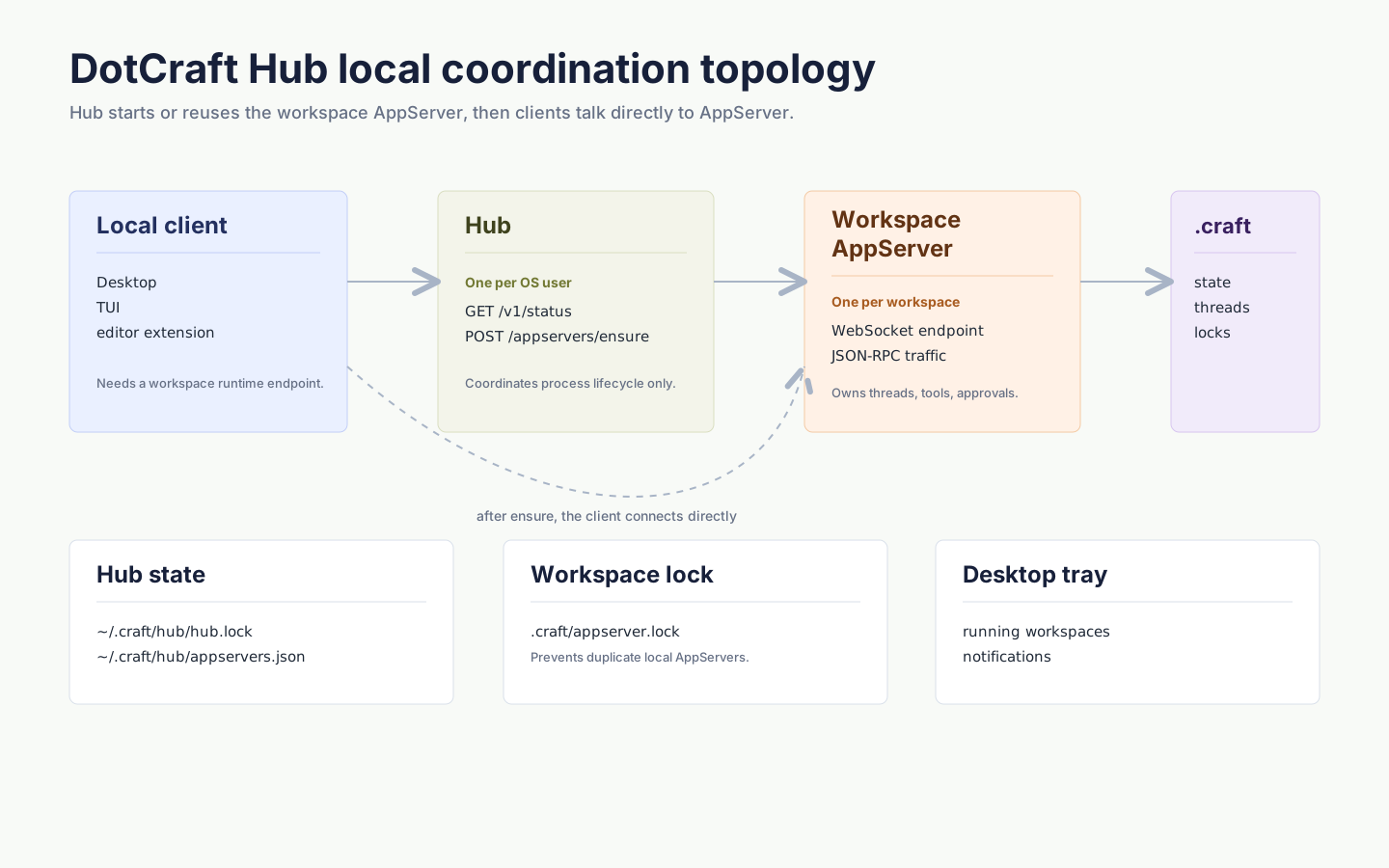
Key properties
- One Hub per OS user
- One AppServer per workspace
- Hub does not handle conversation traffic or proxy the AppServer protocol
- A client only asks Hub during bootstrap: make sure this workspace's AppServer is available
- After bootstrap, the client connects directly to the returned AppServer WebSocket URL
When to start manually
You usually do not need to run dotcraft hub manually. For coordination debugging:
dotcraft hubHub starts a loopback management API and writes discovery metadata to ~/.craft/hub/hub.lock. It allocates local ports automatically; if startup fails because a port is busy, a permission is denied, or security software blocks loopback, restart Hub or Desktop to reallocate.
Local state
~/.craft/hub/
├── hub.lock          # current Hub discovery: API URL, PID, start time, local token, version, binary path
└── appservers.json   # Hub-tracked AppServer state (display & recovery)
Each workspace also has:
<workspace>/.craft/appserver.lockIt records which AppServer process owns the workspace and prevents multiple local AppServers from running against the same workspace.
When Hub or AppServer finds a stale appserver.lock left by a dead process, it removes the lock and continues. If the lock points to a still-running AppServer with a healthy WebSocket endpoint, Hub reuses that endpoint instead of starting a duplicate process. When the lock points to a live AppServer that Hub cannot safely reuse, close the Desktop or CLI process holding that workspace, or stop the workspace runtime from the tray, then reopen it.
Desktop and the tray
Hub itself is a headless background coordinator, and the Desktop tray is its visual layer:
- Open or switch workspaces
- See recent and running workspaces
- Open Desktop or Dashboard
- Restart or stop Hub-managed workspace runtimes
- Receive system notifications forwarded through Hub (task completion, approvals, runtime state)
Exiting from the tray asks Hub to shut down, and Hub stops the workspace AppServers it manages.
For Desktop to open a workspace, dotcraft / dotcraft.exe must be on PATH, or the AppServer executable path must be set in Desktop settings.
Building a client
Use a DotCraft SDK for normal local clients. Its Hub API discovers or starts Hub, ensures the workspace AppServer, preserves structured errors, and then opens the AppServer connection. Implement Hub Protocol directly only for a custom transport, an unsupported language, or protocol debugging.
Related docs
- SDK quickstart — the recommended client path, with bootstrap already wrapped
- Unified Session Core — the Thread / Turn / Item model above Hub and AppServer