
Agent System
At the center of DotCraft is one agent that keeps growing with your project. These pages cover its four kinds of ability: extending what it can do, keeping context across conversations, handing work to more agents, and making progress while nobody is watching.
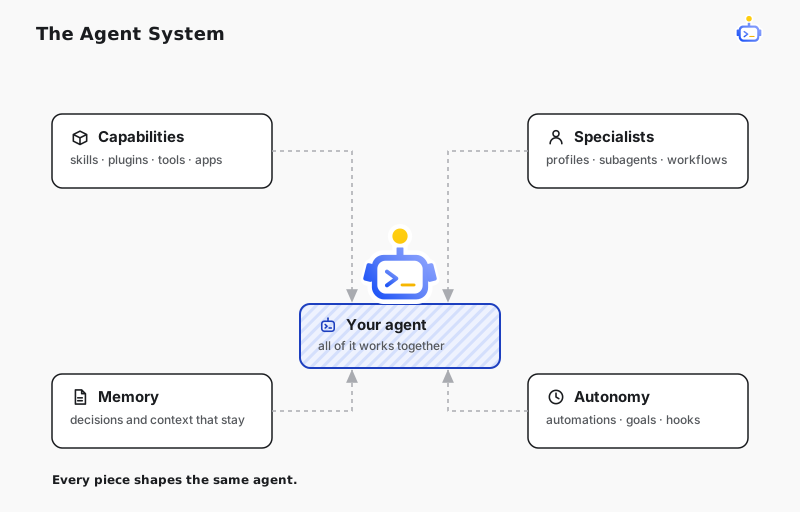
Extend what it can do
Skills & Self-Learning turns a workflow that already worked into a reusable skill, ready for the next task of the same kind. Plugins & Tools covers the built-in tools, plugins, and MCP servers that give the agent its capabilities, and the trust boundary around each. DotCraft Satellite lets the agent work in a shared folder on a colleague's PC — you invite the PC from Desktop, and its owner approves the one folder and can stop it at any time. When you need more, Plugin Marketplaces adds plugin catalogs you trust, and Connected Apps lets a conversation work directly with the products and services you already use.
Keep context across conversations
Memory & Dreams keeps project context, preferences, and decisions available from one conversation to the next. Memory is stored as plain Markdown in your workspace, so you can read and change it at any time.
Build your agent team and delegate work
Agent Profiles gives reusable specialists their own instructions, tools, skills, and model defaults, while Agent Builder lets you shape them through conversation. Subagents run focused assignments in their own context, keeping the main conversation clean. Dynamic Workflows turns repeatable orchestration into scripts that can run several subagents in parallel. When a coding agent outside DotCraft should take over, Workspace Handoff exports the conversation as a handoff document.
Run unattended
Automations & Goals runs routine tasks on a schedule, and can give a conversation a long-running goal to keep pushing on. Lifecycle Hooks run your own scripts at key moments in a conversation, such as confirming a dangerous command before it executes.