
Workspace Handoff
Some work ends up with a coding agent outside DotCraft. DotCraft exports a conversation as one Markdown handoff document — project memory, the session record, and the supporting evidence in a single file — so the other agent doesn't have to guess from chat fragments.
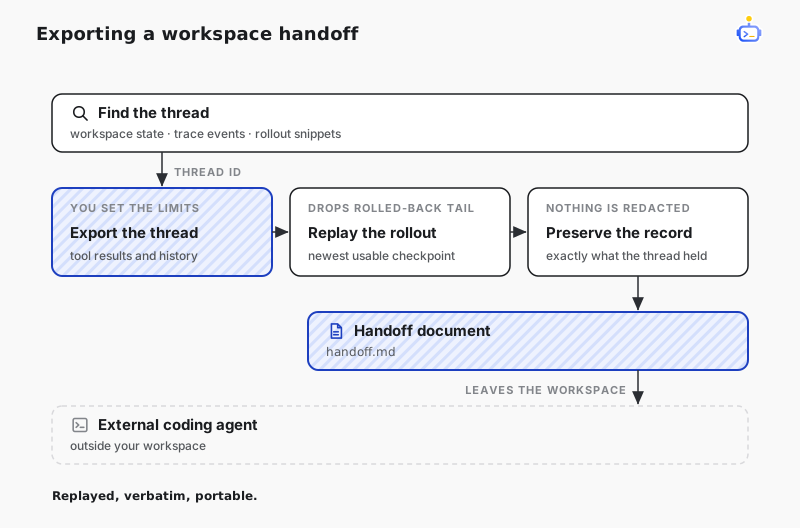
If the other tool can integrate with DotCraft directly, connect it as a client instead — see AppServer Mode. The handoff document is for coding agents that only accept files or pasted context.
What to hand over
A workable handoff usually includes four things:
- The repository, or the exact files the other agent may read.
- The exported document for the relevant conversation.
- The concrete task you want it to do next.
- Any privacy constraints, such as whether tool output and memory history may travel with it.
Never hand over provider credentials, the global ~/.craft/config.json, or raw workspace database files. A Markdown export is far easier to trim and inspect than raw state, but it is not automatically safe to share.
Find the conversation to export
When you remember only a symptom, an error, a tool name, or one phrase, search the workspace first:
dotcraft context search --query "provider timeout gpt-5.3" --workspace "D:\path\to\project" --limit 5Results list the matching conversations, and every exportable one comes with a ready-to-run export command. Search locates the conversation; the export is what carries its content. Add --json when another script consumes the result.
Export the handoff
Once you have the thread id:
dotcraft context export --thread thread_20260601_ab12cd --workspace "D:\path\to\project" --output handoff.mdThe default output is already shaped for a handoff: tool results are kept as summaries rather than full output, and only recent memory history travels with it. For something stricter, drop tool results entirely:
dotcraft context export --thread thread_20260601_ab12cd --tool-results none --history tail --output handoff.mdFor the most complete transcript:
dotcraft context export --thread thread_20260601_ab12cd --profile transcript --tool-results full --history full --output transcript.mdWithout --output, the Markdown goes to stdout.
NOTE
--tool-results full only lifts the export's truncation cap. Large results that were spilled to .craft/tool-results/ are not fetched back, so the export still carries the preview recorded at the time.
What the export contains
An export carries the conversation's basic details, the workspace memory, the context the model currently sees, and the conversation record itself. It is not a raw log dump: anything you rolled back is left out, so the document reflects what this conversation would actually continue from.
Reasoning content and internal provider data are never exported. Tool calls are kept, and tool results — including answers you typed when the agent asked you a question — follow the --tool-results scope.
Review it before you send it
Nothing is redacted. Whatever the record holds goes into the document as written, including any secrets or tokens that tool results captured. Narrow the scope with --tool-results none or summary when that matters. Open the Markdown and read it through before sending, then tell the other agent what to do next and which files it may change.
Related docs
- Subagents — to run an external coding CLI inside DotCraft instead, use a subagent's external runtime
- Observability — replay session traces in the Dashboard to pick the right conversation