
Remote Tool Host
Remote Tool Host executes an Agent's file, Shell, and LSP tools on another machine on the same network. This page targets integrators and operators who set a pairing up outside DotCraft Desktop.
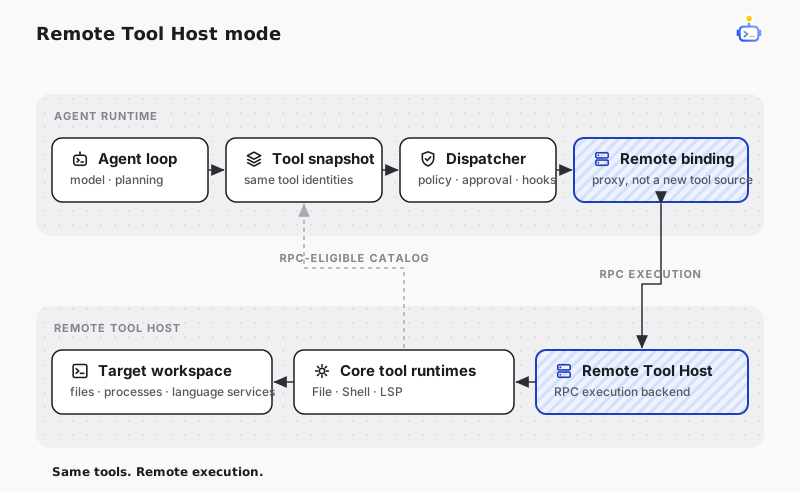
Responsibility split
The Agent machine owns the model loop, approvals, hooks, and the Session history. The workspace machine owns the real workspace, the local tool policy, and the execution audit. A remotely executed tool keeps its existing tool identity, schema, and Session projection — remote execution replaces only the runtime route behind a stable registration, so the model never sees a second, remote copy of a tool.
The Hub on the Agent machine is the rendezvous point. The Remote Tool Host dials out to it and never listens for inbound connections, so the workspace machine needs no inbound firewall rule, port forward, or TLS identity. The Hub relays the bytes between the two sides without interpreting them.
Both machines run as the signed-in user, not as a service, so both must stay signed in.
Pair from the command line
The Agent machine runs DotCraft Hub (dotcraft hub), and the workspace machine must be able to reach it on port 47600. Run this on the Agent machine to mint an invitation:
dotcraft tool-host invite --name "Ann's workstation"The command prints the invitation link plus the exact command to run on the other machine. An invitation names this device by its host name; if the other machine cannot resolve it, mint the invitation with the address to dial instead:
dotcraft tool-host invite --host 192.168.1.20 --expires 4--expires sets the validity in hours. An invitation is single-use.
Run this on the machine that owns the workspace, replacing the link and the folder:
dotcraft tool-host setup --name "Ann's workstation"
dotcraft tool-host join http://ann-pc:47600/i/inv_x1y2z3 --workspace C:\workspaces\sample-project
dotcraft tool-host serve
join stores a long-lived credential in the operating-system credential store and prints the workspace id that Agents will use. serve keeps the control connection open and reconnects on its own after a Hub restart. To start it at sign-in:
dotcraft tool-host autostart installDotCraft Satellite is the tray client that replaces setup, join, serve, and autostart install with an installer and an approval window, for a machine owner who does not want a terminal.
Inspect and route
On the Agent machine, dotcraft tool-host list prints the machines paired with this Hub and their ids, and dotcraft tool-host test <machine-id> checks whether one of them is online. On the workspace machine, dotcraft tool-host workspace list prints the folders it exports, and the policy commands show and change what it will run:
dotcraft tool-host policy list
dotcraft tool-host policy set Exec needs-approval
A policy is allow, deny, or needs-approval, set per canonical tool name.
Policies are enforced on the Tool Host. An Agent cannot weaken a deny rule or create a permanent approval on the remote machine.
Outside Desktop, an Agent routes a conversation with the RemoteToolHost.List, RemoteToolHost.Connect, and RemoteToolHost.Disconnect model tools:
Call RemoteToolHost.List, then connect this conversation to workspace
sample-project on <machine-id> with RemoteToolHost.Connect.
A workspace serves one Agent Host at a time. If it is already held, disconnect it there or wait for it to be released — there is no queue and no takeover. A remote failure is reported as a remote failure; DotCraft never silently retries the call against the local binding.
End a pairing
dotcraft tool-host revoke <machine-id>On the Agent machine this removes the peer from the Hub and closes its connections. On the workspace machine it deletes the local pairing and stops serve. Either side is enough — the stored credential goes with it.
Related docs
- DotCraft Satellite — the same pairing driven from Desktop
- Architecture overview — where the Hub and the Agent Host sit in the wider runtime