
Session persistence
DotCraft persists each conversation as a thread you can resume across clients and process restarts. This page explains the storage authority, recovery path, and lifecycle boundaries for integrators and contributors.
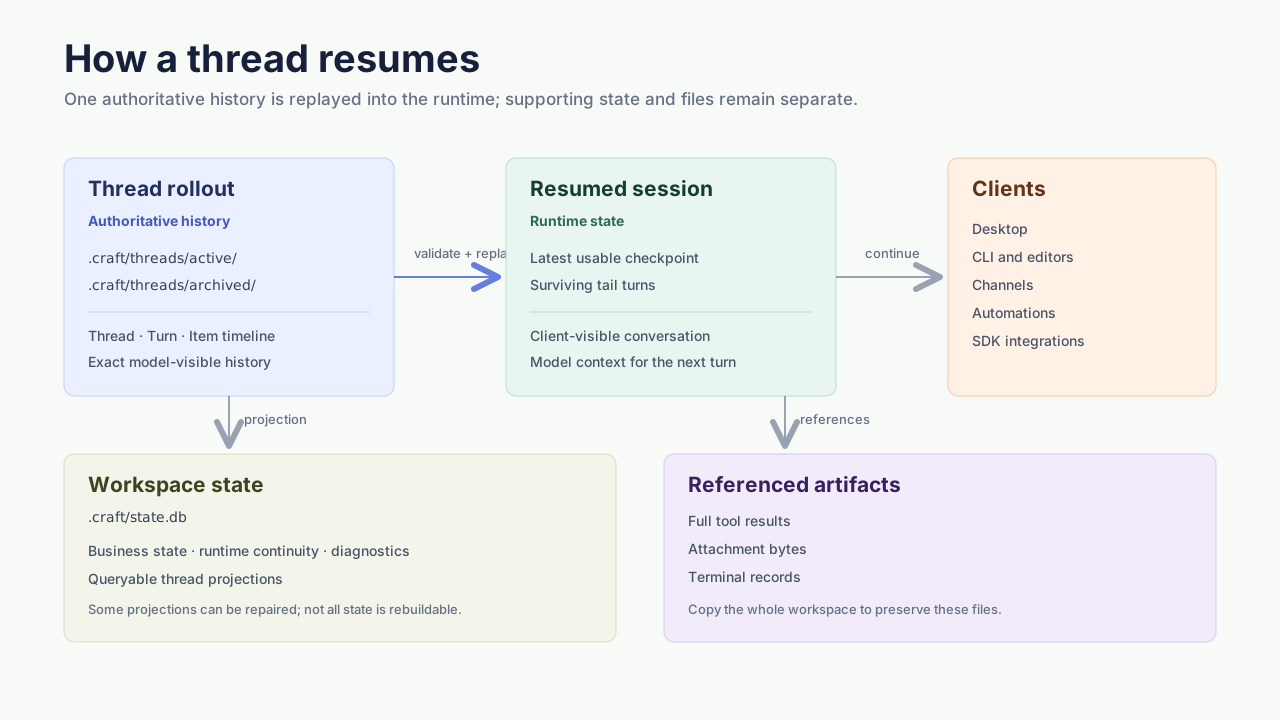
Storage model
| Data | Location | Role |
|---|---|---|
| Thread rollout | .craft/threads/active/ or .craft/threads/archived/ | Authoritative conversation timeline and model-visible history |
| Workspace state | .craft/state.db | Business state, runtime continuity, diagnostics, and query projections |
| Thread artifacts | .craft/tool-results/, .craft/attachments/, and .craft/terminals/ | Large tool results, attachment bytes, and terminal records referenced by a thread |
A rollout contains both the client-visible Thread → Turn → Item history and the exact model history required to continue the conversation. Large results can be stored as separate artifacts with a bounded preview and reference in the rollout.
state.db is not a replacement for the rollout. DotCraft can rebuild selected thread metadata and attachment references from rollout files, but goals, plans, graph relationships, mailbox state, and other business data are not fully recoverable from them. Losing state.db is partial data loss.
Write and resume
During a turn, DotCraft appends records to the thread rollout and updates the relevant workspace state. On resume it:
- Validates the thread identity and source.
- Replays the surviving thread records.
- Restores the latest usable compaction checkpoint.
- Appends the surviving turns after that checkpoint.
- Rebuilds the runtime session.
Malformed records that can be safely ignored are skipped. If a rejected exact-history record can be associated with a turn, DotCraft rebuilds that turn's entire model-visible contribution from its surviving Session Items instead of mixing partial exact history with the fallback. An unsafe or conflicting thread header or source identity fails the resume outright, rather than continuing under the wrong identity.
When a rollout exists but its query projection is missing or stale, filesystem-first reads can repair the rebuildable projection in state.db. Read-repair does not overwrite unrelated business or diagnostic state.
Thread lifecycle
| Action | Persisted result |
|---|---|
| Active | Rollout remains under threads/active/ and can accept new turns. |
| Archive | New turns are blocked, active background terminals are stopped or invalidated, and the rollout moves to threads/archived/. Conversation history is retained. |
| Restore | The rollout returns to the active set. Descendant subagent threads are restored only while their parent/child edges remain open. |
| Delete | The thread and its subagent descendants are permanently removed from durable thread state. Thread-owned filesystem artifacts are cleaned up on a best-effort, retryable basis. |
Archiving does not cancel a main Turn that is already executing. It prevents new turns and stops or invalidates active background terminals. Archive is not a deletion boundary: it preserves conversation history and does not remove spilled tool results that surviving rollout records still reference.
Completed and lost terminal metadata and logs survive the archive operation but remain subject to Tools.Shell.Background.OutputRetentionDays, which defaults to 7 days. Running terminals are not removed by that time-to-live cleanup, and normal process shutdown stops them without treating the thread as deleted.
Back up and restore a workspace
A Git clone includes only tracked files. The generated .craft/.gitignore excludes local databases and several artifact directories, so Git alone is not a complete session backup.
To preserve the complete local state, stop the workspace's AppServer so rollout writers and workspace state are flushed, then copy the entire project folder, including hidden and ignored files under .craft/. Thread records retain the workspace's absolute path, so supported session restore requires the same absolute path. Opening a copy at a different path is not a supported migration workflow. Global provider credentials are stored separately and may need to be configured again. See Getting started for the user workflow.
Supported integration boundary
Rollout JSONL is an internal persistence format, not a public interchange schema. Integrations use one of:
ISessionServiceinside DotCraft- the AppServer protocol
- a supported SDK
dotcraft context searchanddotcraft context exportfor read-only handoff
This keeps integrations independent of internal record versions, compaction details, and recovery behavior.