
Settings lifecycle
This page targets integrators and contributors. It explains the three-tier settings model in Desktop and how to tell whether a change is already applied or still pending.
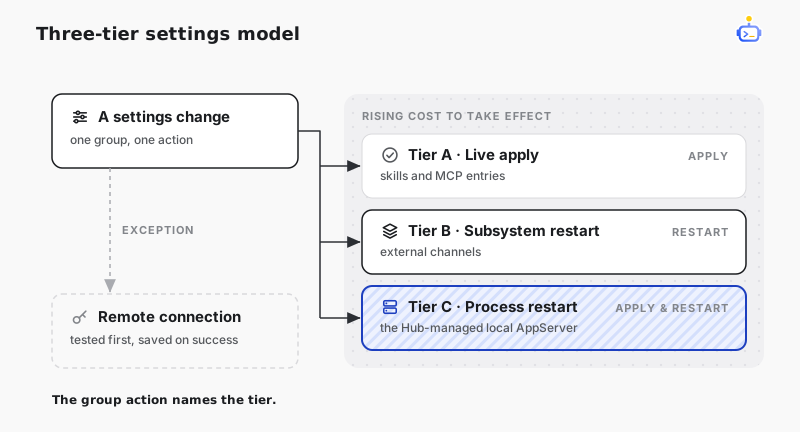
Three-tier settings model
Desktop groups settings by how a change becomes runtime state:
- Live apply (Tier A)
- Effective immediately after apply.
- Typical examples:
Skills.DisabledSkills, MCP configuration entries.
- Subsystem restart (Tier B)
- Persisted, and effective after the related subsystem restarts.
- Typical examples: settings tied to external-channel subsystem lifecycle.
- Process restart (Tier C)
- In Local mode, persisted, and effective after the Hub-managed local AppServer process restarts.
- Typical examples: startup-level Core settings, local AppServer binary path, and some entry-point settings.
The group's action names its tier: live-apply groups take effect on save, and restart tiers expose Restart or Apply & Restart.
Representative fields by tier
| Area | Representative fields | Effect timing |
|---|---|---|
| Skills / MCP | Skills.DisabledSkills, MCP server definitions | Live apply |
| External Channel | External channel related configuration | Subsystem restart |
| Connection / Local AppServer | connectionMode = local, local AppServer binary path, local WebSocket listener config | Hub-managed local AppServer can Apply & Restart |
| Connection / Remote AppServer | connectionMode = remote, remote WebSocket URL, token | Probe the draft URL/token through WebSocket initialize, then save and switch after success. No remote AppServer restart |
| Model providers | Providers[id], ProviderId, ProviderPreferences, SubAgent.ProviderPreferences | Desktop / AppServer refresh new-session defaults through provider management APIs |
Notes:
- The Desktop model page manages the provider registry. Credentials and endpoints belong only to
Providers[id]. - Changing workspace
ProviderIdorProviderPreferencesrefreshes new-thread defaults only. Existing threads keep the model, reasoning, speed, and context-window snapshot captured at creation, unless their own composer atomically changes the complete preference. - Workspace files save
ProviderIdand provider-specific complete preference overrides. Provider credentials stay in the personalProviders[id]registry. - A Remote AppServer is owned by the user or the remote environment. Desktop tests and switches the connection, and offers no remote restart.
- If Desktop was launched with
--remote, that argument controls the connection for the session and persistent connection switching is unavailable in Settings.
Applied vs pending changes
- Applied: the config is persisted and the tier's action is complete — live apply succeeded, or the restart finished.
- Pending: a restart-required hint is shown, which means the config changed on disk but the runtime has not switched yet.
- Pending Remote connection: URL/token edits are not the default connection yet. Apply & Connect probes the draft connection first and saves only after success, so a failed probe does not trap the next launch behind a bad endpoint.
- Per-group dirty state: when only one group changed, only that group's action is required, and no global save is needed.
- Invalid saved Remote config: when a saved Remote connection fails at startup, the error screen offers Open Settings, which takes you to Settings > Connection and clears the blocking overlay so you can fix the URL/token or switch back to Local.
Related docs
- Configuration reference — every field these tiers cover
- AppServer Protocol — the
workspace/configChangedevent clients watch for config changes - AppServer mode — transport and authentication for remote and multi-client connections