
Security & Sandbox
DotCraft holds the agent inside four layers of guardrails: a file blacklist, the workspace boundary, tool capability switches, and sandbox isolation. A personal local project needs the defaults plus a few sensitive paths. Once DotCraft is exposed through external channels or the public internet, work through the strict deployment checklist below.
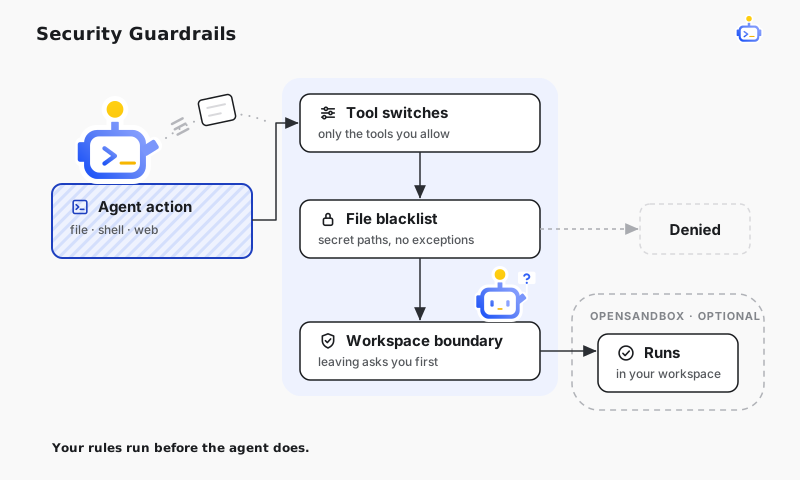
Default safety baseline
In a freshly created workspace:
- File and shell operations outside the workspace require approval.
- The blacklist is empty, so add the credential and secret directories that matter on your machine.
- Every built-in tool is available until you narrow the tool surface.
- Sandbox isolation is off until you turn it on.
Field names, defaults, and JSON examples for all of these live in Tools, Security, and Sandbox.
File blacklist
The blacklist lists paths the agent must never touch. It applies the same way to the CLI, Desktop, external channels, and automations.
Reads, writes, edits, and searches on those paths are denied, and so are shell commands that reference them. The blacklist outranks workspace-boundary approval: a blacklisted path is refused outright rather than sent for approval. Absolute paths and paths starting with ~ both work, and subpaths are covered too.
Workspace boundary
Before running a shell command, DotCraft expands every path the command references: Unix absolute paths, home-directory paths starting with ~, environment variables, Windows drive-letter paths, and UNC paths like \\server\share.
If a path resolves outside the workspace, DotCraft either denies it or asks the active interaction source for approval, depending on the workspace policy. File tools use the same expansion rules, so file operations and shell commands reach the same verdict.
Tool capability switches
Tool policies decide which built-in tools the agent can see, whether outside-workspace file and shell actions need approval, how much content file and web responses may return, and whether LSP and sandbox tools are enabled. When you need a precise allow-list, a web-search provider, a timeout, or an output limit, look up the field in Tools, Security, and Sandbox.
Hooks
Hooks turn security checks into checkpoints on the session lifecycle: inspect a command before it runs, review edits after a tool call, or stop before risky work and wait for your go-ahead. For the concept, see Lifecycle Hooks. For events, matcher rules, and exit-code behavior, see the configuration reference.
When writing a Hook:
- Keep the script small and put complex logic in your project's own scripts.
- Make a blocking Hook print a clear error, or all you see is an action being refused.
- Never put secrets in a Hook — use environment variables or global config.
- Write command paths relative to the workspace — cwd differs across entry points.
Sandbox (OpenSandbox)
OpenSandbox runs Shell and File tool execution inside a Docker container. This layer matters most when a workspace is exposed through a bot, a shared server, or an untrusted task queue.
It needs an OpenSandbox service. Prerequisites and every sandbox field are in Tools, Security, and Sandbox.
Strict deployment checklist
When DotCraft is exposed through external channels or the public internet, enable these together:
| Area | Recommendation |
|---|---|
| Workspace boundary | Require approval for outside-workspace file and shell actions |
| Blacklist | Deny secret and credential directories |
| Tool surface | Keep only the tools the deployment needs |
| AppServer | Use a strong random WebSocket token for remote access |
| Sandbox | Enable OpenSandbox when further isolation is needed |
| Subagents | Keep recursive delegation bounded unless you explicitly need it |
Scenarios
| Scenario | Recommendation |
|---|---|
| Personal local project | Keep outside-workspace approvals, and blacklist SSH, cloud credential, and password manager directories |
| Team shared workspace | Put the security policy in the workspace .craft/config.json so every entry point enforces it |
| External channel or bot | Approvals on, tools restricted, strong tokens |
| Automation tasks | Enable the sandbox or tighten the tool surface per task |
Related docs
- Observability — review approval and block records in Dashboard
- Subagents — bound delegated work with a role's tool policy