
Work with Threads and Turns
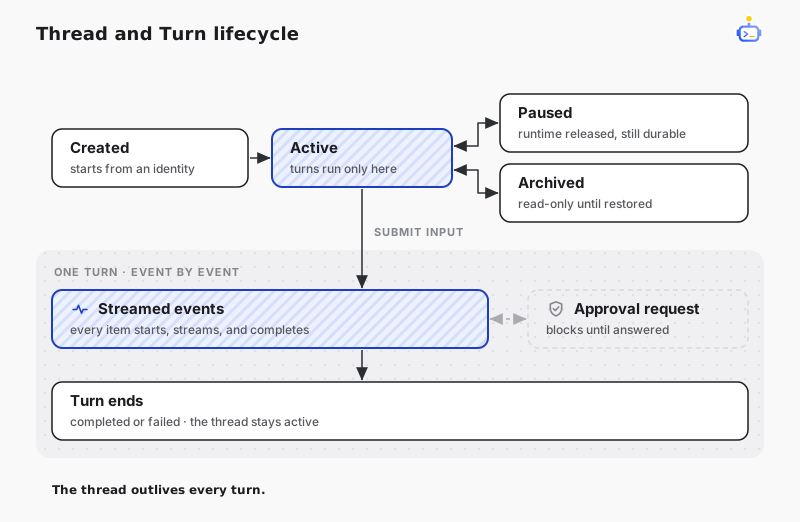
A Thread is a durable conversation. Submitting input starts a Turn and returns a stream of events that describes text generation, tool activity, approvals, completion, and failure.
Resolve the session service
Resolve the host-owned ISessionService after the Host has started:
using DotCraft.Sessions;
using Microsoft.Extensions.DependencyInjection;

var sessions = host.Services.GetRequiredService<ISessionService>();
Reuse this service for the lifetime of the running Host. It is the central API for Thread and Turn operations.
Create a Thread
Every Thread starts with a SessionIdentity. The identity tells Harness which application surface, user, context, and workspace own the conversation.
var identity = new SessionIdentity
{
    ChannelName = "my-app",
    UserId = currentUser.Id,
    ChannelContext = activeDocument.Id,
    WorkspacePath = workspacePath
};

var thread = await sessions.CreateThreadAsync(
    identity,
    displayName: "Workspace review",
    ct: cancellationToken);
Choose stable identity values. They are also used to discover existing Threads:
var recentThreads = await sessions.FindThreadsAsync(
    identity,
    includeArchived: false,
    ct: cancellationToken);
Submit input
Use the string overload for text input. Read the returned event stream until the Turn reaches a terminal event.
await foreach (var sessionEvent in sessions.SubmitInputAsync(
    thread.Id,
    "Summarize the current workspace.",
    ct: cancellationToken))
{
    if (sessionEvent.DeltaPayload?.TextDelta is { } text)
        Console.Write(text);
}
For images or other rich input, call the IList<AIContent> overload from Microsoft.Extensions.AI.
| Event | Meaning |
|---|---|
ItemDelta | Streaming text or reasoning content is available. |
ItemStarted | An Item such as a tool call has started. |
ItemCompleted | An Item has completed and may contain a result. |
ApprovalRequested | The Turn is waiting for an application decision. |
TurnCompleted | The Turn completed successfully. |
TurnFailed | The Turn stopped with an error. |
TIP
Treat the event stream as the source of truth for the active Turn. Update UI incrementally and retain the Thread ID for future resume or history operations.
Resume and pause
Resume a known Thread before continuing a conversation that is not active in memory:
var resumed = await sessions.ResumeThreadAsync(threadId, cancellationToken);

await foreach (var sessionEvent in sessions.SubmitInputAsync(
    resumed.Id,
    "Continue from the previous result.",
    ct: cancellationToken))
{
    // Project events into the application UI.
}
Pause a Thread when the application wants to release its active Runtime state while keeping the conversation durable:
await sessions.PauseThreadAsync(threadId, cancellationToken);Archive a conversation
Archived Threads remain durable but become read-only until restored.
await sessions.ArchiveThreadAsync(threadId, cancellationToken);
await sessions.UnarchiveThreadAsync(threadId, cancellationToken);
Use ResetConversationAsync when the application needs fresh-conversation semantics for an existing identity.