
Channels & Bots
DotCraft can answer from the chat tools your team already uses: QQ, WeCom, Feishu / Lark, Telegram, and WeChat.

Connect a channel
- Open a workspace in DotCraft Desktop.
- Open Channels.
- Select the platform you want to connect.
- Fill in the platform credentials shown on the form.
- Finish the matching setup in the platform console or bot tool.
- Turn the channel on.
- Send a test message to the bot.
Desktop manages the bundled TypeScript channel process for you. Use the standalone adapter path only when you want to run the adapter yourself.
Built-in channels
| Platform | Connection | Main capabilities | Setup |
|---|---|---|---|
| NapCat or OneBot v11 reverse WebSocket | Private chats, groups, approval keywords, media delivery | QQ setup | |
| WeCom | Group bot callback URL, Token, EncodingAESKey | Enterprise group chats, approvals, file and image delivery | WeCom setup |
| Feishu / Lark | Self-built app with Bot and WebSocket event subscription | Card replies, approvals, reactions, optional docx/wiki tools | Feishu setup |
| Telegram | BotFather token and long polling | Direct chats, groups, /new, /help, inline approvals | Telegram setup |
| WeChat / Weixin | Tencent iLink QR login | Weixin chats, saved login session, plain-text replies, file and image delivery | Weixin setup |
| Telegram (Python) | Python standalone adapter | Reference adapter for custom Python channel work | Python Telegram setup |
How channel conversations work
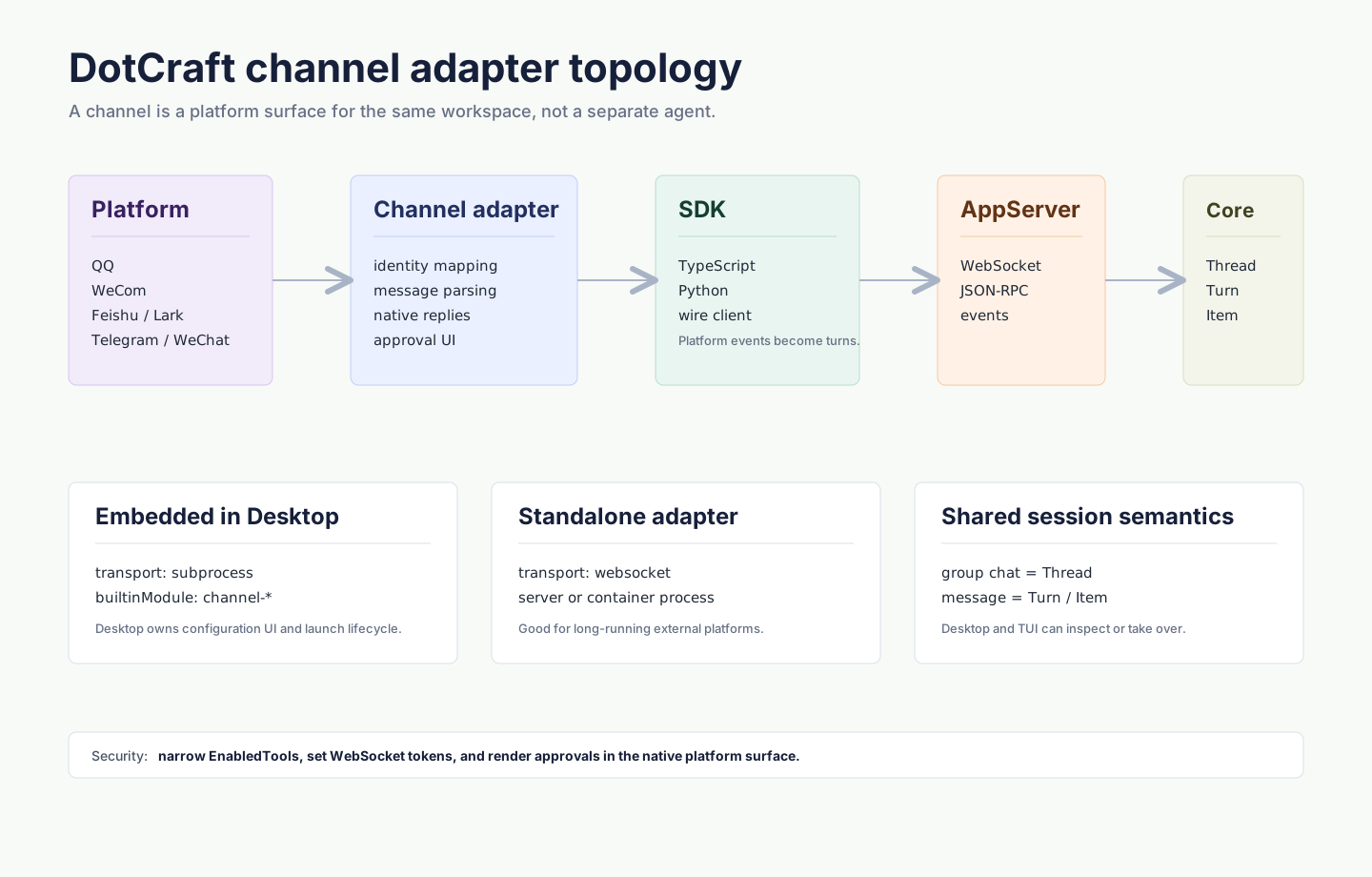
- Messages sent to a connected bot become DotCraft conversation turns.
- Replies are delivered back to the same chat automatically.
- Approval and user-input requests appear in the chat when the platform supports them.
/newstarts a fresh conversation in channels that support slash commands.- Desktop can stay open on the same workspace to inspect history or continue the conversation.
For the underlying model, see Unified Session Core.
Hand off a conversation

Bind an existing Desktop conversation to a connected social channel from the conversation's Apps menu. DotCraft shows a /bind 123456 command; send that command in the target chat to continue the same conversation there.
The binding applies only to that chat. Other chats keep their normal channel conversation.
Security checklist
Before exposing a bot to a group or public chat:
- Keep file and shell actions behind approval.
- Limit the channel to trusted users, groups, or chats when the platform supports it.
- Use a strong AppServer WebSocket token for standalone adapters.
- Run production deployments behind HTTPS when the platform calls back to DotCraft.
- Use OpenSandbox for stronger tool isolation when needed.
Full checklist and exact fields: Security & Sandbox and Configuration Reference.
Build a custom channel
Use the built-in channels first when they cover your platform. For a new platform or custom deployment:
- TypeScript modules: TypeScript Module Integration
- Channel adapter base class: Channel adapters
- Python SDK: Python SDK
- Wire protocol: AppServer Protocol