
Channel adapters
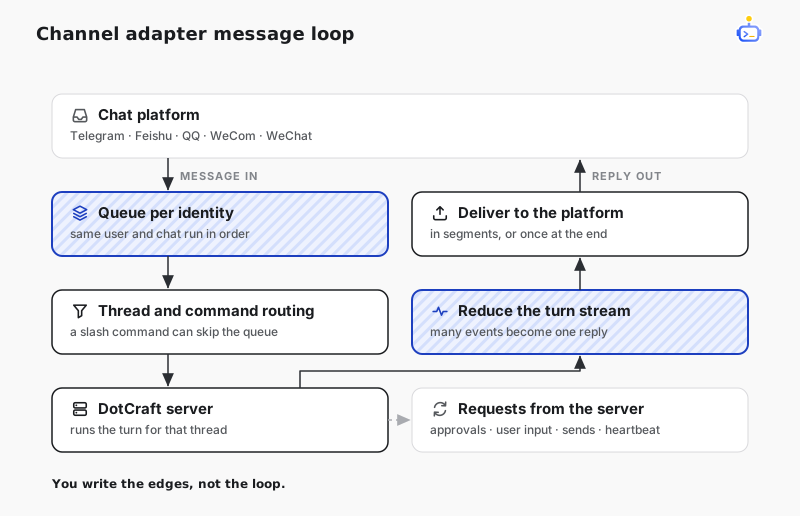
A channel adapter brings an external messaging platform into DotCraft as a first-class channel. It resolves a thread per user, runs turns on it, and delivers replies back to the platform.
NOTE
The channel adapter is a language-specific profile, available in TypeScript only. The .NET SDK does not ship a channel adapter.
Subclass the adapter base class when you want the built-in Channel policy: per-identity message queues, thread resolution, slash-command routing, turn-stream reduction, server-request handlers, and heartbeat.
Minimal adapter
import { ChannelAdapter } from "@dotcraft/channel";

class MyChannel extends ChannelAdapter {
  async onDeliver(target: string, content: string, _metadata: Record<string, unknown>): Promise<boolean> {
    await platform.send(target, content);
    return true;
  }

  async onApprovalRequest(request: Record<string, unknown>): Promise<string> {
    return await platform.requestApproval(request);
  }

  protected async onSegmentCompleted(
    _threadId: string,
    _turnId: string,
    content: string,
    _isFinal: boolean,
    target: string,
  ): Promise<boolean> {
    return await this.onDeliver(target, content, {});
  }
}
Lifecycle and recovery
- Call
start()before accepting platform events. It connects the Wire client, registers Channel handlers, and then advertises the Channel capabilities duringinitialize. Callstop()during shutdown. - Forward each platform event with
handleMessage. The call accepts the event into an in-memory queue; it does not mean the turn or platform delivery has completed. - Queue identity is the combination of user id and channel context. Messages for one identity run serially; different identities can run concurrently. A slash command may bypass the queue when the adapter already knows the thread, so a command such as stop can affect an active turn.
- The adapter resumes a paused thread, replaces a stale or inactive thread, retries against that replacement, and requeues an input when the server reports another turn is already running.
- The Wire client reconnects and repeats initialization. It does not persist or replay platform events or delivery calls it already made. Keep the platform receiver alive and add platform-side deduplication or retry where needed. Reconnect is not a delivery-recovery mechanism.
Handler rules
| Hook | Contract |
|---|---|
onDeliver | Required. Deliver plain text to the platform target and report success. The default structured-send handler delegates text messages here. |
onApprovalRequest | Required. Return a valid approval decision. If the hook throws, the adapter answers cancel. |
onSend | Optional. Override for structured delivery, and declare matching capabilities from getDeliveryCapabilities. The default accepts text and rejects other kinds with UnsupportedDeliveryKind. |
getChannelTools + onToolCall | Optional. Advertise only tools the call hook implements; the default call hook returns UnsupportedTool. |
onReplyProgress | Optional observer for ordered AgentMessage text while a turn is running. It does not mark text as delivered; coalesce platform updates and use onSegmentCompleted or onTurnCompleted for delivery fallback. |
onTurnCompleted, onTurnFailed, onTurnCancelled, onSegmentCompleted | Override for platform formatting, progressive delivery, and failed/cancelled notifications. |
The adapter also handles user-input requests through onUserInputRequest; its default returns an empty answer set. The base adapter registers heartbeat replies itself, so a platform subclass never implements them.
For progressive delivery, return false from onSegmentCompleted when a segment was not delivered. Any other return marks it delivered, and the default onTurnCompleted then skips the full reply.
Packages
TypeScript Channel authoring is provided by the private @dotcraft/channel package. Import adapter and module authoring APIs from its root, queues and routing from /runtime, media helpers from /media, conformance helpers from /testing, and Channel contract metadata from /meta. To load a finished module into Desktop or your own host process, see Channel Module integration.
DotCraft also ships hosted TypeScript modules for the built-in channels on this same base; each depends on @dotcraft/channel, which in turn depends on @dotcraft/sdk. Their setup and configuration are documented in the channel configuration reference.
Related docs
- AppServer Protocol — the JSON-RPC contract beneath the adapter.
- TypeScript reference — full adapter signatures.