
Unified Session Core
DotCraft does not give each client its own agent loop. The Unified Session Core consolidates execution, state, approvals, and observability into a single engine, and CLI, Desktop, ACP, QQ bots, and automations all connect to it.
This page targets integrators and contributors. It explains the session model and the cross-entry boundaries that matter when you build a client or debug shared sessions.
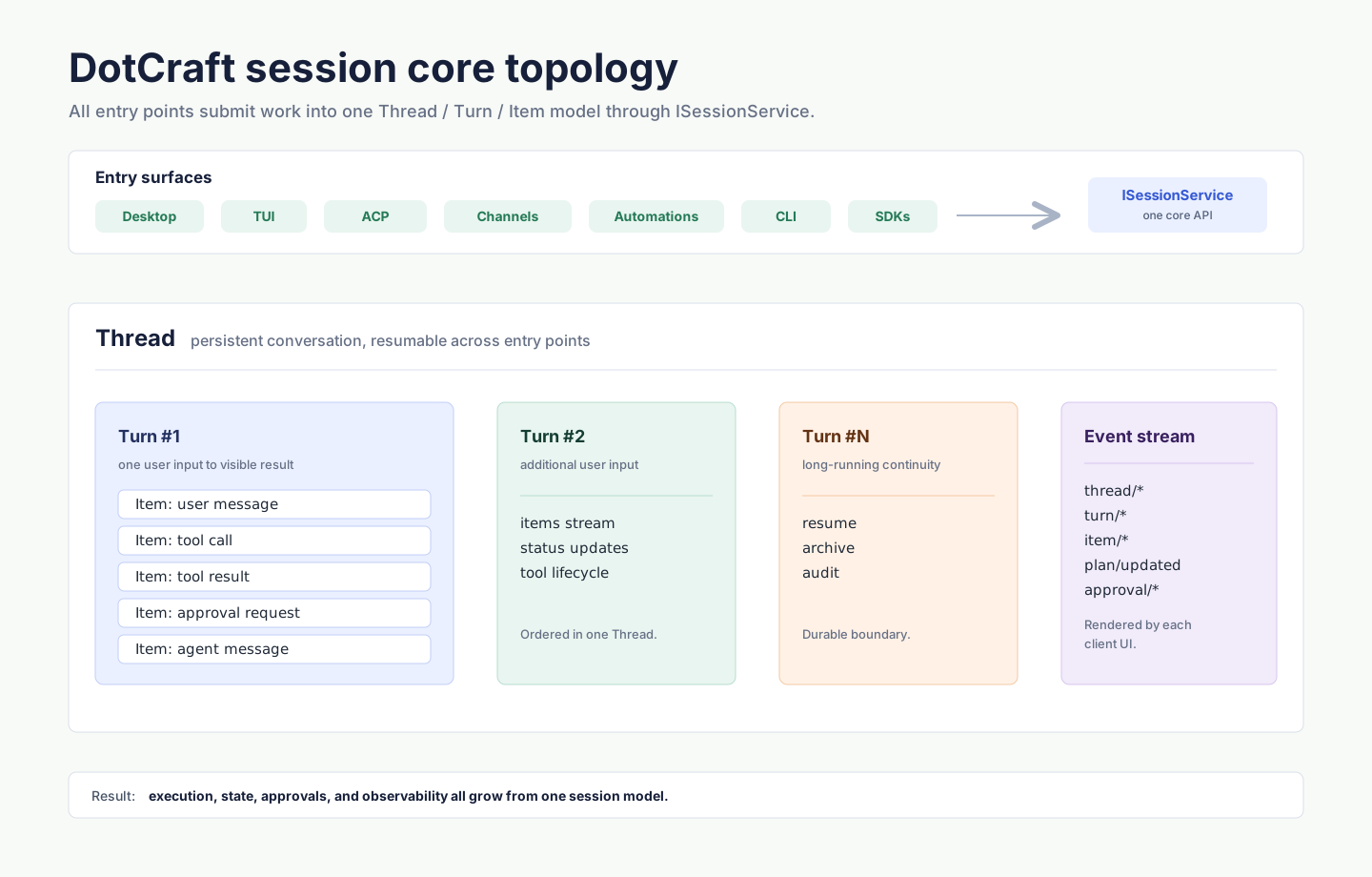
Model: Thread → Turn → Item
| Entity | Meaning |
|---|---|
| Thread | A long-running conversation. Shareable across entry points, resumable, observable, auditable. |
| Turn | One logical "user input → agent work → user-visible result" unit. |
| Item | The smallest event inside a Turn: user message, agent message, tool call, tool result, thought, approval, and so on. |
ISessionService is the core API: thread lifecycle, input submission, streaming event subscription, approval flow. Every entry point (CLI, ACP, Automations, external channel adapters) talks to the engine through it.
How cross-entry sharing works
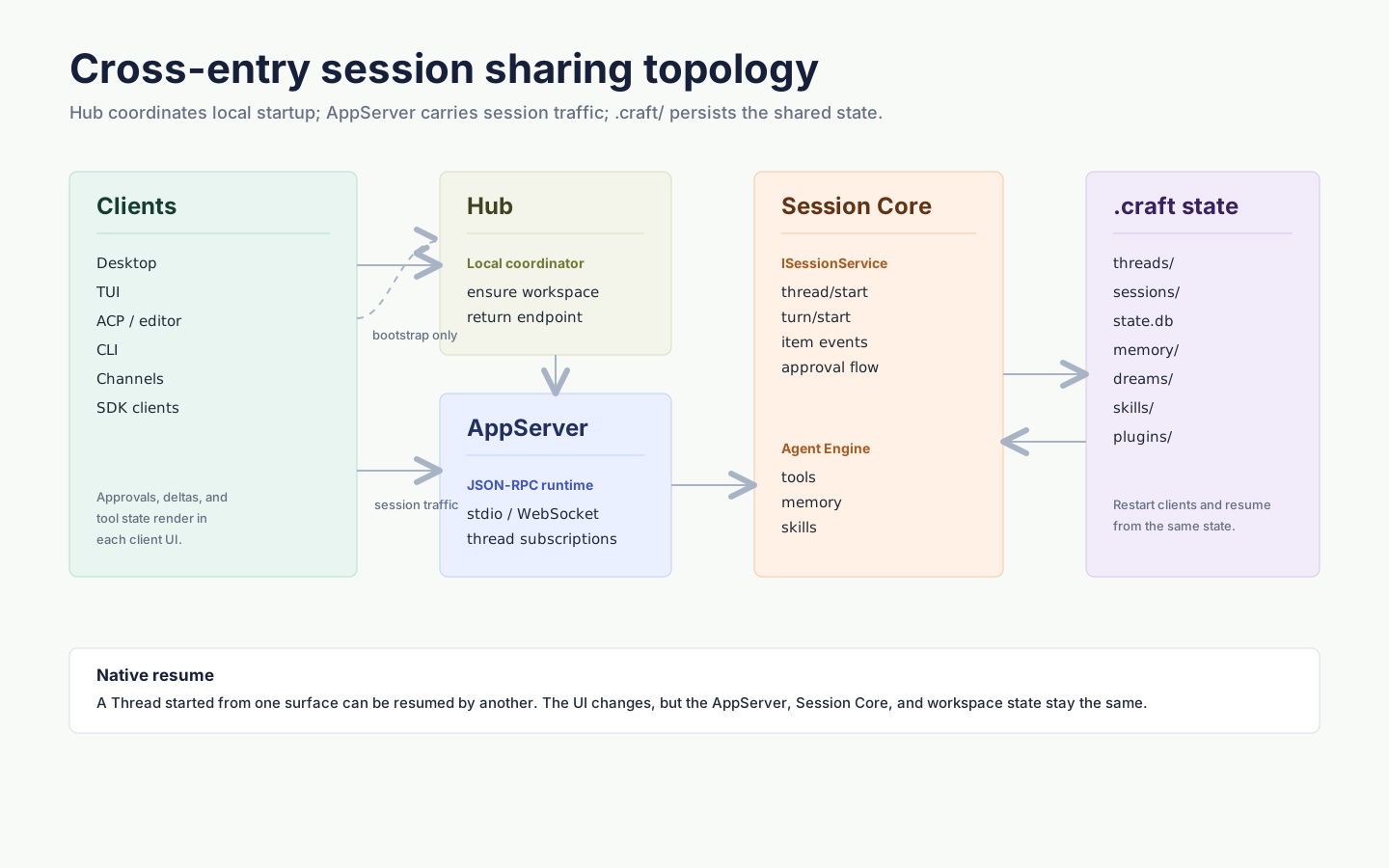
Key points:
- Hub starts or reuses one AppServer per workspace on the local machine. Desktop and CLI use this path by default, so opening the same project from either entry connects to the same process.
- AppServer projects
ISessionServiceas JSON-RPC (full protocol). Any language can implement a client. - Workspace
.craft/persists authoritative thread rollouts underthreads/, classified state and query projections instate.db, and referenced artifacts such as large tool results and attachments separately. See Session persistence for the authority and recovery model.
Approvals and human-in-the-loop
Session Core surfaces "may this tool call run" as a discrete approval event, so each frontend can render it natively:
| Entry | How approval is shown |
|---|---|
| Desktop | Modal / Approvals panel |
| ACP (IDE) | Forwarded as requestPermission to the editor UI |
| QQ / WeCom / channels | Native platform reply |
NOTE
When the same Thread is picked up by a different entry point, approval UI uses each platform's native form — Desktop never stuffs a QQ group message into its own modal.
Cross-channel resume
Session Core hands adapters a structured event stream rather than rendered text. Reasoning content, tool calls, tool results, and approvals are separate Item types, so each client renders them its own way and no semantics are lost in transit. The Thread itself lives in the workspace's .craft/, any connected entry can pick it up, and each Turn records the channel that started it.
Typical flows:
- Draft a PR in Desktop in the morning, continue review on a phone via ACP after work — same Thread.
- A scheduled follow-up continues an existing conversation and preserves its session policy.
- A user pings a WeChat bot, the bot replies, an engineer opens Desktop and sees the same Thread to follow up.
Hub and AppServer
DotCraft has two layers of local coordination:
- Hub — Per-user coordinator that starts or reuses one AppServer per workspace and prevents the same workspace from being held by multiple AppServers. Desktop and CLI users do not need to think about it.
- AppServer — Per-workspace runtime that owns every Thread, tool, approval, and event stream.
When you need direct control (remote deploy, CI, bots, debugging), see:
- AppServer Mode — manual start,
--listen,--token, remote connect - Hub Protocol — implement a Hub client
- AppServer Protocol — implement an AppServer client
When to care about Session Core
| Scenario | Where to start |
|---|---|
| Sharing one workspace across several clients | AppServer Mode |
| Building bots or external channels | TypeScript SDK |
| Integrating a new IDE or editor | IDE / Editors (ACP) |
| Building your own protocol-level client | AppServer Protocol |