
.NET Plugin API and lifecycle
This reference covers contribution contracts, typed dependencies, trust, and generation lifecycle. To create and build a plugin, start with Build a .NET plugin.
Choose a contribution point
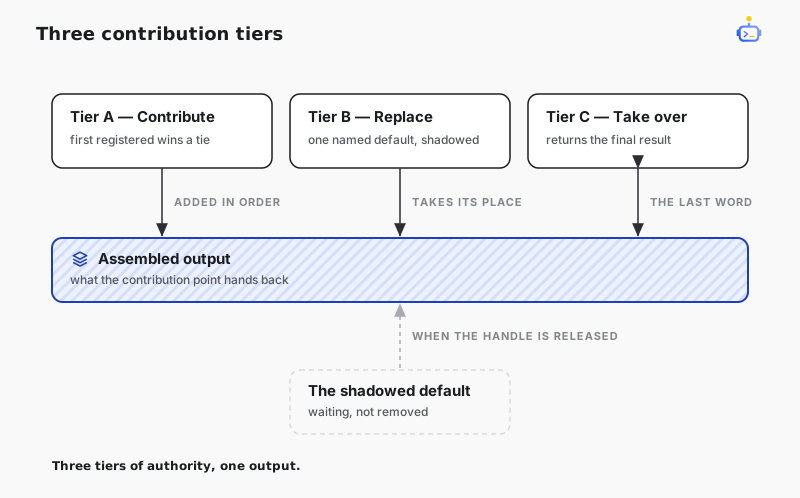
The catalog of contribution points is the whole contribution surface. Each one declares which capability tiers it supports:
| Tier | What it does |
|---|---|
| A — Contribute | Add an item alongside the existing ones, ordered by ascending Order with registration order breaking ties. |
| B — Replace | Shadow a named default with ReplaceTarget. The default returns as soon as the replacement's handle is disposed. |
| C — Take over | Terminal authority over a contribution point's assembled output. Realized through the Tier-B mechanism, on a contract that takes the assembled result. |
| Contribution point | Contract | Tiers |
|---|---|---|
| Tool | IToolSource | A |
| System prompt section | ISystemPromptSection, and ISystemPromptAssembler for Tier C | A, B, C |
| Chat context item | IChatContextProvider | A |
| Thread prompt context | IThreadSystemPromptContextProvider (BaseInstructions only) | A |
| Pre-send context transform | IAgentContextSource → AIContextProvider | A, B |
| Chat middleware | IChatMiddleware | A, B |
| Dispatch stages | policy, approval, recorder, and normalizer stage interfaces | A, B |
| Thread lifecycle | IThreadLifecycleContributor | A |
| Turn lifecycle | ITurnLifecycleContributor | A |
| Thread runtime signals | IThreadRuntimeSignalContributor | A |
| Slash command | ICodeCommand | A |
| Tool restriction | IToolRestriction | A |
| Compaction summary | ICompactionSummarizer | B |
| Compactable tool | ICompactableToolPolicy | A, B |
| SubAgent runtime | ISubAgentRuntimeSource | A |
| Trace sink | ITraceSink | A |
| Auxiliary generators | ICommitMessageSuggester, IWelcomeSuggester | B |
Failure handling is specific to each contribution point. Observation and fan-out contributions normally log and skip a failing contributor; authoritative transforms such as result normalization or compaction can fail the owning operation. Return expected failures through the contract's result type instead of throwing.
Tier A — add a tool
A plugin contributes tools through IToolSource, the same contribution point the kernel's own tool sources use. A source declares each tool as a definition — identity, canonical name, description, JSON schema, policy hints — joined to a runtime binding, the code that executes it.
The host interposes itself at the contribution boundary. It copies the definition into its own objects, re-keys the identity to (pluginId, toolId) with PluginNative provenance, and replaces the binding with a proxy that holds only (pluginId, generationId, toolId) and resolves your source again on every call. A frozen tool snapshot therefore holds nothing your plugin allocated: revoking the contribution takes effect at once, and a call dispatched from an older snapshot fails with tool_unavailable. Plugin tools get the same schema validation, policy, approval, hooks, and recording as built-in ones, and PolicyHints inform host policy without overriding it.
internal sealed class SummaryTool(ReviewJournal journal) : IToolSource, IToolRuntime
{
    private const string ToolId = "review-summary";

    public string SourceId => "acme.review-core.summary";

    public ValueTask<IReadOnlyList<ToolRegistration>> GetRegistrationsAsync(
        ToolPlanningContext context,
        CancellationToken cancellationToken = default)
    {
        var definitionId = new ToolDefinitionId(
            ToolSourceKind.PluginNative,
            SourceId,
            new SourceToolId(ToolId));
        var registration = new ToolRegistration(
            new ToolDefinition(
                definitionId,
                new ToolName("review", "summary"),
                "Normalizes review text.",
                JsonSerializer.SerializeToElement(new
                {
                    type = "object",
                    properties = new { text = new { type = "string" } },
                    required = new[] { "text" },
                    additionalProperties = false
                }),
                policyHints: new ToolPolicyHints(RequiresApproval: false, ReadOnly: true)),
            new ToolRuntimeBinding(
                new RuntimeBindingId($"{SourceId}:{ToolId}:{context.Revision}"),
                definitionId,
                this,
                ToolBindingLeases.AlwaysAvailable,
                SourceId,
                context.Revision),
            ToolProjectionShape.StandardPair);
        return ValueTask.FromResult<IReadOnlyList<ToolRegistration>>([registration]);
    }

    public ValueTask<ToolExecutionResult> InvokeAsync(
        ToolInvocationContext context,
        JsonObject arguments,
        CancellationToken cancellationToken = default)
    {
        journal.Write("echo tool invoked");
        return ValueTask.FromResult(ToolExecutionResult.Succeeded(
            arguments["text"]?.GetValue<string>() ?? string.Empty));
    }
}
GetRegistrationsAsync runs once per planning pass, so keep it cheap and free of side effects and return the tools valid for the ToolPlanningContext it receives. One source may declare several tools; a duplicate tool id within one plugin is reported as a diagnostic and skipped rather than failing activation.
Report expected failures with ToolExecutionResult.Failed and a ToolError, whose code stays stable. A thrown exception's text is discarded and reaches the model only as an unspecified tool failure. The boundary is JSON-only in both directions: the host copies the arguments in, and copies the text, the structured content, and the error out.
Tier A — add a slash command
A plugin contributes a slash command through ICodeCommand: a name, optional aliases, a description, and an Expand that turns one invocation into the text the turn runs on.
internal sealed class TriageCommand(ReviewService service) : ICodeCommand
{
    public string Name => "triage";

    public string Description => "Summarize the open review queue";

    public IReadOnlyList<string> Aliases => ["tri"];

    public string? Expand(CommandInvocation invocation) =>
        service.BuildTriagePrompt(invocation.Arguments);
}
A contributed command is a markdown custom command whose body is code, and the host serves it exactly where it serves those: the command palette, command/list, command/execute, and the ACP slash-command list all pick it up with no client change. It produces model input only — returning a direct reply to the user stays with the host's own commands.
It never shadows anything: a built-in command, a workspace markdown command, and a workflow command all keep a contested name. Among contributions the lowest Order claims a name, and returning null declines the invocation so the next contribution may answer it. Revoking the handle removes the command from every listing and every resolution at once — the contribution point is read per call, so there is nothing left registered anywhere.
Tier B — replace a named default
Built-in prompt sections and middleware register under stable target names. Set ReplaceTarget to one of them and your contribution shadows it for as long as its handle lives:
context.Contributions.Add<ISystemPromptSection>(
    new ReviewResponseStyleSection(),
    new ContributionOptions(ReplaceTarget: SystemPromptSectionNames.ResponseStyle));
The agent's built-in memory provider registers on the same terms, under AgentContextSourceNames.Memory; replacing it takes over the whole system prompt, and AgentContextRequest.PromptInputs carries the build-time values the built-in would have used — tool names, deferred MCP servers, the SubAgent profile section, the skill-variant target. It is the one target where returning null declines instead of suppressing: the built-in composes in its place, so no agent runs without a prompt.
Suppression is a replacement that produces nothing: a section returning null removes the built-in outright, and there is no separate remove verb. When two replacements target the same name, a thread-scoped one beats a workspace-scoped one and the later registration wins within a scope; Order only orders the resolved list and never decides a replacement. The loser is recorded as a ReplaceConflict diagnostic rather than failing the contribution point.
Tier C — take over a contribution point's output
A takeover is an ordinary contribution point whose contract receives the assembled default result and returns the final one — ISystemPromptAssembler for the system prompt. The consumer applies the last contribution of the resolved list, so "at most one active takeover" follows from ordering rather than from a rule the registry enforces. A takeover that neither out-orders nor replaces its predecessor is simply not effective.
Order and scope
Order is local to one contribution point. Use that point's published target names and order constants when positioning relative to a built-in; lower values run first unless the contract says otherwise. ContributionOptions.Scope is Workspace by default; ContributionOptions.ForThread(threadId) limits a contribution to one thread. A forked thread does not inherit thread-scoped contributions; use workspace scope or re-register on its started lifecycle event when a contribution should follow a fork.
Contribution points evaluated per turn or per call observe a change on the next evaluation. Those captured into per-thread state — the tool snapshot, the agent's pipeline and instructions — are rebuilt through the host's invalidation chain. In-flight turns finish with the contribution set they started with.
Export and consume a typed service
Put public service interfaces in their own assembly and list it in exportedApiAssemblies. The provider exports an implementation during activation:
context.Exports.Add<IReviewService>(new ReviewService());A direct consumer declares the minimum compatible provider version it needs and resolves the interface during its own activation:
{ "dependencies": { "acme.review-core": "1.0.0" } }var review = context.Dependencies.GetRequired<IReviewService>("acme.review-core");Dependencies coordinate generation lifetime and API sharing; they do not resolve private packages. Resolution is activation-only, and providers activate before consumers and stop after them, so capture the resolved service in ActivateAsync and keep all work under the consumer's lifetime.
Keep exported signatures to plugin-owned exported types and host assemblies both plugins share. Within one consumer's providers, exported API assembly simple names must be unique; a conflict fails with PluginApiAssemblyConflict.
Dependency versions are minimums within one compatibility line. "acme.review-core": "1.2.0" accepts 1.2.0 and later 1.x versions, but not 2.0.0. For 0.x, both major and minor must match: 0.2.1 accepts later 0.2.x versions, not 0.3.0. A provider below the minimum or outside the line leaves the consumer blocked with PluginDependencyUnsatisfied.
Within a compatibility line, a provider must keep each exported API assembly's identity unchanged: simple name, AssemblyVersion, culture, and public-key token. A breaking API change starts a new compatibility line and should normally use a new plugin id and API assembly identity. Declare the lowest compatible version that provides the API you use.
Trust
Installing or enabling a dotnet plugin never grants trust. An installed plugin runs only when enabled and its current .NET execution fingerprint already has an explicit grant in the machine-local authority; otherwise it remains blocked.
- Grants bind an exact id and fingerprint. The client asks for trust by plugin id; the server binds the grant to the bytes it has actually accepted. Several fingerprints of the same plugin id may remain granted. Changed bytes are
modifiedonly when their fingerprint has no matching grant. - Managed paths and contract data are part of the fingerprint. DotCraft hashes the normalized .NET declaration, plugin version and dependencies, and the non-Desktop bundle tree. Moving those bytes between files changes identity. The raw manifest bytes, deployment-only
.builtinmarker, anddesktop/tree are excluded, so changing only a Desktop module does not invalidate .NET trust. - The authority is separate from configuration. Grants live in
dotnet-plugin-trust.jsonnext to global configuration. The file is not merged configuration, and workspace config cannot grant trust. - Installed plugins have no implicit trust tier. Every installed
dotnetplugin needs an explicit grant, host-shipped bundles included. - Revocation is fingerprint-specific. Revoking removes only the current plugin id and fingerprint pair. It stops the active closure when that pair was its authority, while grants for other fingerprints of the same id remain intact.
Without a matching grant, an installed plugin is blocked on PluginUntrusted or PluginTrustModified and no load context is created, so none of its code has run. A DotNetPlugin.Build authoring session instead grants process-local execution qualification to its exact development fingerprint; that qualification is not persisted and does not apply to installed plugins.
Lifecycle and updates
Each activation gets its own collectible load context and an opaque generation id. Activation loads the bundle from a per-generation shadow copy, so the installed directory can be replaced while a generation is live.
| State | Meaning |
|---|---|
stopped | No generation is live because the plugin is disabled. |
blocked | Not attempted, and here is why: preflight failed, minHostVersion is unsatisfied, a dependency is unavailable, or trust is missing or stale. No load context exists. |
activating | A candidate generation is being built; nothing of it is published yet. |
active | One generation is committed and accepting calls. |
deactivating | Admission is closed and the generation is draining. |
faulted | Attempted, and here is how it broke: construction, activation, or registered background work failed. |
reclaiming | Functionally stopped and routing nothing; its memory has not come back yet. |
blocked is non-terminal and re-evaluated whenever its cause can have changed — a host upgrade, a dependency activating, a trust grant, a reinstall. Retry an installed faulted plugin by disabling and re-enabling it. For an authoring project, fix the source and run DotNetPlugin.Build again.
Revocation is guaranteed, reclaim is not
Deactivation revokes every contribution handle first, so no new call reaches that generation; an older tool snapshot receives tool_unavailable. For an ordinary mutation, the runtime waits up to its cleanup timeout. If plugin work ignores cancellation, functional teardown remains pending: the plugin cannot reactivate and its dependency providers cannot stop until that work actually settles.
Host shutdown waits for actual functional teardown before disposing providers and the host root, even when that exceeds the cleanup timeout. A service manager or other outer process owns any hard shutdown deadline. Once functional teardown is complete, assembly-memory reclaim is best-effort and blocks neither replacement, dependency teardown, nor shutdown. leakedGenerations and restartRecommended expose generations whose load contexts remain pinned; only a process restart releases their memory.
Replace an installed bundle
Update a bundle managed through the plugin installation flow by disabling the plugin, replacing its files, and enabling it again. DotNetPlugin.Build performs publication and generation replacement for projects under .craft/plugin-projects; it does not use this client-operation cycle.
Disabling revokes the .NET generation and its consumers, consumers first. A filesystem mutation also asks root-backed declarative contributions to stop; if that step fails, the mutation returns notApplied with PluginContributionQuiesceFailed and leaves the bundle directory unchanged. Re-enabling re-admits the current bytes.
The new bytes are a new bundle with a new fingerprint. They activate only if that exact fingerprint was already granted; otherwise trust becomes modified until the user confirms it. A content change that keeps the same version still produces a new generation. DotCraft does not roll back to the previous bundle if the new one ends blocked or faulted.
Client operations
Installation, enablement, trust, and removal are separate AppServer operations. Installing never grants .NET trust, and an applied mutation may still leave a plugin blocked. Use the AppServer protocol for methods, wire results, blockers, and remediation data.