
MCP Apps
MCP Apps let an MCP tool attach an interactive result view. The MCP server declares a ui:// resource, and DotCraft Desktop renders it in a sandbox through the standard AppBridge contract. Other clients keep using the tool's text fallback.
App Binding does not define a separate UI protocol. An App Binding app exposes its tools and views from its own binding-scoped Streamable HTTP MCP server.

Declare a view
Add stable UI metadata to the MCP tool:
{
  "name": "ListBoardItems",
  "inputSchema": { "type": "object" },
  "_meta": {
    "ui": {
      "resourceUri": "ui://example/board.html",
      "visibility": ["model", "app"]
    }
  }
}
Use visibility to publish the tool to the model, the app, or both; omitting it publishes to both. DotCraft treats malformed metadata as unavailable rather than widening access.
Serve the resource
Return the resource from standard MCP resources/list and resources/read. MCP App HTML uses this MIME type:
text/html;profile=mcp-appBundle scripts and styles with the server. Desktop strips any Content-Security-Policy meta tag from the HTML and applies its own: default-src 'none', widened only to the HTTPS origins the resource declares in _meta.ui.csp. Browser permissions and a domain declared in _meta.ui are recorded as capability metadata and never granted — the view gets no camera, microphone, geolocation, or clipboard-write access.
The resource body and each result delivered to the view are both capped at 2 MB.
Return a useful fallback
Every call should return concise content for the model and non-visual clients. Put machine-readable result data in structuredContent; reserve result _meta for the MCP App.
{
  "content": [{ "type": "text", "text": "Found 4 board items." }],
  "structuredContent": { "itemIds": ["OR-12", "OR-15"] },
  "_meta": { "selectedItemId": "OR-12" }
}
The UI communicates through the official @modelcontextprotocol/ext-apps client. Use AppBridge operations such as tools/call, link opening, display-mode requests, and host-context notifications. Do not create a private postMessage protocol.
Security boundaries
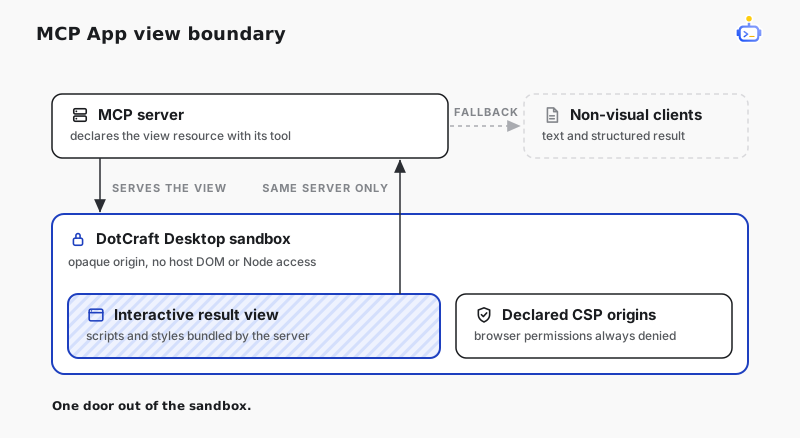
- The iframe has an opaque origin and no host DOM or Node access.
- The host CSP starts at
default-src 'none'and opens only to the HTTPS origins the resource declares. - Browser permissions are never granted, whatever the resource declares.
- App-initiated tool calls are re-checked against the live tool snapshot: same MCP server, app visibility still declared.
- Revoking an App Binding closes its MCP session and views immediately.