
Dynamic Workflows
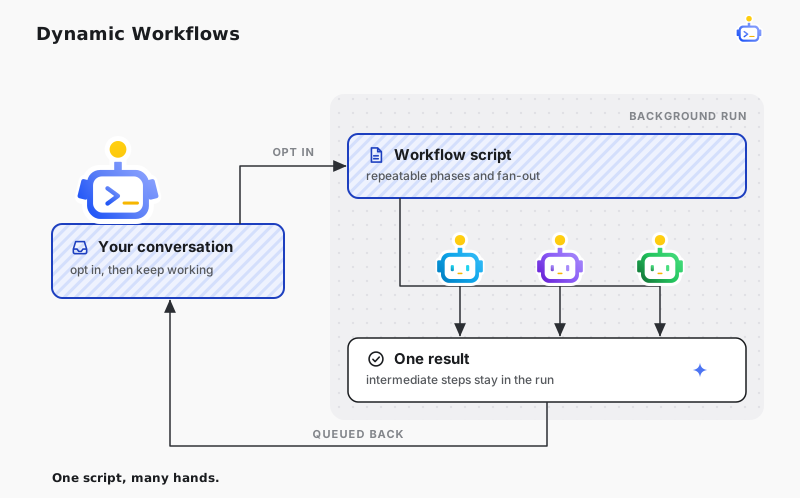
Dynamic Workflows let DotCraft turn a large task into a reusable JavaScript orchestration. The script coordinates focused SubAgents in the background, keeps intermediate results outside the main conversation, and returns the completed result to that conversation.
Use a workflow when the order, branching, or fan-out should be repeatable. A single SubAgent is a better fit for one bounded delegation; an Agent Team is a better fit when peers need to coordinate with each other while they work.
Ask DotCraft to use a workflow
Explicitly opt in from the conversation:
Use a Dynamic Workflow to review the changed files from correctness, security, and test-coverage
perspectives, then combine the findings into one ranked report.
DotCraft writes the orchestration, asks for approval when the current permission policy requires it, and starts the run in the background. The conversation remains available for other work. When the run finishes, DotCraft queues its result back into the originating conversation.
Save a reusable workflow
Store a workspace workflow as a .js file directly under .craft/workflows/. Commit the file when the workflow should travel with the repository. Store a personal workflow under ~/.craft/workflows/ to make it available across your local workspaces.
Every workflow starts with literal metadata followed by a JavaScript body:
export const meta = {
  name: "review-change",
  description: "Review a change from independent perspectives",
  whenToUse: "Use for a substantive code review",
  phases: ["review", "synthesize"]
};

const reviews = await parallel([
  () => agent("Review the change for correctness.", {
    label: "correctness",
    phase: "review"
  }),
  () => agent("Review the change for missing tests.", {
    label: "tests",
    phase: "review"
  })
]);

return agent({
  prompt: "Combine the reviews into one ranked report.",
  context: reviews
}, {
  label: "synthesis",
  phase: "synthesize"
});
meta.name and meta.description are required. whenToUse and phases are optional. Metadata must be literal data: imports, computed values, function calls, and runtime-dependent metadata are not accepted. The body supports top-level await and must return a JSON-serializable value.
The saved workflow becomes a slash command. Run the example with structured input by typing:
/review-change focus on the authentication changes under src/DotCraft converts the command text into the immutable args value available to the script. Workspace workflows take precedence over personal workflows with the same name. Keep names unique within each location.
Compose agent work
The workflow script has a small orchestration API:
| API | Purpose |
|---|---|
agent(input, options?) | Start one fresh native SubAgent and resolve to its result or null. |
parallel(thunks) | Start deferred calls concurrently and return results in declaration order. |
pipeline(items, ...stages) | Process items concurrently while running each item's stages in order. |
phase(name, detail?) | Record a named progress boundary. |
log(value) | Record bounded diagnostic data for the run. |
args | Read the immutable structured input for this invocation. |
budget | Read the current run limits and accumulated usage. |
cwd | Read the workflow's workspace root. |
Each pipeline stage receives (previous, original, index). If a stage returns null, later stages for that item do not run. parallel() and pipeline() preserve input order even when agents finish in a different order.
Configure an agent call
agent() accepts these options:
| Option | Purpose |
|---|---|
label | Give the call a stable name in run records. |
phase | Associate the call with a workflow phase. |
schema | Require a result that matches a JSON Schema. |
model | Override the child model. |
effort | Override the child reasoning effort. |
isolation | Use shared or a managed worktree. |
agentType | Select a native Agent role. |
A structured call returns the submitted JSON value after schema validation. Without schema, the call returns the SubAgent's final text. A cancelled or unrecoverable call contributes null, so handle that value before using the result.
Share workflows through plugins
An enabled plugin can contribute workflows from a root workflows/ directory or from the directory named by its manifest workflows field. Plugin commands are always namespaced:
/review-tools:review-changeThe namespace prevents a plugin workflow from replacing a workspace or personal workflow.
Understand the execution boundary
The JavaScript body coordinates work but cannot read files, open network connections, start processes, load modules, or call DotCraft services directly. Delegate those actions to agent(), where the normal workspace boundaries and tool approvals continue to apply.
Each agent() call starts with fresh conversation context while inheriting the parent workspace, permission policy, and model defaults. isolation: "worktree" gives that call a managed Git worktree. DotCraft removes a clean worktree after completion and keeps one that contains changes or commits for inspection; it does not merge the worktree automatically.
The runtime bounds concurrent work and allows at most 1,000 Agent calls in one run.
Related docs
- SubAgents — understand the child sessions a workflow creates
- Plugins and tools — package and distribute reusable capabilities
- Automations & Goals — schedule work or keep a long-running objective moving
- Security & Sandbox — configure workspace and tool boundaries