
Skills & Self-Learning
A skill teaches the agent how to do something once, so the next time a similar job comes up it loads that write-up and follows it. Each skill is a Markdown file with frontmatter. Some ship with DotCraft, some you write yourself, and the agent can save its own after a job goes well.
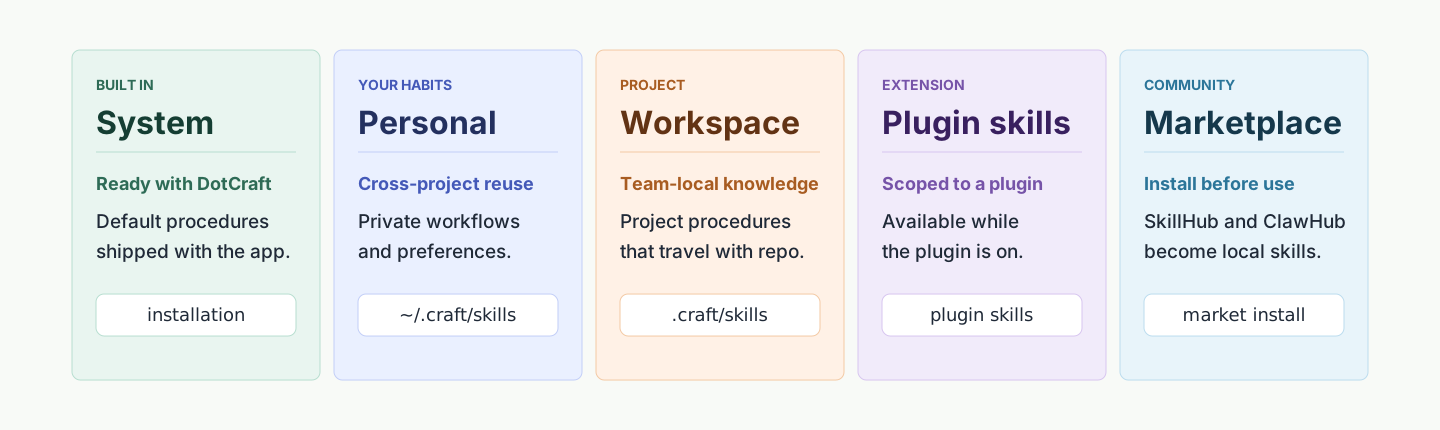
Where skills come from
| Source | Description |
|---|---|
| System | Built-in skills that ship with DotCraft and are shared by every workspace |
| Personal | General-purpose skills you write once and reuse across workspaces |
| Workspace | Skills that belong to the current project and travel with the repository |
| Plugin-bundled | Skills distributed by a plugin, installed and removed with it |
| Market-installed | Third-party skills pulled in from SkillHub or ClawHub |
When you write a skill yourself, ~/.craft/skills/ makes it personal and the workspace's .craft/skills/ makes it project-specific. Every source is switched on or off from the Skills page, and a skill you find in a marketplace has to be installed before it joins the local list.
Let DotCraft explain and configure itself
No need to read the docs or hand-edit config files. Ask in the conversation: "what can you do", "switch to Claude", "which MCP servers do you have". DotCraft answers, and when a setting has to change it makes the change for you and tells you when it takes effect. To integrate DotCraft into your own application, ask it to walk you through that too; it writes code against the SDK version you actually have installed.
Let the agent save its own skills
Turn on Settings → Personalization → Enable self-learning in Desktop, and the agent can turn a procedure that worked into a workspace skill, or patch steps in an existing skill that turned out to be stale or wrong. Creating a skill and any destructive change ask you first.
Self-learning writes only to the current workspace's skill directory. System and personal skills are read-only, so the agent copies one into the workspace before changing it. With self-learning on, the agent also gets a built-in authoring reference covering how a skill is structured, where supporting files go, and the usual pitfalls. Turn self-learning off and that reference goes away with it. The full set of switches and limits is in the Configuration Reference.
What's worth saving as a skill
- A reusable procedure that emerged from a complex task
- A fix for a problem that will likely come back
- A correction you made that settled into a stable way of working
- An existing skill you found to be stale, incomplete, or wrong
A one-off answer doesn't need a skill.
Search and install
The Desktop Skills page searches your installed skills and the SkillHub and ClawHub marketplaces at the same time. The source filter (All / System / Personal / Marketplace) changes what you browse, not what is enabled.

To install a skill from a marketplace:
- Open it in the search results and read its README, description, and source links.
- Select Install with DotCraft.
- DotCraft starts an install agent that inspects your workspace, system, and available tools, and produces a version tuned to your environment when that helps.

Installing a market skill through DotCraft and generating a local variant
Market skills land under the workspace's .craft/skills/. If a skill of the same name is already there, Desktop asks before overwriting it. System and plugin-bundled skills are trusted by default. SkillHub and ClawHub are external sources, so try anything you're unsure about on a branch or in a separate workspace first.
Variants: keep the original, layer the optimization
A skill installed with Install with DotCraft is never rewritten in place. The agent keeps the original and generates a variant tuned to your environment, then prefers the active variant from then on. To go back to what the marketplace published, select Restore original skill on the skill's detail page.

You keep what self-learning improved, with a clean way back if it goes wrong.
Enable and disable
Manage, at the top right of the Skills page, is where you switch skills on and off in bulk. Search your installed skills there and use the toggle on each row. A disabled skill stays on disk but never enters the agent's context.
Official workflow plugins
The official development skills are split into two plugins by scope. dotcraft covers DotCraft-specific development, documentation, release, simplification, troubleshooting, context handoff, and issue reporting. harness-workflow covers shared feature planning and isolated UI prototyping that follow the current project's conventions. Enable either from the Plugins page as the work requires. Substantial DotCraft features usually call for both. For how the two divide product rules from shared workflows, see Spec-Driven Development.
Which one to use
| Scenario | Recommendation |
|---|---|
| A fixed procedure in one project ("run lint and tests before any PR") | Workspace skill, hand-written or agent-created |
| A preference that follows you everywhere (your code style) | Personal skill |
| Tools plus several skills you want to distribute | Build a plugin |
| Capturing a problem the agent just solved | Turn on self-learning |
| Reusing something the community already built | Search the marketplace from the Skills page, then install with DotCraft |
Related docs
- Plugins & Tools — package skills and tools into a plugin you can distribute
- Memory & Dreams — memory keeps the facts, skills keep the procedures