
Channel Module integration
This guide is for developers embedding TypeScript external channel modules into a host — Desktop, a CLI tool, or any supervisor process — through the @dotcraft/channel module contract. Channel authoring packages are repository-local. Build sdk/typescript first, then install the required local package directories. See the TypeScript SDK setup for the published client package.
Overview
The module contract gives hosts a stable boundary:
- Load metadata from
manifest - Create a runnable instance through
createModule(context) - Observe machine-readable lifecycle and errors
- Render grouped config UX from
configGroupsandconfigDescriptors - Substitute module variants by
moduleIdwhile keeping runtime channel identity bychannelName
Import only from the package root. Don't import package-internal files or infer behavior from the source layout.
Loading a module
A host reads the manifest and factory from the package root:
import { configDescriptors, configGroups, createModule, manifest } from "@dotcraft/channel-feishu";
import type { ModuleFactory, ModuleManifest } from "@dotcraft/channel";

const moduleManifest: ModuleManifest = manifest;
const moduleFactory: ModuleFactory = createModule;

console.log(moduleManifest.moduleId);
console.log(configGroups.length);
console.log(configDescriptors.length);
Discovering modules
A host can maintain a registry from an allowlist of package roots or moduleId mappings.
Recommended model:
- Load known package roots.
- Read each
manifest. - Index by
moduleId. - Maintain optional channel grouping by
channelName.
The selection key is moduleId. Runtime channel identity remains channelName.
Creating and starting a module instance
Create WorkspaceContext explicitly and pass it to the module factory.
import { createModule, manifest } from "@dotcraft/channel-feishu";
import type { ModuleInstance, WorkspaceContext } from "@dotcraft/channel";

const context: WorkspaceContext = {
  workspaceRoot: "F:/workspace/demo",
  craftPath: "F:/workspace/demo/.craft",
  channelName: manifest.channelName,
  moduleId: manifest.moduleId,
};

const instance: ModuleInstance = createModule(context);
await instance.start();
The host controls startup inputs. Pass the workspace context explicitly — a module does not rely on the current working directory to locate the workspace.
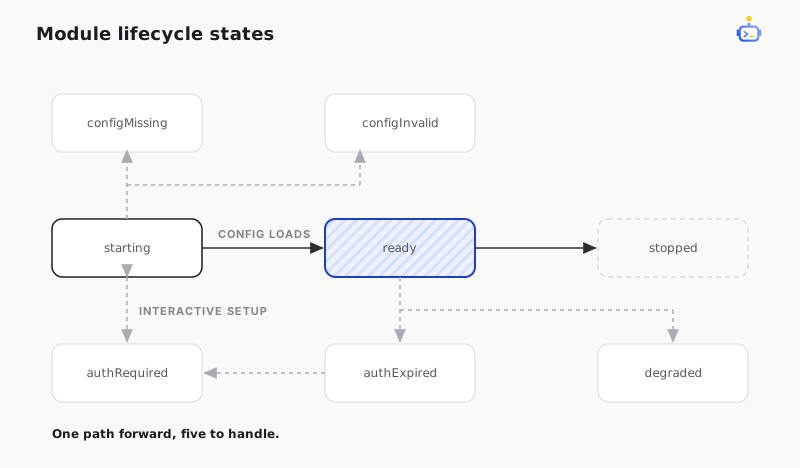
Observing lifecycle
Register status handlers before calling start() so no early transition is missed.
import type { LifecycleStatus, ModuleError, ModuleInstance } from "@dotcraft/channel";

function mapStatusToHostAction(status: LifecycleStatus, error?: ModuleError): string {
  switch (status) {
    case "configMissing":
      return "Prompt user to create module config";
    case "configInvalid":
      return `Show config error: ${error?.message ?? "Invalid config"}`;
    case "starting":
      return "Show connecting state";
    case "ready":
      return "Mark module active";
    case "authRequired":
      return "Start interactive setup flow";
    case "authExpired":
      return "Prompt re-authentication";
    case "degraded":
      return "Show degraded warning";
    case "stopped":
      return "Mark module stopped";
  }
}

function observeLifecycle(instance: ModuleInstance): void {
  instance.onStatusChange((status, error) => {
    const action = mapStatusToHostAction(status, error);
    console.log(`[module-status] ${status} -> ${action}`);
  });
}
The host can query immediate state through instance.getStatus() and the last structured error through instance.getError().
Rendering config UI
If exported, configGroups and configDescriptors drive host config forms without package-internal schema parsing. Render non-empty groups in exported order and keep them expanded.
import { configDescriptors, configGroups } from "@dotcraft/channel-feishu";
import type { ConfigDescriptor, ConfigGroupDescriptor } from "@dotcraft/channel";

type FormGroup = {
  group: ConfigGroupDescriptor;
  fields: ConfigDescriptor[];
};

const groups: FormGroup[] = configGroups
  .map((group) => ({
    group,
    fields: configDescriptors.filter((descriptor) => descriptor.group === group.id),
  }))
  .filter(({ fields }) => fields.length > 0);
Have the host UI respect:
- unique, non-empty group ids and valid
ConfigDescriptor.groupreferences requiredfor validationmaskedanddataKind: "secret"for protected input displaydisplayLabelanddescriptionas user-facing guidance- structured
optionsfor localized enum labels and previews; prefer them overenumValues allowCustomValuefor a preset-plus-custom enum controldefaultValueas the effective display value when the stored field is absent
Showing defaultValue must not initialize or save the field. Persist it only after the user edits the control.
Fields without group appear in an implicit Configuration group. A field with advanced: true and no group appears in an implicit Advanced group. New modules should declare every group and field assignment explicitly.
Interactive setup
Interactive setup is signaled by lifecycle status, not host-specific UI assumptions.
import type { ModuleInstance } from "@dotcraft/channel";

function attachInteractiveSetupHandlers(instance: ModuleInstance): void {
  instance.onStatusChange((status, error) => {
    if (status === "authRequired") {
      console.log("Display QR path or setup prompt to user");
      return;
    }
    if (status === "authExpired") {
      console.log("Notify session expired and start re-auth flow");
      return;
    }
    if (status === "configMissing" || status === "configInvalid") {
      console.log(`Config action needed: ${error?.message ?? status}`);
    }
  });
}
The host decides the UI (Desktop panel, CLI prompt, dashboard notification). The contract only requires structured state signaling.
Stopping a module
Stop with await instance.stop() and treat stopped as terminal for that runtime instance.
Recommended host behavior:
- Disable send and tool actions for this module instance.
- Mark connection as offline.
- Keep the last structured error for diagnostics.
Variant substitution
Variant substitution lets hosts swap module implementations while preserving logical channel identity.
Selection model:
- choose implementation by
moduleId - keep runtime identity by
channelName - keep default config naming by channel conventions unless manifest explicitly differs
Example:
- Standard:
moduleId = "feishu-standard",channelName = "feishu" - Enterprise:
moduleId = "feishu-enterprise",channelName = "feishu"
A host can switch variants by changing the selected moduleId without changing the host-facing integration model.
Adding new modules
A third-party package is loadable by the same model when it exports from package root:
manifestcreateModule- optional
configGroups - optional
configDescriptors
Checklist for new module packages:
- Implement the
@dotcraft/channelmodule contract types. - Keep host integration on package-root exports only.
- Provide machine-readable lifecycle and error transitions.
- Validate config in module boundary code.
- Include package tests and conformance tests.
This keeps first-party, enterprise, and partner modules interchangeable at the host boundary.
Related docs
- Channel adapters — the adapter base class the modules build on.
- Connect DotCraft to Feishu — a complete module that implements this contract.