
AppServer mode
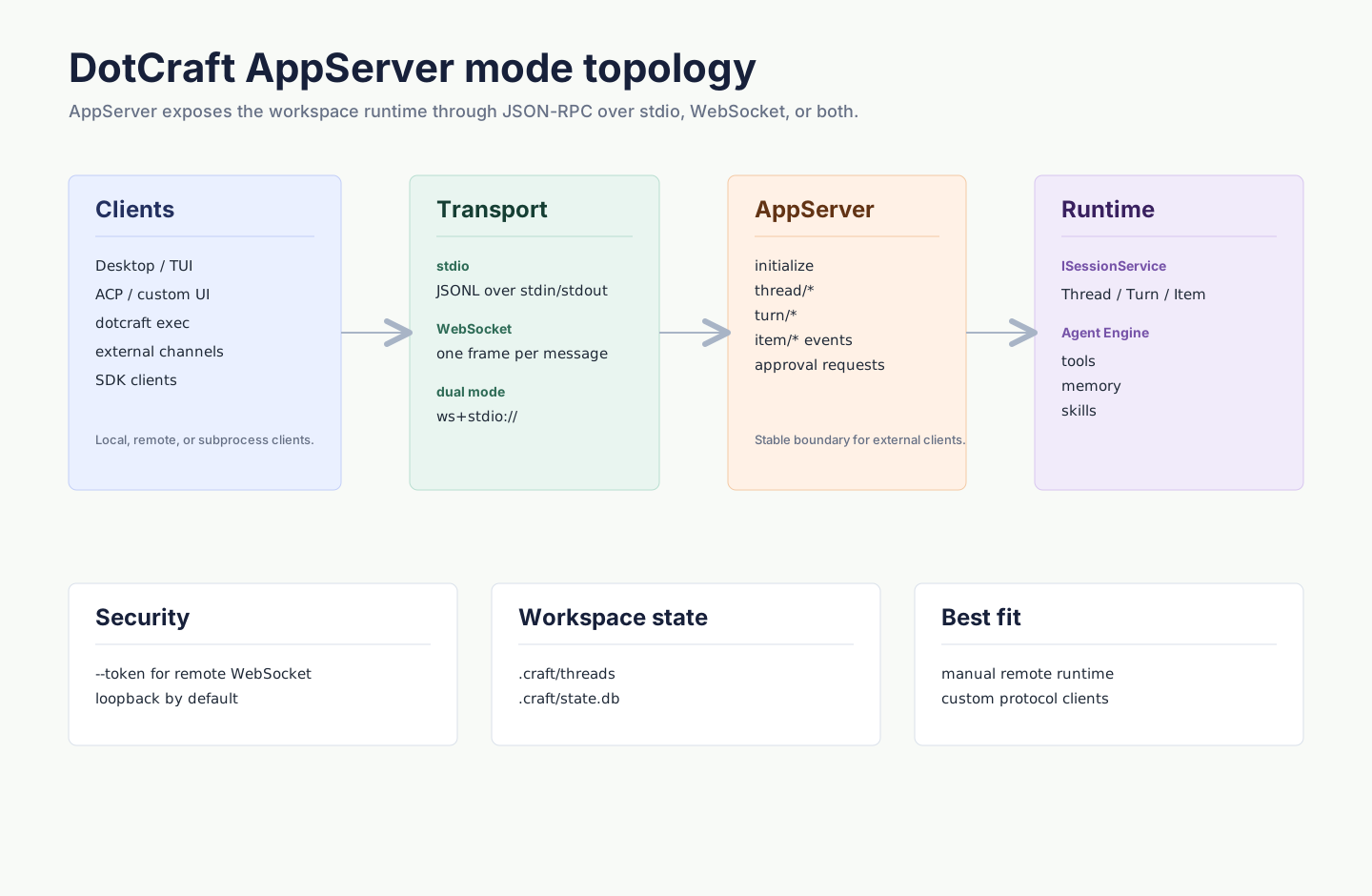
This page targets integrators and contributors who manage AppServer directly; day-to-day Desktop and dotcraft exec go through Hub local coordination. AppServer is an optional protocol and transport boundary over the host-owned Session Core: it projects the host's single ISessionService to external clients through JSON-RPC rather than creating a second session kernel. One AppServer process owns one Session Core, the stdio and WebSocket transports can be open at once, and Desktop, ACP, dotcraft exec, external channel adapters, and custom integrations all share the same session state when connected.
See DotCraft SDKs for client library APIs and AppServer Protocol for wire messages.
Starting AppServer
# stdio (default, for subprocess communication)
dotcraft app-server

# Pure WebSocket (for remote, multi-client)
dotcraft app-server --listen ws://127.0.0.1:9100

# stdio + WebSocket dual mode
dotcraft app-server --listen ws+stdio://127.0.0.1:9100
The server listens on the bare ws://host:port address, and clients append the /ws path to connect, for example ws://host:port/ws. The examples below follow this rule.
The built-in listener does not terminate TLS, and --listen wss://… is rejected. For TLS, put a reverse proxy in front of AppServer to terminate it, and point clients at wss://host/ws.
Connecting from the command line
# One-shot task
dotcraft exec --remote ws://127.0.0.1:9100/ws "Summarize this workspace"

# With token auth
dotcraft exec --remote ws://server:9100/ws --token my-secret "Summarize this workspace"
Command-line reference
Subcommands and global options
| Command / Option | Description |
|---|---|
dotcraft exec <prompt> | Run a one-off command-line Agent task |
dotcraft exec - | Read input from stdin and run a one-off task |
dotcraft app-server | Start AppServer (defaults to stdio) |
--listen <URL> | AppServer transport, used with app-server |
--remote <URL> | Client connection to a remote AppServer, used with exec or ACP |
--token <VALUE> | WebSocket auth token, used with --listen or --remote |
--listen URL schemes
| Scheme | Transport | stdout | Example |
|---|---|---|---|
stdio:// | Pure stdio (default) | Reserved for JSON-RPC | --listen stdio:// |
ws://host:port | Pure WebSocket | Normal console output | --listen ws://127.0.0.1:9100 |
ws+stdio://host:port | stdio + WebSocket | Reserved for JSON-RPC | --listen ws+stdio://127.0.0.1:9100 |
Transport modes
stdio (default)
AppServer communicates over stdin/stdout using newline-delimited JSON (JSONL). This is the local subprocess communication method commonly used by ACP and custom clients.
Client (stdin) → JSON-RPC Request → AppServer
AppServer → JSON-RPC Response/Notification → Client (stdout)
AppServer → Diagnostic logs → stderrProperties:
- 1:1 communication (one client per server process)
- stdout is reserved for the wire protocol; console logs go to stderr
- No network configuration; ideal for local development
WebSocket
AppServer starts a WebSocket listener on the given address. Each text frame carries a complete JSON-RPC message.
dotcraft app-server --listen ws://127.0.0.1:9100Properties:
- Multiple concurrent client connections (each with independent init state and thread subscriptions)
- stdout is free; console output works normally
- Supports remote connections and network authentication
stdio + WebSocket dual mode
dotcraft app-server --listen ws+stdio://127.0.0.1:9100For deployments that need both subprocess and remote connections.
Security authentication
A token is required when AppServer listens on a non-loopback address (not 127.0.0.1 / ::1). Without one, AppServer refuses to start rather than leaving an unauthenticated open port.
Server
dotcraft app-server --listen ws://0.0.0.0:9100 --token my-secretClient
dotcraft exec --remote ws://server:9100/ws --token my-secret "Check status"The token is passed via the WebSocket query: ws://host:port/ws?token=<value>. Once the server sets --token, every client — Desktop, ACP, dotcraft exec, and custom clients — must send the same token, and a missing or mismatched token is rejected with HTTP 401 before the WebSocket handshake completes. Token values must be URL-safe (alphanumeric plus -, _, .); otherwise the client percent-encodes them.
Configuration
Command line (recommended)
CLI arguments override config-file values:
dotcraft app-server --listen ws://127.0.0.1:9100 --token my-secretconfig.json (alternative)
Suitable for fixed deployments. ExternalChannels tells DotCraft how to launch an external adapter; structured delivery capabilities and channelTools are not in config — adapters declare them dynamically during initialize.
AppServer config
| Field | Description | Default |
|---|---|---|
AppServer.Mode | Transport: Disabled / Stdio / WebSocket / StdioAndWebSocket | Disabled |
AppServer.WebSocket.Host | WebSocket bind address | 127.0.0.1 |
AppServer.WebSocket.Port | WebSocket bind port | 9100 |
AppServer.WebSocket.Token | WebSocket auth token | empty |
CLI client config
| Field | Description | Default |
|---|---|---|
CLI.AppServerUrl | Remote AppServer URL used by dotcraft exec | empty |
CLI.AppServerToken | Remote auth token used by dotcraft exec | empty |
CLI.AppServerBin | Custom executable used when dotcraft exec starts a local Hub/AppServer | empty (current process) |
Examples
{
    "AppServer": {
        "Mode": "WebSocket",
        "WebSocket": {
            "Host": "0.0.0.0",
            "Port": 9100,
            "Token": "my-secret"
        }
    }
}{
"CLI": {
"AppServerUrl": "ws://server:9100/ws",
"AppServerToken": "my-secret"
}
}Common scenarios
| Scenario | Approach |
|---|---|
| Run one task from a script | dotcraft exec "..." |
| Share one backend across Desktop / ACP / custom clients | dotcraft app-server --listen ws://127.0.0.1:9100 |
| Connect to a remote workspace | Listen with WebSocket; clients connect to /ws |
| Build a custom raw client | Speak JSON-RPC 2.0 over stdio or WebSocket |
Related docs
- SDK quickstart — the recommended client path, without implementing the protocol yourself
- Configuration reference — full descriptions of the
AppServer.*/CLI.*fields - Architecture overview — where AppServer sits among assembly ownership and dependency boundaries