
DotCraft App
本页面向 App 集成方和 client 开发者。DotCraft App 通过 App Binding 管理权限,并通过 binding-scoped Streamable HTTP MCP server 提供工具。
Desktop 上的操作流程见应用连接。
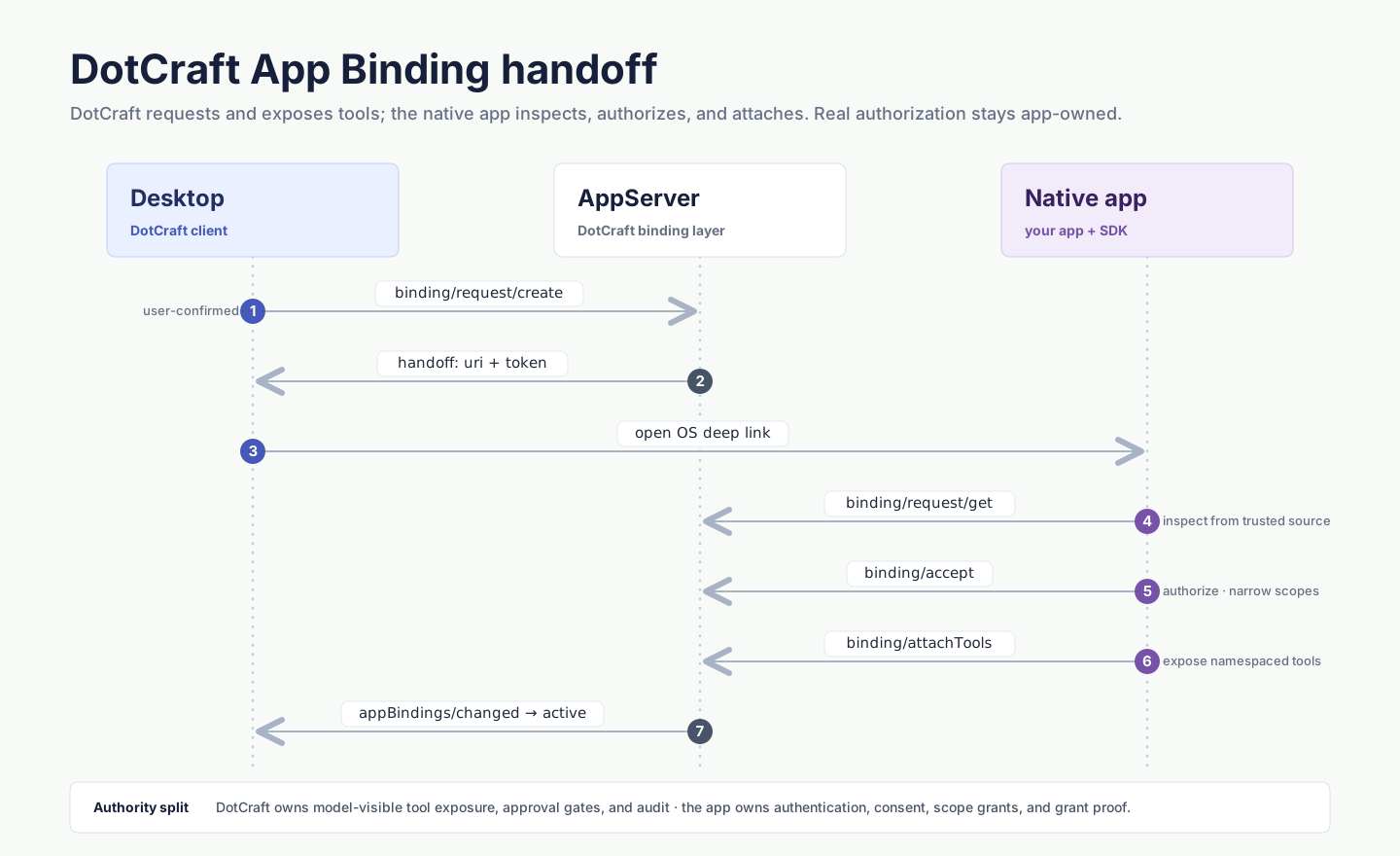
连接与 binding
| 范围 | 用途 | 控制面 |
|---|---|---|
| App connection | 在工作区中认证一个 App principal | app/connection/* |
| Thread binding | 授权一个 thread 使用该 App | thread/appBindings/*、app/binding/* |
一个 App 可以有一份工作区连接和多份 thread bindings。在一个 thread 中关闭 App 只撤销对应 binding。断开 App principal 会撤销该连接拥有的全部 bindings。
在可信 client 中使用类型化 SDK
可信 DotCraft client 通过高层 SDK 发现 App、启动连接 handoff、查询连接状态并管理 thread binding。不要在日志中记录 requestToken、principal credential 或 binding bearer。
const apps = await dotcraft.appBindings.listApps({ threadId: thread.id });
const app = await dotcraft.appBindings.viewApp(appId, { threadId: thread.id });
const handoff = await dotcraft.appBindings.startConnection(appId);

// App principal 按下文流程完成 handoff。
const connection = await dotcraft.appBindings.connectionStatus(appId);
const enabled = await dotcraft.appBindings.enable(thread.id, appId);
const bindings = await dotcraft.appBindings.listThreadBindings(thread.id);
await dotcraft.appBindings.revokeThreadBinding(thread.id, bindingId, "user disconnected app");using DotCraft.Protocol.AppServer;
var apps = await client.AppBindings.ListAppsAsync(new AppListParams { ThreadId = thread.Id });
var app = await client.AppBindings.ViewAppAsync(new AppViewParams { AppId = appId, ThreadId = thread.Id });
var handoff = await client.AppBindings.StartConnectionAsync(new AppConnectionStartParams { AppId = appId });
// App principal 按下文流程完成 handoff。
var connection = await client.AppBindings.GetConnectionStatusAsync(new AppConnectionStatusParams { AppId = appId });
var enabled = await client.AppBindings.EnableBindingAsync(new ThreadAppBindingEnableParams { ThreadId = thread.Id, AppId = appId });
var bindings = await client.AppBindings.ListThreadBindingsAsync(new ThreadAppBindingsListParams { ThreadId = thread.Id });
await client.AppBindings.RevokeThreadBindingAsync(new ThreadAppBindingRevokeParams
{
ThreadId = thread.Id,
BindingId = bindingId,
Reason = "user disconnected app"
});启动连接请求本身不认证 App。App connection ready 之后才能启用 thread binding。请在 UI 中使用返回的 handoff,不要把其中的 token 发送到 agent prompt。
连接 App principal
- 可信 client 使用 App ID 调用
app/connection/start。 - App 通过
app/connection/request/get读取 handoff。 - App 调用
app/connection/connect。 - Server 只返回一次 principal credential。
- App 立即在已经 initialized 的 AppServer 连接上调用
app/connection/authenticate。 - 后续连接使用已保存的 credential 认证。
Principal credential 会在 30 天后过期。app/connection/refresh 轮换它,轮换后旧 credential 立即失效。
app/connection/revoke 会移除工作区连接,并撤销它拥有的全部 thread bindings。
激活 thread binding
可信 client 通过 thread/appBindings/enable 发起 binding。Server 会创建一个十分钟有效的 binding request。
App principal 在线时,会收到带 bindingRequestId 的 app/binding/requested。App 离线时,可信 client 会从 thread/appBindings/enable 获得请求专用 handoff,并把它交给 App。完成认证的 App 先通过 app/binding/request/get 读取请求,然后激活:
{
  "jsonrpc": "2.0",
  "id": 1,
  "method": "app/binding/activate",
  "params": {
    "bindingRequestId": "appbindreq_...",
    "endpoint": "https://app.example/mcp/binding/123",
    "bearer": "one-time-binding-secret"
  }
}
Endpoint 必须提供 Streamable HTTP MCP server。DotCraft 会创建 binding-scoped MCP session,并在 binding ready 前读取 tool snapshot。
DotCraft 以 initialize 和 2025-06-18 协议版本启动 binding MCP session,不会发送实验性的 server/discover 探测。按 initialize 协商实现即可。
thread/appBindings/revoke 只移除一个 thread 的 binding,不会断开 App principal。
新 thread 选择
Client 可以在创建 thread 前暂存 App 选择。完成 thread/start 后,先启用选中的 Apps 并等待 ready,再提交第一个 turn。
能力变化
第一份有效 tool snapshot 由最初的启用操作批准。此后只有能证明是收窄的能力才会自动接受,其余变化都要再次确认:
- 新增工具,或输入 schema 无法证明是原 schema 的子集。
- 工具可见性新增受众。
- 风险标注放宽——移除
requiresApproval,或新增destructive、openWorld。 - UI resource 变更,或新增 CSP domain、浏览器 permission。
可信 client 通过 thread/appBindings/confirmCapabilities 接受新基线或保留原基线。接受后新能力立即成为有效基线。保留原基线会拒绝这次扩展、移除 live MCP session,并让 binding 保持 offline,直到 App 用兼容的能力集重新绑定。
离线与 rebind
离线 binding 会保留稳定的 tool schemas,但调用会返回 AppBindingOffline。
进程重启后,完成认证的 App 先调用 app/bindings/list(.NET SDK 为 client.AppBindings.ListBindingsAsync()),再通过 app/binding/rebind 提交当前 authorityRevision、可信 endpoint 和新 bearer。
每个 binding 都有自己的 MCP session 与 bearer。Live MCP clients 和 binding bearer 不会持久化。
Endpoint 规则
- 只接受 Streamable HTTP endpoint。
- 远程 endpoint 必须使用 HTTPS。
- Loopback endpoint 可以使用 HTTP。
- App Binding 不接受 command、arguments、environment、working directory 或 stdio 配置。
- Redirect 或信任边界变化后必须重新激活。
社交渠道
社交会话 binding 使用 social binding 方法和原生 plugin tools,不使用 MCP tools。DotCraft 在 server 端注入已绑定的投递目标。
Channel tools 不得声明 target、chatId、groupId、conversationId、deliveryTarget 或这些字段的别名。
安全边界
完成认证的 App connection 只能调用 App Binding app-role 方法。它不能读取 threads、启动 turns、检查 workspace 或控制其他 App。
DotCraft 会持久化加盐 credential verifiers 与不含敏感信息的规范化 capability snapshots,不会持久化 principal credentials、binding bearers、live MCP clients 或 UI resource bodies。
相关文档
- MCP Apps——为同一个 binding 提供的工具结果附加交互式视图。
- AppServer 协议——本页用到的
app/*与thread/appBindings/*方法的线上定义。