
Desktop Plugin API
本页是受信任 Desktop Plugin 的 API 参考。若要创建并构建第一个插件,请先阅读 构建 Desktop Plugin。
使用四个内核元语
Runtime 只有四个内核元语。六类 contribution 为常见产品集成提供简洁 shortcut。
管理副作用
如果一项工作需要 setup 和 cleanup,但没有自然的 React owner,请使用 host.effect:
host.effect(() => {
  const interval = window.setInterval(refreshBoard, 30_000);
  window.addEventListener("online", refreshBoard);

  return () => {
    window.clearInterval(interval);
    window.removeEventListener("online", refreshBoard);
  };
});
Effects、Host-owned subscriptions,以及通过其他元语创建的 registrations,都属于当前 revision generation。禁用、卸载、替换 revision 或关闭 Desktop 时,它们会一起清理。
组合 UI surface
根据需要进行的改变选择三种 host.ui 操作:
| 操作 | 组合规则 |
|---|---|
add | 保留全部 active registration,由 surface 把它们一起渲染。 |
replace | 使用最后一个 active registration。Dispose 后恢复前一个 replacement 或 Core default。 |
wrap | 包装当前 surface。后注册的 wrapper 位于早期 wrapper 外层。 |
每次调用都会返回 disposable registration,同时也由 generation 管理。Dispose 一个 add 只会移除该项;dispose 一个 replace 会显露下一个 active replacement;dispose 一个 wrap 会用剩余 wrappers 重新组成链条。
Replacement 生效时,被替换的 default component tree 不会挂载。Dispose replacement 会重新挂载当前 fallback,而不是显露一个一直在后台运行的隐藏实现。
“最后”和“后注册”都按实际注册顺序判断,包括来自不同插件的 registration。
如果需要保留当前实现,只在外层添加行为或布局,请使用 wrap:
import type { DesktopPluginSurfaceWrapperProps } from "@dotcraft/plugin";

function ReviewFrame({
  children,
}: DesktopPluginSurfaceWrapperProps<"composer">) {
  return <section className="acme-board-review-frame">{children}</section>;
}

host.ui.wrap("composer", ReviewFrame);
共享 service
当另一个插件需要可调用的契约,而不是视觉 surface 时,使用 renderer-local service:
interface BoardService {
  openCard(id: string): void;
}

host.services.provide<BoardService>("acme-board.board", {
  openCard: (id) => openBoardCard(id),
});

const board = host.services.use<BoardService>("acme-board.board");
board?.openCard("DC-42");
use 返回最后一个 active provider 的同步快照;dispose 它以后会恢复前一个 provider。Desktop 模块可能并行激活,因此应在交互真正需要 service 时再解析,并处理 undefined。Manifest dependencies 要求同时存在 .NET,也不会让 Desktop provider 优先激活。Renderer service 不会自动跨入 .NET、CLI、远程客户端或 AppServer。
发布 event
如果只是发布发生过的事件,不需要共享 service reference,请使用 event:
host.events.on<{ cardId: string }>("acme-board.card-opened", ({ cardId }) => {
  console.log("Opened", cardId);
});

host.events.emit("acme-board.card-opened", { cardId: "DC-42" });
Event listener 会随 generation 一起移除。Event 只存在于 renderer,不会持久化 Session data,也不会变成 AppServer notification。
使用 Core surface
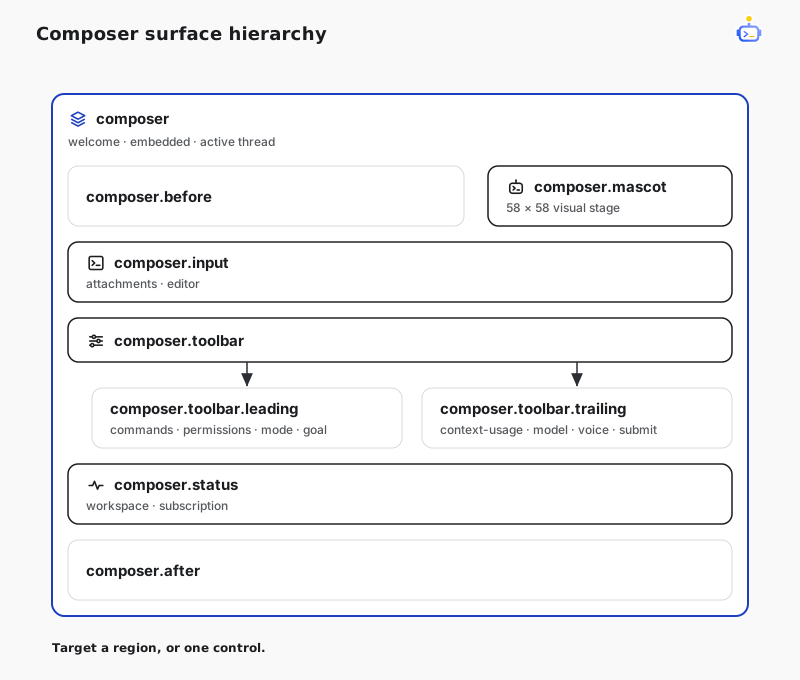
DotCraft 的正式 surface 覆盖 application 与 Composer。Composer surface 采用层级结构,既可以定位完整区域,也可以定位单个 Core 控件:
| Surface | 位置 |
|---|---|
app | 完整的 Desktop application renderer tree。 |
app.background | application shell 后方的空装饰 seat;Core background 仍位于 app 内。 |
composer | 完整的已挂载 Composer,包括新聊天 welcome、创建 thread 前的 embedded Composer 与 active thread 状态。 |
composer.mascot | Composer mascot 的 58×58 逻辑像素 visual stage。 |
composer.before | Composer body 之前的内容。 |
composer.after | Composer shell 之后的内容。 |
composer.input | 完整的 attachment 与 rich-input 区域。 |
composer.toolbar | Composer card 内完整的 control row。 |
composer.toolbar.leading | command、permission、mode 与 goal 所在的 leading group。 |
composer.toolbar.trailing | context、model、voice 与 submit 所在的 trailing group。 |
composer.status | Composer card 下方的 workspace 与 subscription 状态行。 |
当区域范围过大时,可以直接定位这些 Core 控件:
| 区域 | 控件 surface |
|---|---|
| Input | composer.input.attachments、composer.input.editor |
| Leading toolbar | composer.toolbar.commands、composer.toolbar.permissions、composer.toolbar.mode、composer.toolbar.goal |
| Trailing toolbar | composer.toolbar.context-usage、composer.toolbar.model、composer.toolbar.voice、composer.toolbar.submit |
| Status | composer.status.workspace、composer.status.subscription |
Core 会把正常组件作为每个 surface 的 default content。add 在其后渲染内容;如需在前面加入内容并保留原行为,请使用 wrap;如需移除 Core 组件并自行接管替代行为,请使用 replace:
import { Button } from "@dotcraft/plugin";
import type {
  DesktopPluginSurfaceProps,
  DesktopPluginSurfaceWrapperProps,
} from "@dotcraft/plugin";

function BeforeModel({ children }: DesktopPluginSurfaceWrapperProps<"composer.toolbar.model">) {
  return (
    <>
      <Button size="sm">Review model</Button>
      {children}
    </>
  );
}

function SubscriptionStatus(_: DesktopPluginSurfaceProps<"composer.status.subscription">) {
  return <span>Review ready</span>;
}

host.ui.wrap("composer.toolbar.model", BeforeModel);
host.ui.add("composer.status.subscription", SubscriptionStatus);
同一组名称会挂载在 thread、Welcome、approval 与 user-input Composer 中。即使当前 provider、compact mode、minimal chrome 或 decision state 隐藏了 Core default,surface 仍然可用。渲染插件内容前应检查共享 Composer context。Surface name 与 typed context 属于公共契约;surface 生成的 DOM 不属于公共契约。
只要 Composer 尚未创建或挂接到真实 Session thread,其 surface context 的 threadId 就为 null,这包括 welcome 与 detached embedded Composer;挂接后则为真实 thread id。
| 字段 | 含义 |
|---|---|
workspacePath | 当前 workspace path;不可用时为 null。 |
threadId | 已连接的 Session thread;连接前为 null。 |
mode | 当前 agent 或 plan 模式。 |
busy | Composer 正在运行、等待或执行维护。 |
awaitingApproval | Host 正在等待审批决定。 |
variant | default 或 agentBuilder 等嵌入式 Composer 变体。 |
minimalChrome | Core 为嵌入式 Composer 隐藏了非必要控件。 |
在新聊天 Welcome 页,composer 覆盖完整的 pre-thread composition experience:app 选择、hero、输入框、workspace footer 与 quick starts。替换它时,这组共享 draft 与 voice lifecycle 的内容会作为一个整体切换。
替换 Composer mascot
替换 composer.mascot 后,可以使用图片、SVG、canvas、Lottie player 或 React character。下面的 inline SVG 不依赖额外资源,可直接构建:
import type { DesktopPluginActivate, DesktopPluginSurfaceProps } from "@dotcraft/plugin";

function Mascot({ context }: DesktopPluginSurfaceProps<"composer.mascot">) {
  return (
    <svg
      viewBox="0 0 58 58"
      width={context.size}
      height={context.size}
      data-activity={context.activity}
      role="img"
      aria-label="Acme mascot"
    >
      <circle cx="29" cy="29" r="24" fill="var(--accent)" />
      <circle cx="21" cy="26" r="3" fill="currentColor" />
      <circle cx="37" cy="26" r="3" fill="currentColor" />
      <path d="M20 38 Q29 44 38 38" fill="none" stroke="currentColor" strokeWidth="3" />
    </svg>
  );
}

export const activate: DesktopPluginActivate = (host) => {
  host.ui.replace("composer.mascot", Mascot);
};
Core 继续管理 mascot 的位置、bubble、menu、click handling、sleep timer、Composer handoff 与 outer motion。Context 继承普通 Composer 字段,并增加 activity、expression、light、size、submitRevision、reasoningEffort、speed、contextMax 与 reducedMotion。直接响应这些 snapshot;同一状态下连续提交需要 one-shot animation 时,请监听 submitRevision。插件自定义 occurrence 继续使用 host.events。
ui.add("composer.mascot", ...) 会在同一 stage 上叠加 accessory 或 effect。如果插件还要控制位置与交互行为,请直接替换 composer。composer.mascot 不会改变 Error Screen mascot 或 Agent Profile avatar。
暴露插件 surface
在组件中渲染 PluginSurface,即可暴露 plugin-owned extension point:
import { PluginSurface } from "@dotcraft/plugin";

declare module "@dotcraft/plugin" {
  interface DesktopPluginSurfaceContextMap {
    readonly "acme-board.card.footer": {
      readonly issueId: string;
    };
  }
}

function BoardCard() {
  return (
    <article className="acme-board-card">
      <h2>DC-42</h2>
      <PluginSurface name="acme-board.card.footer" context={{ issueId: "DC-42" }} />
    </article>
  );
}
把自定义名称加入 DesktopPluginSurfaceContextMap,owner 与所有 consumer 才会获得同一个 context 类型。Provider 与 consumer package 应导入共享的 declaration module;没有 declaration merging 时,未知 surface 的 context 类型是 unknown。另一个已启用插件可以通过 ui.add、ui.replace 或 ui.wrap 定位 acme-board.card.footer,activation 顺序不影响注册。建议使用 plugin-qualified name,但不强制。
Surface 只在其组件 mounted 时存在。Registration 仍由注册它的 revision 持有,并会在 surface 存在时渲染。
使用便捷 contribution
如果某种标准产品集成已经符合需求,可以返回 DesktopPluginActivation:
| 字段 | 便捷行为 |
|---|---|
mainViews | 添加 navigation、routing 与完整 view。 |
settingsPages | 向 Desktop Settings 添加 page。 |
conversationViews | 在 Chat 旁添加 thread-scoped tab。 |
commands | 添加带 availability 与 execution 的 searchable command。 |
toolRenderers | 渲染精确的 presentationId,并保留 Core 与 generic fallback。 |
messageActions | 向标准 assistant-message action area 添加 action。 |
这六个字段是 convenience API,不是 allowlist 或能力上限。通过 host.ui.add("composer.toolbar.leading", ...) 添加 Composer UI;如果功能不适合这些便捷字段,请使用 surface、service、event 与 effect。
返回的 activation 还可以提供 dispose()。Contribution id 在该 activation 中必须唯一。使用 label.translations 提供本地化标签;只有在 convenience API 定义了有序 placement 时才设置 order。
使用 Host API
除四个元语外,DesktopPluginHost 按 owner 对稳定的产品操作分组:
| 成员 | 用途 |
|---|---|
plugin、environment | 插件身份,以及 locale、theme、platform 与 workspace context。 |
navigation | View、Settings、thread、外部 URL 与用户通知。 |
appServer | 受支持的 JSON-RPC request 与 subscription。 |
appBindings、appSurfaces | Connected App binding 与 app 提供的 UI surface。 |
workspaces | 读取本地 workspace 信息。 |
oratorio | Team run、handoff 与 event。 |
从 @dotcraft/plugin 导入共享 UI 组件;官方 builder 会把 hooks 与 JSX 连接到 Desktop 的 React runtime。
Host API 是兼容性契约,不是 access-control boundary。主进程的 URL、route、bearer、size 与 timeout checks 是 service invariants,而不是插件权限。
有意识地使用 DOM 与 CSS
Desktop Plugin 可以访问 renderer DOM 并加载 global CSS,DotCraft 不会阻止这些方式;但 DotCraft-owned DOM structure、class names、private CSS variables、stores 与 feature components 都不是公共契约。已有公共 surface 或 service 时应优先使用;直接操作 DOM 或 CSS 需要自行承担维护成本。
分离 UI 与后端职责
自定义背景、Composer decoration、wrapper、plugin surface、renderer service 或 renderer event 只需要 Desktop Plugin。DotCraft 不会为纯 UI 创建对应的 C# 或 AppServer API。
如果功能需要 backend execution、durable host-owned state、Agent tools 或 hooks、其他客户端,或者跨进程与远程协调,再添加 .NET plugin 或 AppServer contract。一个 plugin bundle 可以同时包含这两种模块,但不会仅因为其中一种存在就要求另一种。
Generation 与重新加载生命周期
可运行的 DotNetPluginSample 包含两个 .NET 与 Desktop bundle。Core 插件替换背景、包装整个应用,并拥有 renderer service、event 与自定义 surface;Consumer 插件添加 Composer 控件,并向 Core 拥有的 surface 注入 UI。
请在 DotCraft 发现插件或打包插件之前完成构建。刷新插件列表,然后启用插件。Desktop 会把整个 content revision 作为一个 generation 激活。相同 revision 不发生变化;更新 revision 时,Desktop 会 dispose 旧 generation,再激活新 generation。
禁用或替换 revision 时,Desktop 会立即撤销 Host-owned registrations,不会等待插件尚未完成的 activate() 或 dispose() Promise;迟到的 activation result 也不能重新发布。
Revision 是开发迭代单元。Desktop Plugin 不内置 file watcher、HMR、component-only reload 或 partial-generation update。重新构建后,再刷新或重新启用插件。
Desktop 不会从远程 AppServer 加载可执行插件代码。使用远程 workspace 时,它只会激活本地已经打包,并且 plugin id、version 与 Desktop content revision 都和远程 snapshot 一致的代码。