
AppServer 协议
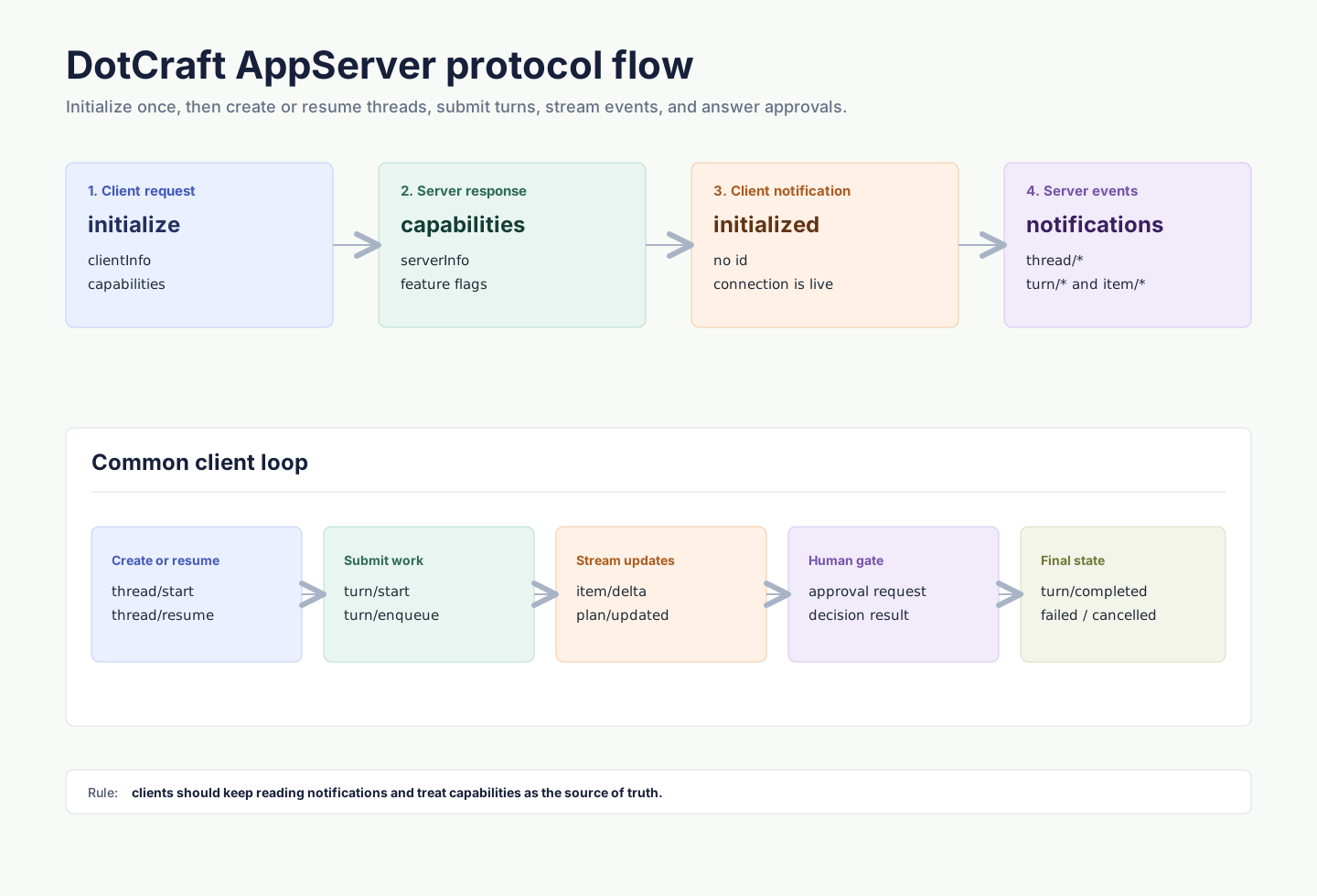
AppServer Protocol 是 DotCraft 暴露给外部客户端的 JSON-RPC wire protocol。Desktop、ACP bridge、外部 channel adapter 和自定义 IDE client 都可以通过它创建或恢复线程、提交用户输入、消费流式事件,并参与命令执行或文件变更审批。
本页定义 AppServer JSON-RPC wire contract:初始化、消息方向、方法分组、传输、错误处理和客户端兼容性要求。DotCraft SDK 页面介绍各语言客户端库的 API,Hub 协议介绍本地 AppServer 的发现与启动。
协议
AppServer Protocol 使用 JSON-RPC 2.0。每条消息都包含 "jsonrpc": "2.0"。
| 消息类型 | id | method | 方向 |
|---|---|---|---|
| Request | 有 | 有 | client → server 或 server → client |
| Response | 有 | 无 | 响应 request |
| Notification | 无 | 有 | client → server 或 server → client |
Request:
{
  "jsonrpc": "2.0",
  "id": 1,
  "method": "thread/list",
  "params": {}
}
Response:
{
  "jsonrpc": "2.0",
  "id": 1,
  "result": {
    "data": []
  }
}
Notification:
{
  "jsonrpc": "2.0",
  "method": "turn/started",
  "params": {
    "turn": {
      "id": "turn_001"
    }
  }
}
传输方式
| Transport | Wire format | 适用场景 |
|---|---|---|
stdio | UTF-8 JSONL,每行一条完整 JSON-RPC 消息 | 子进程 client,一对一连接,默认模式 |
websocket | 每个 WebSocket text frame 一条完整 JSON-RPC 消息 | 多客户端共享工作区、本地 Hub 托管、远程连接 |
stdio 模式下,stdout 保留给协议消息,日志和诊断输出应写入 stderr。
WebSocket 模式下,每个连接都有独立的初始化状态和线程订阅。通过 Hub 托管时,client 通常连接 endpoints.appServerWebSocket 返回的 URL。
初始化
每个连接的第一条 request 必须是 initialize。成功后,client 必须发送 initialized notification。
初始化 request:
{
  "jsonrpc": "2.0",
  "id": 0,
  "method": "initialize",
  "params": {
    "clientInfo": {
      "name": "my-client",
      "title": "My Client",
      "version": "0.1.0"
    },
    "capabilities": {
      "approvalSupport": true,
      "streamingSupport": true,
      "commandExecutionStreaming": true,
      "toolExecutionLifecycle": true,
      "configChange": true
    }
  }
}
初始化响应会返回服务端信息和能力:
{
  "jsonrpc": "2.0",
  "id": 0,
  "result": {
    "serverInfo": {
      "name": "dotcraft",
      "version": "0.2.0",
      "protocolVersion": "1",
      "extensions": ["acp"]
    },
    "capabilities": {
      "threadManagement": true,
      "threadSubscriptions": true,
      "dynamicToolRebind": true,
      "runtimeAdditionalContext": true,
      "approvalFlow": true,
      "skillsManagement": true,
      "pluginManagement": true,
      "skillVariants": true,
      "modelCatalogManagement": true,
      "mcpManagement": true
    }
  }
}
然后发送:
{
  "jsonrpc": "2.0",
  "method": "initialized",
  "params": {}
}
在初始化完成前发送其他方法会被拒绝。重复 initialize 也会被拒绝。
核心对象
| Primitive | 说明 |
|---|---|
| Thread | 一个可恢复的会话,包含工作区、来源 channel、配置和 turns。 |
| Turn | 一次用户输入及其触发的 agent 执行。 |
| Item | turn 内的输入或输出单元,例如用户消息、agent 消息、命令执行、工具调用、工具结果和 reasoning。 |
常见流程:
thread/start创建新线程,或thread/resume恢复已有线程。turn/start提交用户输入。- 持续读取
turn/*和item/*notifications。 - 如果收到 server-initiated approval request,展示 UI 并返回 decision。
- 收到
turn/completed、turn/failed或turn/cancelled后更新 UI 状态。
线程
创建线程需要提供 identity,用于表示 client/channel、用户和工作区归属:
{
  "jsonrpc": "2.0",
  "id": 1,
  "method": "thread/start",
  "params": {
    "identity": {
      "channelName": "desktop",
      "userId": "local-user",
      "channelContext": "workspace:/Users/me/project",
      "workspacePath": "/Users/me/project"
    },
    "historyMode": "server",
    "displayName": "Fix tests"
  }
}
响应:
{
  "jsonrpc": "2.0",
  "id": 1,
  "result": {
    "thread": {
      "id": "thread_20260316_x7k2m4",
      "workspacePath": "/Users/me/project",
      "userId": "local-user",
      "originChannel": "desktop",
      "status": "active"
    }
  }
}
Server 还会广播 thread/started。多 client 场景下,发起请求的 client 可能同时收到 response 和 broadcast,应按 thread id 去重。
常用 thread 方法:
| Method | 说明 |
|---|---|
thread/start | 创建新线程。 |
thread/resume | 恢复已有线程。 |
thread/list | 按 identity 列出线程。 |
thread/read | 读取当前 Thread 头部和持久化 runtime 状态,不恢复执行上下文。 |
thread/turns/list | 读取一页有界的 Turn 元数据,不包含 Item。 |
thread/items/list | 跨 Thread 或按单个 Turn 读取一页有界的 Item。 |
thread/subscribe | 订阅线程事件。 |
thread/unsubscribe | 取消订阅线程事件。 |
thread/rename | 更新显示名称。 |
thread/pause | 暂停活跃线程,直到再次恢复。 |
thread/archive | 阻止新 Turn,停止或失效活跃后台终端,并归档线程及其 subagent 子树。 |
thread/unarchive | 恢复已归档线程,以及 subagent edge 仍为 open 的后代。显式关闭的后代保持归档。 |
thread/delete | 从持久化状态中永久删除线程及其 subagent 子树。线程专属文件采用 best effort 清理,失败后可以重试。 |
thread/config/update | 更新线程配置。 |
thread/mode/set | 切换 agent mode,例如 plan 或 agent。 |
thread/list 接受可选的 query、limit 和 opaque cursor 参数。分页时 result 会包含 nextCursor 和 totalMatched。未传 limit/cursor 的调用保持兼容,继续返回完整列表。
thread/read 只接受 threadId,不返回持久化的 Turn 或 Item。使用 thread/turns/list 和 thread/items/list 读取历史。Turn 页默认 20 条、最多 100 条,Item 页默认 100 条、最多 500 条。两者默认按 descending 排序,并按请求方向返回数据。Item 页可以带可选的 turnId。只能为相同 Thread、scope、可选 Turn 和方向继续传入 opaque nextCursor。rollback、fork、archive 或 unarchive 后,应丢弃受影响的 cursor 并重新读取所需历史页。
归档是可逆操作:它会阻止新 Turn,并停止或失效活跃后台终端,但不会取消已经在执行的主 Turn。对话历史会保留,保留下来的配套文件仍遵循各自的保留规则。恢复父线程时,只会恢复 subagent edge 仍为 open 的后代。删除会永久移除线程持久化数据和绑定的 tracing 数据。线程专属文件会同步尝试清理,单项失败后可以重试。归档和恢复会发出 thread/statusChanged。删除完成后会向工作区广播 thread/deleted。存储生命周期见会话持久化。
Runtime Dynamic Tools 与 App Context
暴露 Runtime Dynamic Tools 的客户端,也可以在 thread/start 或 thread/resume 上附加精简的 app context。additionalContext 适合放简短的模型可见提示,帮助 agent 发现或使用客户端自有能力,尤其是 deferred tools。
发送 additionalContext 前先检查 capabilities.runtimeAdditionalContext:
{
  "jsonrpc": "2.0",
  "id": 3,
  "method": "thread/resume",
  "params": {
    "threadId": "thread_20260316_x7k2m4",
    "additionalContext": {
      "myapp.threadGuidance": {
        "kind": "application",
        "value": "When the user asks about MyApp issues, search for the relevant MyApp tool first."
      }
    }
  }
}
kind 目前只支持 "application"。value 应保持简洁,不要放入 secret、授权材料或大块状态快照。Server 会把每个条目渲染进 System prompt 的 <app-context>...</app-context> 中。它是 app context,不是更高优先级的指令。
在 thread/resume 上,省略 additionalContext 会保留当前 runtime context,发送 {} 会清空它。
ACP bridge runtime tools
ACP client 可以通过 DotCraft 的私有 ACP extension 暴露 client-owned Runtime Dynamic Tools。该扩展必须放在 clientCapabilities._meta.dotcraft 中。ACP capability 对象不接受自定义根字段。
{
  "clientCapabilities": {
    "_meta": {
      "dotcraft": {
        "runtimeTools": {
          "version": 1,
          "tools": [
            {
              "namespace": "unity",
              "name": "unity_execute_csharp",
              "description": "Execute a C# snippet in Unity.",
              "inputSchema": { "type": "object" },
              "acpMethod": "_unity/execute_csharp"
            }
          ]
        }
      }
    }
  }
}
runtimeTools.version 固定为 1。自定义方法必须以 _ 开头。文件系统和终端 callback 继续使用对应的 ACP 标准 capability。每个 callback 返回 DotCraft Runtime Dynamic result envelope,其中包含 success、contentItems、structuredContent、errorCode 和 errorMessage。该 envelope 是标准 ACP JSON-RPC response 承载的私有 extension,不是 ACP Tool Call,也不是 MCP tool result。失败的 dynamicToolCall 会保留 callback 返回的非空 errorCode 和 errorMessage。只有 callback 未提供可用字段时,才回退到服务端稳定的 dispatcher 错误。
回合
turn/start 提交用户输入并启动 agent 执行。响应会立即返回初始 turn,后续输出通过 notification 流式发送。
{
  "jsonrpc": "2.0",
  "id": 2,
  "method": "turn/start",
  "params": {
    "threadId": "thread_20260316_x7k2m4",
    "input": [
      {
        "type": "text",
        "text": "Run the tests and fix any failures."
      }
    ]
  }
}
响应:
{
  "jsonrpc": "2.0",
  "id": 2,
  "result": {
    "turn": {
      "id": "turn_001",
      "threadId": "thread_20260316_x7k2m4",
      "status": "running",
      "items": []
    }
  }
}
input 是 tagged union,常见类型包括:
text:普通用户文本。commandRef:结构化 slash command 引用。skillRef:结构化 skill 引用。fileRef:结构化文件引用。image:使用 base64data:image/...URL 编码的内联图片。服务端会拒绝 HTTP 和 HTTPS 图片 URL。客户端应先下载远程图片,再提交 data URL 或localImage。localImage:本地图片路径和可选 MIME 信息。
如果一个 turn 正在运行,Desktop 类客户端通常使用 turn/enqueue 将下一条输入加入队列,或使用 turn/interrupt 取消当前 turn。
事件
AppServer 通过 notification 推送线程、turn 和 item 状态。持续读取传输流,并把 item/completed 视为该 item 的最终状态。
常见 notification:
| Notification | 说明 |
|---|---|
thread/started | 线程创建。 |
thread/resumed | 线程恢复。 |
thread/deleted | 线程删除。 |
thread/renamed | 显示名称变化。 |
thread/runtimeChanged | 运行状态变化。 |
turn/started | turn 开始。 |
turn/completed | turn 成功完成。 |
turn/failed | turn 失败。 |
turn/cancelled | turn 被取消。 |
plan/updated | plan 更新,payload 包含来源 threadId 和完整 plan/todo 快照。 |
item/started | item 开始。 |
item/completed | item 完成,包含最终状态。 |
item/agentMessage/delta | agent 回复文本增量。 |
item/reasoning/delta | reasoning 增量。 |
item/commandExecution/outputDelta | 命令输出增量。 |
item/toolCall/argumentsDelta | 工具参数增量。 |
声明 capabilities.toolExecutionLifecycle: true 后,server 可额外发送 toolExecution item lifecycle:item/started 表示某个工具调用开始执行,item/completed 表示这个 callId 对应的工具已经完成。它是 UI/runtime enhancement,用于并行工具中提前更新单个工具状态。完整权威结果仍以匹配的 toolResult 为准。
Client 可以在 initialize.params.capabilities.optOutNotificationMethods 中传入精确 method 名称,关闭当前连接不需要的 notification。
审批
当命令执行、文件变更或其他敏感操作需要人工确认时,server 会发送 server-initiated JSON-RPC request。Client 必须展示审批 UI,并返回 decision。
命令审批示例:
{
  "jsonrpc": "2.0",
  "id": 50,
  "method": "item/approval/request",
  "params": {
    "threadId": "thread_20260316_x7k2m4",
    "turnId": "turn_001",
    "itemId": "item_005",
    "requestId": "approval_001",
    "approvalType": "shell",
    "operation": "dotnet test",
    "target": "/Users/me/project",
    "scopeKey": "shell:*",
    "reason": "Agent wants to execute a shell command."
  }
}
响应:
{
  "jsonrpc": "2.0",
  "id": 50,
  "result": {
    "decision": "accept"
  }
}
常见 decision 包括 accept、acceptForSession、acceptAlways、decline 和 cancel。可用 decision 以实际 request payload 为准。
如果 client 在 initialize 中声明 approvalSupport: false,server 会按自身策略处理无法交互的审批场景。富 UI client 应保持 approvalSupport: true。
API 概览
下面是 AppServer client 常用的方法族。
| 方法族 | 示例 | 说明 |
|---|---|---|
| 初始化 | initialize, initialized | 建立连接能力和 server 能力。 |
| Thread | thread/start, thread/list, thread/read, thread/turns/list, thread/items/list, thread/subscribe | 会话生命周期、有界历史和订阅。 |
| Turn | turn/start, turn/enqueue, turn/interrupt | 用户输入、队列和取消。 |
| Skills | skills/list, skills/read, skills/view, skills/restoreOriginal, skills/setEnabled, skills/uninstall | Skill 发现、有效内容查看、恢复原始技能、开关和可卸载 skill 删除。 |
| Tools | tool/list | 内置工具目录(名称、描述、图标、Plan 模式可用性),用于 agent profile 的工具选择器。 |
| Plugins | plugin/list, plugin/view, plugin/install, plugin/installLocal, plugin/remove, plugin/setEnabled, plugin/setTrusted | 插件发现、详情、安装、移除、启用状态与 .NET trust 管理。 |
| 插件市场 | marketplace/add, marketplace/refresh, marketplace/remove | 用户管理的插件目录来源。 |
| Commands | command/list, command/execute | 自定义命令发现和执行。 |
| Models | model/list | 模型目录。 |
| MCP | mcp/list, mcp/get, mcp/upsert, mcp/test, mcpServerStatus/list | MCP 配置和状态。 |
| External channels | externalChannel/list, externalChannel/upsert | 外部 channel 配置。 |
| Subagents | subagent/profiles/list, subagent/profiles/upsert | subagent profile 管理。 |
| Automations | automation/list, automation/create, automation/runs/list | 本地任务生命周期、绑定和受管 worktree 清理。 |
| Worktrees | worktree/list, worktree/status, thread/worktree/handoff | 受管 Git worktree 状态和交接。 |
| Workspace config | workspace/config/update | 工作区配置更新。 |
| App Binding | app/connection/authenticate、app/binding/activate、app/threadInput/enqueue | 面向外部应用的扩展模块,由 capabilities.appBindingVersion 门控。 |
展示功能相关的 UI 之前,先读 initialize 响应中的 capabilities。
skills/list 返回的 Skill 条目可能包含 hasVariant: true,表示当前运行环境下该技能会通过工作区适配内容执行。skills/read 仍读取源 SKILL.md。需要展示或执行有效内容时使用 skills/view。
App Binding 客户端通过 capabilities.appBindingVersion: 1 协商版本。完成认证的 App principal 连接只能调用 app-role allowlist:连接认证、刷新、状态与撤销,binding 请求、激活、rebind 与列表,app/surface/publish,以及 app/threadInput/enqueue。工具由 binding-scoped MCP session 提供。不受支持的 App Binding 版本返回 AppBindingUpgradeRequired,未声明的方法返回 MethodNotFound,其他越权方法返回 AppPrincipalUnauthorized。详见 DotCraft App。
自动化运行与 worktree
自动化定义和运行记录相互独立。使用 automation/runs/list 获取结果对应的 threadId 和 turnId。Git 项目的独立运行每次使用一个受管 worktree,显式请求的 worktree 创建失败会显示为运行失败。使用该次运行的线程调用 worktree/status 检查改动,使用 thread/worktree/handoff 继续在本地审核。
Plugins 和 Skills 管理
调用 skills/* 前检查 capabilities.skillsManagement,调用 plugin/* 前检查 capabilities.pluginManagement,调用 marketplace/* 前检查 capabilities.pluginMarketplaces。
skills/uninstall 只用于删除可卸载的工作区或个人 skill。系统 skill 不能卸载。plugin-contained skill 由插件生命周期管理,不能单独卸载。若卸载的 source skill 有关联变体,server 会同时清理该 source skill 的 workspace-local variants,并广播 workspace/configChanged,regions: ["skills"]。
插件生命周期把安装状态和启用状态分开:
plugin/install:把可安装目录中的插件安装到当前工作区,并默认启用。目录项可来自 Desktop 或已配置的市场。plugin/installLocal:把有效的本地插件目录复制到当前工作区,并默认启用。plugin/setEnabled:只切换已安装插件是否进入 Agent 上下文,不安装也不删除目录。plugin/setTrusted:授予或撤销 server 已接受的 plugin id 与 .NET fingerprint 的执行信任。Client 选择插件,而不能任意指定 fingerprint。plugin/remove:移除.craft/plugins/<id>/下的工作区插件目录,包括 DotCraft 管理的内置插件,以及通过plugin/installLocal安装的用户本地插件。不会删除显式配置的外部插件 root 或 user-global 插件目录。
插件安装、移除、启用状态或 trust 变化会通过 workspace/configChanged 广播受影响的 plugins、skills、mcp、lsp 与 hooks regions。插件贡献的 tools 使用标准 toolCall / toolResult 生命周期,并在这些 item 上保留插件来源信息。面向用户的插件模型见 插件与工具。
插件市场
Marketplace 方法管理插件目录来源。添加市场不会安装其中的插件。Client 通过 plugin/install 把目录项安装到当前工作区。
marketplace/add
{
  "source": "owner/repo",
  "ref": "main",
  "sparsePaths": [".craft/plugins", "plugins"]
}| 字段 | 类型 | 必填 | 说明 |
|---|---|---|---|
source | string | 是 | 仓库简写、Git URL 或本地目录 |
ref | string? | 否 | Git 分支、标签或 commit。覆盖 source 中附带的引用 |
sparsePaths | string[]? | 否 | Git checkout 中包含的仓库内相对路径 |
marketplacePath | string? | 否 | 目录文档路径。默认为 .craft/plugins/marketplace.json |
结果包含 marketplace: MarketplaceInfo 和 alreadyAdded。添加成功后会发送 workspace/configChanged,regions: ["plugins"]。
marketplace/refresh
传入 { "name": "example-marketplace" } 刷新一个市场,传入 {} 刷新全部已配置市场。
结果包含 marketplaces: MarketplaceInfo[] 和 errors。每个错误包含 name、稳定的 code 与 message。一个市场失败不会阻止其他市场继续刷新。
marketplace/remove
传入 { "name": "example-marketplace" }。结果包含 name。当 DotCraft 删除了 materialized checkout 时,还会包含 removedRoot。
移除市场不会卸载已经复制到工作区的插件。移除成功后会发送 workspace/configChanged,regions: ["plugins"]。
市场元数据
plugin/list 返回 marketplaces: MarketplaceInfo[]。来自市场的插件条目包含 marketplaceName。
MarketplaceInfo 字段 | 类型 | 说明 |
|---|---|---|
name | string | 稳定的市场标识 |
displayName | string? | 面向 client 的显示名称 |
sourceType | string | git、local 或 archive |
source | string | 已配置的仓库、目录或归档 |
ref | string? | 已配置的 Git 引用 |
sparsePaths | string[] | 已配置的 Git sparse paths |
root | string? | materialized 或原地读取的根目录 |
lastUpdated | string? | 最近一次成功更新时间 |
revision | string? | 最近一次解析到的来源 revision |
removable | boolean | client 是否可以移除该来源 |
pluginIds | string[] | 从该市场发现的插件 |
市场请求失败时,无效请求使用 JSON-RPC code -32093,获取失败使用 -32094。结构化错误数据包含稳定的市场错误 code、messageKey 和英文 fallbackText。
来源校验和市场文档见插件市场。
最小 Node Client 示例
下面示例使用 stdio 启动 AppServer、初始化连接、创建 thread 并启动 turn:
import { spawn } from "node:child_process";
import readline from "node:readline";

const workspacePath = process.cwd();
const proc = spawn("dotcraft", ["app-server"], {
  cwd: workspacePath,
  stdio: ["pipe", "pipe", "inherit"],
});

const rl = readline.createInterface({ input: proc.stdout });
let nextId = 0;
let threadId: string | undefined;

function send(method: string, params?: unknown, id = ++nextId) {
  proc.stdin.write(
    JSON.stringify({ jsonrpc: "2.0", id, method, params: params ?? {} }) + "\n",
  );
  return id;
}

function notify(method: string, params?: unknown) {
  proc.stdin.write(
    JSON.stringify({ jsonrpc: "2.0", method, params: params ?? {} }) + "\n",
  );
}

rl.on("line", (line) => {
  const message = JSON.parse(line);
  console.log("server:", message);

  if (message.id === 0 && message.result) {
    notify("initialized");
    send("thread/start", {
      identity: {
        channelName: "custom",
        userId: "local-user",
        channelContext: `workspace:${workspacePath}`,
        workspacePath,
      },
      historyMode: "server",
    });
    return;
  }

  if (message.result?.thread?.id && !threadId) {
    threadId = message.result.thread.id;
    send("turn/start", {
      threadId,
      input: [{ type: "text", text: "Summarize this repository." }],
    });
  }
});

send(
  "initialize",
  {
    clientInfo: {
      name: "custom-client",
      title: "Custom Client",
      version: "0.1.0",
    },
    capabilities: {
      approvalSupport: true,
      streamingSupport: true,
      commandExecutionStreaming: true,
      toolExecutionLifecycle: true,
      configChange: true,
    },
  },
  0,
);
生产 client 还要处理 process exit、JSON parse 错误、request timeout、approval request、turn cancellation 和 reconnect。
错误与背压
JSON-RPC 错误响应使用标准 error 字段:
{
  "jsonrpc": "2.0",
  "id": 2,
  "error": {
    "code": -32602,
    "message": "Invalid params"
  }
}
常见错误处理建议:
Not initialized:确保第一条 request 是initialize。Already initialized:不要在同一连接重复初始化。Invalid params:检查 method 参数 shape 和 required 字段。Server overloaded; retry later.:对 WebSocket 请求做指数退避和 jitter。- Turn 失败:监听错误事件和最终的
turn/failed,不要只依赖 request response。
Client 实现检查清单
- 每个连接只初始化一次,并在 response 后发送
initialized。 - 为所有 request 分配唯一
id,并保留 id 类型。 - 持续读取 notification,不要只等待 request response。
- 按 thread id 和 turn id 做去重,尤其是多 client broadcast 场景。
- 把
item/completed作为 item 的最终状态。 - 支持 server-initiated approval request,或明确声明不支持。
- 使用
capabilities做功能发现,不要假设所有管理 API 都存在。 - 对未知 notification、item 类型和 capability 保持兼容。
相关文档
- SDK 快速开始——不想手写本页契约时,用官方客户端库跑通同一条流程。
- AppServer 模式——本协议背后的进程如何启动、监听和退出。
- Dashboard API——排查 trace 和会话记录用的另一套 HTTP 接口。