
Oratorio 集成
本文面向 DotCraft 贡献者,说明内置 Oratorio 工作流的集成边界,不重复其领域模型或 Server API。
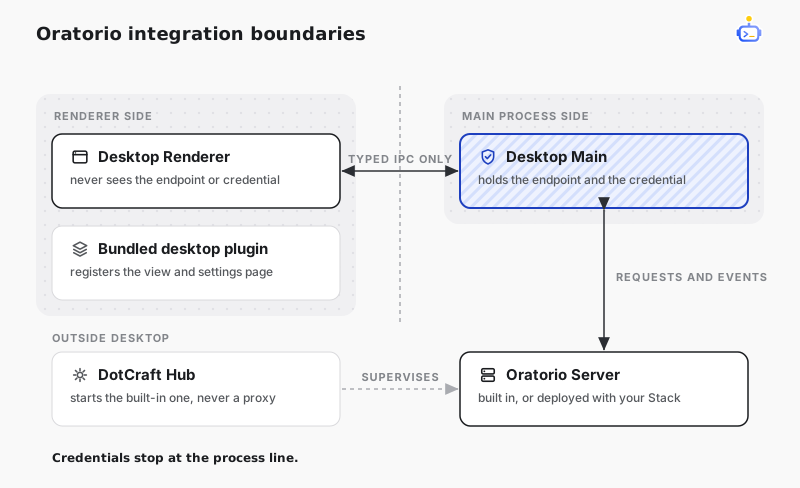
组件边界
| 组件 | 职责 |
|---|---|
| Oratorio Server | 管理任务、运行、草稿、来源同步、Worktree、决策、设置与实时事件。 |
| DotCraft Hub | 启动并监管已注册的用户级 oratorio managed service,不代理 Oratorio 业务请求。 |
| Desktop Main | 解析本地或远程服务访问、注入 bearer、校验允许的 route,并持有实时连接。 |
| Desktop Renderer | 通过 typed IPC 渲染 Board、任务详情和 Settings,不获取 endpoint 或 bearer。 |
| 内置 Desktop Plugin | 通过公共 Desktop Plugin 激活契约注册 Oratorio 视图与 Settings page。 |
本地 Desktop 会在首次使用时请求 Hub 确保随包提供的 Server 已运行。远程 Desktop 则从当前 DotCraft Stack 解析 Oratorio 服务。两种模式下,Renderer 请求都经过同一个 Main process 边界。
App connection handoff 在 Main 中检查,并要求用户明确批准。用户为 Thread 启用 Oratorio 后,Main 会把 bind handoff 作为技术激活直接交给 managed service,并将激活失败返回发起流程。Renderer 只在 connection consent 时接收 request ID 与脱敏摘要。
开发与验证
在仓库根目录构建 Server 并运行专用测试:
bash
dotnet build src/DotCraft.Oratorio/DotCraft.Oratorio.csproj
dotnet test tests/DotCraft.Oratorio.Tests/DotCraft.Oratorio.Tests.csproj
在 desktop/ 目录运行 Desktop 检查:
bash
npm test
npm run build
仓库打包脚本会把 self-contained Server 发布到 build/oratorio/,然后放入 Desktop resources。Windows 使用 build.bat,Linux 打包流程使用 build_linux.bat。
Oratorio 领域行为应保留在 Server 中。Desktop view model 可以格式化显示数据,但不得重新实现 lifecycle、retry、recovery、Worktree 或 decision 规则。