
AppServer Protocol
AppServer Protocol is DotCraft's JSON-RPC wire protocol for external clients. Desktop, ACP bridges, external channel adapters, and custom IDE clients can use it to create or resume threads, submit user input, consume streaming events, and participate in command or file-change approvals.
This page defines the AppServer JSON-RPC wire contract: initialization, message directions, method groups, transports, error handling, and client compatibility requirements. The DotCraft SDK pages document the per-language client library APIs, and Hub Protocol documents local AppServer discovery and startup.
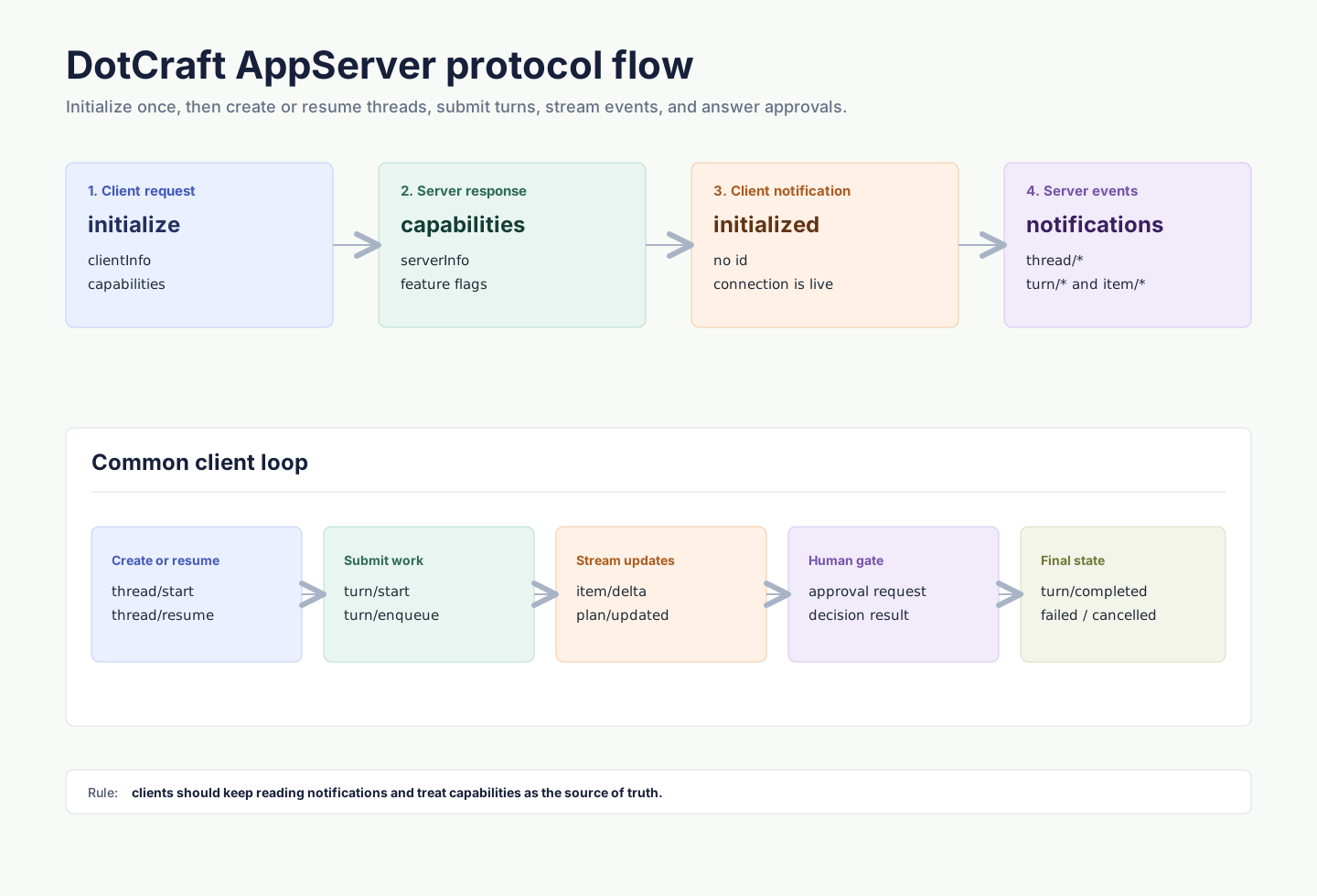
Protocol
AppServer Protocol uses JSON-RPC 2.0. Every message includes "jsonrpc": "2.0".
| Message kind | id | method | Direction |
|---|---|---|---|
| Request | yes | yes | client to server or server to client |
| Response | yes | no | replies to a request |
| Notification | no | yes | client to server or server to client |
Request:
{
  "jsonrpc": "2.0",
  "id": 1,
  "method": "thread/list",
  "params": {}
}
Response:
{
  "jsonrpc": "2.0",
  "id": 1,
  "result": {
    "data": []
  }
}
Notification:
{
  "jsonrpc": "2.0",
  "method": "turn/started",
  "params": {
    "turn": {
      "id": "turn_001"
    }
  }
}
Transports
| Transport | Wire format | Use case |
|---|---|---|
stdio | UTF-8 JSONL; one full JSON-RPC message per line | Subprocess clients, one-to-one connections, default mode |
websocket | One full JSON-RPC message per WebSocket text frame | Multi-client workspace sharing, Hub-managed local mode, remote connections |
In stdio mode, stdout is reserved for protocol messages. Send logs and diagnostics to stderr.
In WebSocket mode, each connection has independent initialization state and thread subscriptions. With Hub-managed local mode, clients usually connect to the URL returned in endpoints.appServerWebSocket.
Initialization
The first request on every connection must be initialize. After it succeeds, the client must send an initialized notification.
Initialize request:
{
  "jsonrpc": "2.0",
  "id": 0,
  "method": "initialize",
  "params": {
    "clientInfo": {
      "name": "my-client",
      "title": "My Client",
      "version": "0.1.0"
    },
    "capabilities": {
      "approvalSupport": true,
      "streamingSupport": true,
      "commandExecutionStreaming": true,
      "toolExecutionLifecycle": true,
      "configChange": true
    }
  }
}
The response returns server info and capabilities:
{
  "jsonrpc": "2.0",
  "id": 0,
  "result": {
    "serverInfo": {
      "name": "dotcraft",
      "version": "0.2.0",
      "protocolVersion": "1",
      "extensions": ["acp"]
    },
    "capabilities": {
      "threadManagement": true,
      "threadSubscriptions": true,
      "dynamicToolRebind": true,
      "runtimeAdditionalContext": true,
      "approvalFlow": true,
      "skillsManagement": true,
      "pluginManagement": true,
      "skillVariants": true,
      "modelCatalogManagement": true,
      "mcpManagement": true
    }
  }
}
Then send:
{
  "jsonrpc": "2.0",
  "method": "initialized",
  "params": {}
}
Requests sent before initialization are rejected. Repeated initialize calls on the same connection are also rejected.
Core primitives
| Primitive | Description |
|---|---|
| Thread | A resumable conversation with workspace, origin channel, configuration, and turns. |
| Turn | One user input and the agent work it triggers. |
| Item | A unit inside a turn, such as user message, agent message, command execution, tool call, tool result, or reasoning. |
Common flow:
- Call
thread/startto create a thread, orthread/resumeto continue one. - Call
turn/startto submit user input. - Keep reading
turn/*anditem/*notifications. - If the server sends an approval request, render UI and return a decision.
- Update UI state when
turn/completed,turn/failed, orturn/cancelledarrives.
Threads
Creating a thread requires an identity that identifies the client/channel, user, and workspace owner:
{
  "jsonrpc": "2.0",
  "id": 1,
  "method": "thread/start",
  "params": {
    "identity": {
      "channelName": "desktop",
      "userId": "local-user",
      "channelContext": "workspace:/Users/me/project",
      "workspacePath": "/Users/me/project"
    },
    "historyMode": "server",
    "displayName": "Fix tests"
  }
}
Response:
{
  "jsonrpc": "2.0",
  "id": 1,
  "result": {
    "thread": {
      "id": "thread_20260316_x7k2m4",
      "workspacePath": "/Users/me/project",
      "userId": "local-user",
      "originChannel": "desktop",
      "status": "active"
    }
  }
}
The server also broadcasts thread/started. In multi-client deployments, the initiating client may receive both the response and the broadcast; dedupe by thread id.
Common thread methods:
| Method | Description |
|---|---|
thread/start | Create a new thread. |
thread/resume | Resume an existing thread. |
thread/list | List threads by identity. |
thread/read | Read the current Thread header and persisted runtime state without resuming execution context. |
thread/turns/list | Read one bounded page of Turn metadata without Items. |
thread/items/list | Read one bounded Item page across the Thread or for one Turn. |
thread/subscribe | Subscribe to thread events. |
thread/unsubscribe | Unsubscribe from thread events. |
thread/rename | Update the display name. |
thread/archive | Block new turns, stop or invalidate active background terminals, and archive the thread and its subagent subtree. |
thread/unarchive | Restore an archived thread and descendants whose subagent edges remain open. Explicitly closed descendants stay archived. |
thread/delete | Permanently delete a thread and its subagent subtree from durable state. Thread-owned filesystem cleanup is best effort and retryable. |
thread/config/update | Update thread configuration. |
thread/mode/set | Switch agent mode, such as plan or agent. |
thread/list accepts optional query, limit, and opaque cursor params. When paged, the result includes nextCursor and totalMatched; callers that omit both limit and cursor keep receiving the full compatible list.
thread/read accepts only threadId and does not return persisted Turns or Items. Read history with thread/turns/list and thread/items/list. Turn pages default to 20 entries and allow at most 100; Item pages default to 100 and allow at most 500. Both default to descending order and return data in the requested direction. Item pages may include an optional turnId. Continue with the opaque nextCursor only for the same Thread, scope, optional Turn, and direction. Turn pages also return a backwardsCursor anchored at the first returned Turn. It includes that Turn and works with either sortDirection: descending reads that Turn and older ones, and ascending reads that Turn and newer ones. It is null when the page is empty. After rollback, fork, archive, or unarchive, discard affected cursors and reload the required history pages.
Archiving is reversible: it blocks new turns and stops or invalidates active background terminals, but it does not cancel a main Turn that is already executing. Conversation history is retained, while retained artifacts remain subject to their normal retention rules. Restoring a parent restores only descendants whose subagent edges remain open. Deletion permanently removes persisted thread data and bound tracing data; cleanup of thread-owned filesystem artifacts is attempted synchronously, and individual failures can be retried. Clients receive thread/archived and thread/unarchived for archive and restore operations, and a workspace-level thread/deleted broadcast after deletion. See Session persistence for the storage lifecycle.
Runtime Dynamic Tools and app context
Clients that expose Runtime Dynamic Tools can also attach compact app context on thread/start or thread/resume. Use additionalContext for short model-visible guidance that helps the agent discover or use client-owned capabilities, especially deferred tools.
Check capabilities.runtimeAdditionalContext before sending additionalContext:
{
  "jsonrpc": "2.0",
  "id": 3,
  "method": "thread/resume",
  "params": {
    "threadId": "thread_20260316_x7k2m4",
    "additionalContext": {
      "myapp.threadGuidance": {
        "kind": "application",
        "value": "When the user asks about MyApp issues, search for the relevant MyApp tool first."
      }
    }
  }
}
kind currently supports only "application". Keep value concise; do not include secrets, authorization material, or large state snapshots. The server renders each entry into the System prompt inside <app-context>...</app-context>. It is app context, not a higher-priority instruction.
On thread/resume, omitting additionalContext keeps the current runtime context; sending {} clears it.
ACP bridge runtime tools
An ACP client can expose client-owned Runtime Dynamic Tools through DotCraft's private ACP extension. Advertise the extension through clientCapabilities._meta.dotcraft; ACP capability objects do not accept custom root fields.
{
  "clientCapabilities": {
    "_meta": {
      "dotcraft": {
        "runtimeTools": {
          "version": 1,
          "tools": [
            {
              "namespace": "unity",
              "name": "unity_execute_csharp",
              "description": "Execute a C# snippet in Unity.",
              "inputSchema": { "type": "object" },
              "acpMethod": "_unity/execute_csharp"
            }
          ]
        }
      }
    }
  }
}
runtimeTools.version is 1. Custom methods start with _; filesystem and terminal callbacks use their standard ACP capabilities. Each callback returns DotCraft's Runtime Dynamic result envelope with success, contentItems, structuredContent, errorCode, and errorMessage. This envelope is a private extension carried by a standard ACP JSON-RPC response, not an ACP Tool Call or MCP tool result. A failed dynamicToolCall preserves the callback's non-empty errorCode and errorMessage, falling back to the server's stable dispatcher error only when the callback omits a usable field.
Turns
turn/start submits user input and starts agent execution. The response returns the initial turn immediately; later output streams through notifications.
{
  "jsonrpc": "2.0",
  "id": 2,
  "method": "turn/start",
  "params": {
    "threadId": "thread_20260316_x7k2m4",
    "input": [
      {
        "type": "text",
        "text": "Run the tests and fix any failures."
      }
    ]
  }
}
Response:
{
  "jsonrpc": "2.0",
  "id": 2,
  "result": {
    "turn": {
      "id": "turn_001",
      "threadId": "thread_20260316_x7k2m4",
      "status": "running",
      "items": []
    }
  }
}
input is a tagged union. Common types include:
text: plain user text.commandRef: structured slash-command reference.skillRef: structured skill reference.fileRef: structured file reference.image: inline image encoded as a base64data:image/...URL. HTTP and HTTPS image URLs are rejected; download remote images in the client and submit a data URL orlocalImageinstead.localImage: local image path with optional MIME metadata.
If a turn is already running, Desktop-style clients usually use turn/enqueue to queue the next input, or turn/interrupt to cancel the current turn.
Events
AppServer pushes thread, turn, and item state through notifications. Keep reading the transport stream, and treat item/completed as the final state for that item.
Common notifications:
| Notification | Description |
|---|---|
thread/started | Thread created. |
thread/resumed | Thread resumed. |
thread/deleted | Thread deleted. |
thread/renamed | Display name changed. |
thread/status/changed | Runtime state changed. |
turn/started | Turn started. |
turn/completed | Turn completed successfully. |
turn/failed | Turn failed. |
turn/cancelled | Turn was cancelled. |
plan/updated | Plan updated, with source threadId and the complete plan/todo snapshot. |
item/started | Item started. |
item/completed | Item completed with final state. |
item/agentMessage/delta | Agent message text delta. |
item/reasoning/delta | Reasoning delta. |
item/commandExecution/outputDelta | Command output delta. |
item/toolCall/argumentsDelta | Tool-call argument delta. |
When a client declares capabilities.toolExecutionLifecycle: true, the server may also send toolExecution item lifecycle events: item/started marks one tool invocation as executing, and item/completed marks that callId as finished. This is a UI/runtime enhancement for updating individual parallel tool cards early; the matching toolResult remains the complete authoritative result.
Clients can suppress specific notifications for the current connection by passing exact method names in initialize.params.capabilities.optOutNotificationMethods.
Approvals
When command execution, file changes, or other sensitive operations require human confirmation, the server sends a server-initiated JSON-RPC request. The client must render approval UI and return a decision.
Command approval example:
{
  "jsonrpc": "2.0",
  "id": 50,
  "method": "item/approval/request",
  "params": {
    "threadId": "thread_20260316_x7k2m4",
    "turnId": "turn_001",
    "itemId": "item_005",
    "requestId": "approval_001",
    "approvalType": "shell",
    "operation": "rm -rf build",
    "target": "/Users/me/project",
    "scopeKey": "shell:3f9c1b0e5d2a4c7f8b6e1d0a9c3f5e7b2a4d6c8e0f1a3b5c7d9e2f4a6b8c0d1e",
    "reason": "Agent wants to execute a shell command. rm -f style commands are not permitted without approval.",
    "shell": {
      "reasons": ["rm -f style commands are not permitted without approval."],
      "rememberedPrefixes": [],
      "remembersExactCommand": true
    }
  }
}
Response:
{
  "jsonrpc": "2.0",
  "id": 50,
  "result": {
    "decision": "accept"
  }
}
Common decisions include accept, acceptForSession, acceptAlways, decline, and cancel. Use the available decisions in the actual request payload as the source of truth.
Approval requests do not expire, and they belong to the thread rather than to one connection. Every subscribed client that supports approvals receives a pending request, including one that subscribes after it was raised. The request stays pending until one client answers or its turn ends, and every subscribed client then receives item/approval/resolved and should dismiss its prompt.
If a client declares approvalSupport: false during initialize, the server never sends it approval requests, and approvals in turns that client starts resolve immediately from the thread's approval policy. Rich UI clients should keep approvalSupport: true.
API overview
The table below covers common method families used by AppServer clients.
| Family | Examples | Description |
|---|---|---|
| Initialization | initialize, initialized | Negotiate client and server capabilities. |
| Thread | thread/start, thread/list, thread/read, thread/turns/list, thread/items/list, thread/subscribe | Conversation lifecycle, bounded history, and subscriptions. |
| Turn | turn/start, turn/enqueue, turn/interrupt | User input, queues, and cancellation. |
| Skills | skills/list, skills/read, skills/view, skills/restoreOriginal, skills/setEnabled, skills/uninstall | Skill discovery, effective view, restore original, enablement, and removable skill deletion. |
| Tools | tool/list | Built-in tool catalog (name, description, icon, Plan-mode availability) for agent profile tool pickers. |
| Plugins | plugin/list, plugin/view, plugin/install, plugin/installLocal, plugin/remove, plugin/setEnabled, plugin/setTrusted | Plugin discovery, detail, installation, removal, enablement, and .NET trust management. |
| Plugin marketplaces | marketplace/add, marketplace/refresh, marketplace/remove | User-managed plugin catalog sources. |
| Commands | command/list, command/execute | Custom command discovery and execution. |
| Models | model/list | Model catalog. |
| MCP | mcp/list, mcp/get, mcp/upsert, mcp/test, mcpServerStatus/list | MCP configuration and status. |
| External channels | externalChannel/list, externalChannel/upsert | External channel configuration. |
| Subagents | subagent/profiles/list, subagent/profiles/upsert | Subagent profile management. |
| Automations | automation/list, automation/create, automation/runs/list | Local task lifecycle, binding, and managed worktree cleanup. |
| Worktrees | worktree/list, worktree/status, thread/worktree/handoff | Managed Git worktree status and handoff. |
| Configuration | config/schema, config/read, config/value/write, config/batchWrite | Read and change user and workspace configuration by key path. |
| App Binding | app/connection/authenticate, app/binding/activate, app/threadInput/enqueue | Extension module for external apps, gated by capabilities.appBindingVersion. |
Use capabilities from the initialize response before showing feature-specific UI.
Skill entries returned by skills/list may include hasVariant: true, which means the current runtime resolves that skill through a workspace adaptation. skills/read still reads the source SKILL.md; use skills/view when a client needs the effective content.
App Binding clients negotiate capabilities.appBindingVersion: 1. An authenticated app-principal connection may call only the app-role allowlist — connection authentication, refresh, status, and revoke, binding request, activation, rebind, and list, app/surface/publish, and app/threadInput/enqueue — and its tools are delivered by binding-scoped MCP sessions. An unsupported App Binding version returns AppBindingUpgradeRequired, undeclared methods return MethodNotFound, and other unauthorized methods return AppPrincipalUnauthorized. See DotCraft App.
Automation runs and worktrees
Automation definitions and run records are separate. Read automation/runs/list to locate the exact threadId and turnId for a result. Independent Git runs use a managed worktree per run. Explicit worktree provisioning failures are surfaced as run failures. Use the run's thread with worktree/status to inspect changes and thread/worktree/handoff to continue reviewing locally.
Plugin and skill management
Check capabilities.skillsManagement before calling skills/*, capabilities.pluginManagement before calling plugin/*, and capabilities.pluginMarketplaces before calling marketplace/*.
skills/uninstall deletes removable workspace or personal skills only. System skills cannot be uninstalled; plugin-contained skills are managed by the plugin lifecycle and are not uninstalled separately. If the removed source skill has associated variants, the server also removes those workspace-local variants and broadcasts config/changed with regions: ["skills"].
Plugin lifecycle separates installation from enablement:
plugin/install: installs an installable catalog plugin into<craft-home>/plugins/<id>, so it is available in every workspace, and enables it by default. Catalog entries can come from Desktop or a configured marketplace.plugin/installLocal: copies a valid local plugin directory into<craft-home>/plugins/<id>and enables it by default.plugin/setEnabled: only controls whether an installed plugin enters the Agent context in the current workspace. It writes the workspace'sPlugins.DisabledPluginsand does not install or delete plugin files.plugin/setTrusted: grants or revokes execution trust for the server-accepted id and .NET fingerprint. The client selects the plugin, not an arbitrary fingerprint.plugin/remove: removes a plugin directory under<craft-home>/plugins/<id>/, which removes it from every workspace, or under the workspace's.craft/plugins/<id>/. Explicit external plugin roots are not deleted.
Plugin install, remove, enablement, and trust changes broadcast config/changed for the affected plugins, skills, mcp, lsp, and hooks regions. Tools contributed by plugins use the standard toolCall / toolResult lifecycle and retain plugin provenance on those items. For the user-facing plugin model, see Plugins & Tools.
Plugin marketplaces
Marketplace methods manage catalog sources. Adding a marketplace does not install its plugins; clients use plugin/install to install a catalog entry.
marketplace/add
{
  "source": "owner/repo",
  "ref": "main",
  "sparsePaths": [".craft/plugins", "plugins"]
}| Field | Type | Required | Description |
|---|---|---|---|
source | string | yes | Repository shorthand, Git URL, or local directory |
ref | string? | no | Git branch, tag, or commit; overrides a reference in source |
sparsePaths | string[]? | no | Repository-relative paths included in a Git checkout |
marketplacePath | string? | no | Catalog path; defaults to .craft/plugins/marketplace.json |
The result contains marketplace: MarketplaceInfo and alreadyAdded. A successful add emits config/changed with regions: ["plugins"].
marketplace/refresh
Pass { "name": "example-marketplace" } to refresh one marketplace, or {} to refresh all configured marketplaces.
The result contains marketplaces: MarketplaceInfo[] and errors. Each error has name, stable code, and message; one marketplace can fail without preventing the others from refreshing.
marketplace/remove
Pass { "name": "example-marketplace" }. The result contains name and may include removedRoot when DotCraft deleted a materialized checkout.
Removing a marketplace does not uninstall plugins already installed. A successful removal emits config/changed with regions: ["plugins"].
Marketplace metadata
plugin/list returns marketplaces: MarketplaceInfo[]. Marketplace-sourced plugin entries include marketplaceName.
MarketplaceInfo field | Type | Description |
|---|---|---|
name | string | Stable marketplace identity |
displayName | string? | Client-facing title |
sourceType | string | git, local, or archive |
source | string | Configured repository, directory, or archive |
ref | string? | Configured Git reference |
sparsePaths | string[] | Configured Git sparse paths |
root | string? | Materialized or in-place root |
lastUpdated | string? | Last successful update time |
revision | string? | Last resolved source revision |
removable | boolean | Whether the client may remove the source |
pluginIds | string[] | Plugins discovered from the marketplace |
Marketplace request failures use JSON-RPC code -32093 for invalid requests and -32094 for fetch failures. Structured error data includes a stable marketplace error code, messageKey, and English fallbackText.
See Plugin Market for source validation and the marketplace document.
Minimal Node client
This example starts AppServer over stdio, initializes the connection, creates a thread, and starts a turn:
import { spawn } from "node:child_process";
import readline from "node:readline";

const workspacePath = process.cwd();
const proc = spawn("dotcraft", ["app-server"], {
  cwd: workspacePath,
  stdio: ["pipe", "pipe", "inherit"],
});

const rl = readline.createInterface({ input: proc.stdout });
let nextId = 0;
let threadId: string | undefined;

function send(method: string, params?: unknown, id = ++nextId) {
  proc.stdin.write(
    JSON.stringify({ jsonrpc: "2.0", id, method, params: params ?? {} }) + "\n",
  );
  return id;
}

function notify(method: string, params?: unknown) {
  proc.stdin.write(
    JSON.stringify({ jsonrpc: "2.0", method, params: params ?? {} }) + "\n",
  );
}

rl.on("line", (line) => {
  const message = JSON.parse(line);
  console.log("server:", message);

  if (message.id === 0 && message.result) {
    notify("initialized");
    send("thread/start", {
      identity: {
        channelName: "custom",
        userId: "local-user",
        channelContext: `workspace:${workspacePath}`,
        workspacePath,
      },
      historyMode: "server",
    });
    return;
  }

  if (message.result?.thread?.id && !threadId) {
    threadId = message.result.thread.id;
    send("turn/start", {
      threadId,
      input: [{ type: "text", text: "Summarize this repository." }],
    });
  }
});

send(
  "initialize",
  {
    clientInfo: {
      name: "custom-client",
      title: "Custom Client",
      version: "0.1.0",
    },
    capabilities: {
      approvalSupport: true,
      streamingSupport: true,
      commandExecutionStreaming: true,
      toolExecutionLifecycle: true,
      configChange: true,
    },
  },
  0,
);
A production client also handles process exit, JSON parse errors, request timeouts, approval requests, turn cancellation, and reconnect.
Errors and backpressure
JSON-RPC errors use the standard error field:
{
  "jsonrpc": "2.0",
  "id": 2,
  "error": {
    "code": -32602,
    "message": "Invalid params"
  }
}
Recommended handling:
Not initialized: make sure the first request isinitialize.Already initialized: do not initialize twice on the same connection.Invalid params: check the method parameter shape and required fields.Server overloaded; retry later.: use exponential backoff and jitter for WebSocket requests.- Turn failure: listen for error events and the final
turn/failed; do not rely only on request responses.
Import tools and chats
The extensions.agentImport capability enables import/detect, import/run, import/settings/get, import/settings/set, and import/history/list. Detection returns scoped candidates with fingerprints. Submit the selected source ids, item references, and category selection to import/run, plus an optional offered selection naming the categories your UI presented. The saved sync selection takes the new choice only for offered categories. Progress and completion arrive through import/progress and import/completed. Import is additive and reads sources on the AppServer host. History includes a separate list of currently actionable items.
MCP upsert and remove require a scope of user or workspace. The origin returned by mcp/list identifies the effective scope. Editing a user server writes back to the user configuration.
Client checklist
- Initialize exactly once per connection and send
initializedafter the response. - Assign a unique
idto every request and preserve the id type. - Keep reading notifications; do not only wait for request responses.
- Dedupe by thread id and turn id, especially with multi-client broadcasts.
- Treat
item/completedas the final state for an item. - Support server-initiated approval requests, or explicitly declare that you do not.
- Use
capabilitiesfor feature discovery instead of assuming all management APIs exist. - Stay compatible with unknown notifications, item types, and capabilities.
Related docs
- SDK quickstart — run the same flow through an official client library instead of hand-writing this contract.
- AppServer mode — how the process behind this protocol starts, listens, and shuts down.
- Dashboard API — the separate HTTP surface for inspecting traces and session records.