
DotCraft Harness overview
DotCraft Harness embeds DotCraft's agent runtime in your .NET process. Your application owns the host, configuration, workspace, lifecycle, and user experience while Harness provides the Agentic Loop, durable sessions, tools, approvals, and model integrations.
Use Harness when a Console application, desktop application, service, or test environment runs an agent directly instead of delegating that responsibility to another process.
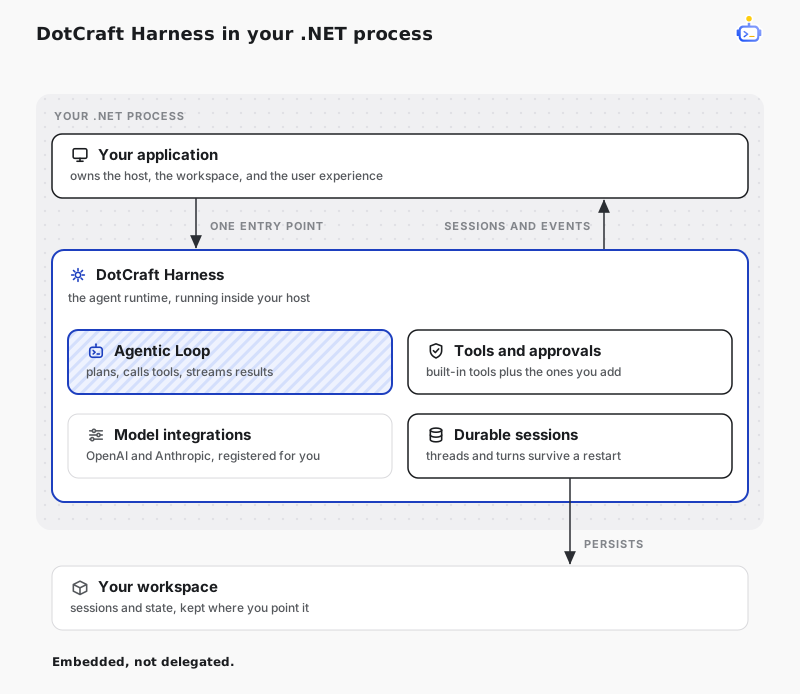
How it fits
Harness composes the services required to run DotCraft through one public entry point.
| Capability | Harness responsibility | Application responsibility |
|---|---|---|
| Hosting | Register Runtime services in a .NET Generic Host. | Build, start, stop, and dispose the Host. |
| Configuration | Consume an effective AppConfig. | Load or construct configuration before registration. |
| Paths | Validate and expose workspace and optional user-data roots. | Choose the workspace and owned data locations. |
| Sessions | Provide durable Threads, Turns, Items, and event streams. | Map application users and UI actions to session operations. |
| Extensibility | Compose built-in providers and application tools. | Supply credentials, custom tools, and approval UX. |
Minimal composition
Prepare an AppConfig, then add Harness to a Generic Host. The configuration can come from files, environment variables, a database, or application-owned settings.
using DotCraft.Configuration;
using DotCraft.Harness;
using Microsoft.Extensions.Hosting;

AppConfig appConfig = LoadApplicationConfig();
var workspacePath = Directory.GetCurrentDirectory();

var builder = Host.CreateApplicationBuilder(args);
builder.Services.AddDotCraftHarness(appConfig, options =>
{
    options.WorkspacePath = workspacePath;
});

using var host = builder.Build();
await host.StartAsync();

// Resolve and use Harness services here.

await host.StopAsync();
AddDotCraftHarness registers Runtime, the built-in configuration schema, OpenAI and Anthropic model providers, one validated DotCraftPaths, and one host-owned ISessionService. Runtime joins the Host lifecycle through an IHostedService and initializes when the Host starts.
TIP
Keep composition at the application boundary. Domain services should depend on focused services such as ISessionService or DotCraftPaths, not on the Host itself.
Explore the Harness
- Hosting and lifecycle explains Generic Host ownership and desktop application integration.
- Configuration and paths defines configuration ownership,
.craft, custom data directories, and user-data isolation. - Threads and Turns shows how to create durable conversations and process streaming events.
- Tools and approvals covers application-owned tools and approval handling.
- Model providers configures OpenAI, Anthropic, and compatible endpoints.
- NuGet package covers installation and the assemblies the package ships.
$dotcraft-api covers the in-process hosting path as well. Ask it in a DotCraft conversation when you embed Harness.
Related docs
- Runtime architecture — the assembly layering and boundaries Harness embeds.
- Session Core — the Thread, Turn, and Item model behind
ISessionService.