
Work with Threads and Turns
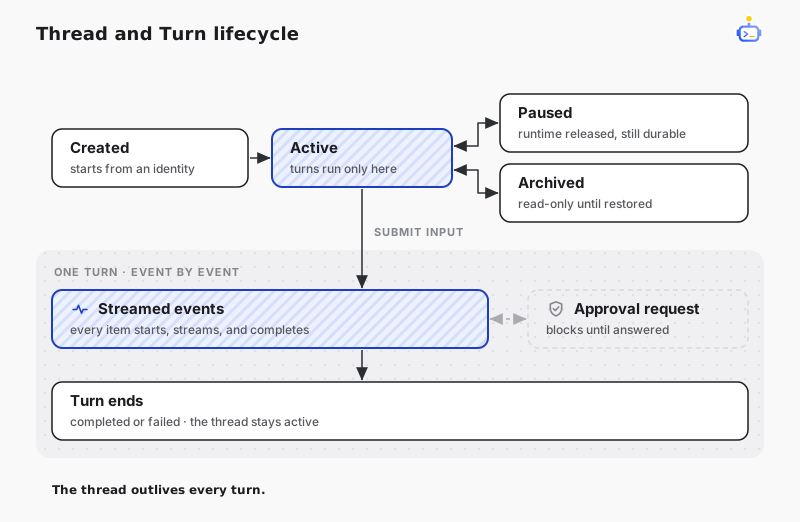
A Thread is a durable conversation. Submitting input starts a Turn and returns an event stream carrying text generation, tool activity, approval requests, and the Turn's final outcome.
Resolve the session service
Resolve the host-owned ISessionService after the Host has started:
using DotCraft.Sessions;
using Microsoft.Extensions.DependencyInjection;

var sessions = host.Services.GetRequiredService<ISessionService>();
Reuse this service for the lifetime of the running Host. It is the central API for Thread and Turn operations.
Create a Thread
Every Thread starts with a SessionIdentity. The identity tells Harness which application surface, user, context, and workspace own the conversation.
var identity = new SessionIdentity
{
    ChannelName = "my-app",
    UserId = currentUser.Id,
    ChannelContext = activeDocument.Id,
    WorkspacePath = workspacePath
};

var thread = await sessions.CreateThreadAsync(
    identity,
    displayName: "Workspace review",
    ct: cancellationToken);
Choose stable identity values. They are also used to discover existing Threads:
var recentThreads = await sessions.FindThreadsAsync(
    identity,
    includeArchived: false,
    ct: cancellationToken);
Submit input
Use the string overload for text input. Read the returned event stream until the Turn ends.
await foreach (var sessionEvent in sessions.SubmitInputAsync(
    thread.Id,
    "Summarize the current workspace.",
    ct: cancellationToken))
{
    if (sessionEvent.DeltaPayload?.TextDelta is { } text)
        Console.Write(text);
}
For images and other rich input, call the IList<AIContent> overload from Microsoft.Extensions.AI.
A Thread runs one Turn at a time. Calling SubmitInputAsync again before the previous Turn ends fails. Pass the input to EnqueueTurnInputAsync instead to queue it and start it automatically once the active Turn completes successfully.
Each event carries an EventType from SessionEventType. These are the ones applications handle most:
| Event | Meaning |
|---|---|
ItemDelta | Streaming text or reasoning content is available. |
ItemStarted | An Item such as a tool call has started. |
ItemCompleted | An Item has completed and may contain a result. |
ApprovalRequested | The Turn is waiting for an application decision. |
TurnCompleted | The Turn completed successfully. |
TurnFailed | The Turn stopped with an error. |
TIP
Treat the event stream as the source of truth for the active Turn. Update UI incrementally and retain the Thread ID for future resume or history operations.
Resume a conversation
Resume a known Thread before continuing a conversation that is not active in memory. Resuming rebuilds the agent session from persisted history:
var resumed = await sessions.ResumeThreadAsync(threadId, cancellationToken);

await foreach (var sessionEvent in sessions.SubmitInputAsync(
    resumed.Id,
    "Continue from the previous result.",
    ct: cancellationToken))
{
    // Project events into the application UI.
}
Archive a conversation
Archived Threads remain durable but become read-only until restored.
await sessions.ArchiveThreadAsync(threadId, cancellationToken);
await sessions.UnarchiveThreadAsync(threadId, cancellationToken);
ResetConversationAsync archives the reusable Threads of an identity and creates a fresh one.
Related docs
- Tools and approvals — answer the approval requests in this event stream and add application-owned tools.
- Session Core — how the Thread, Turn, and Item model looks from the engine side.