
Build a .NET plugin
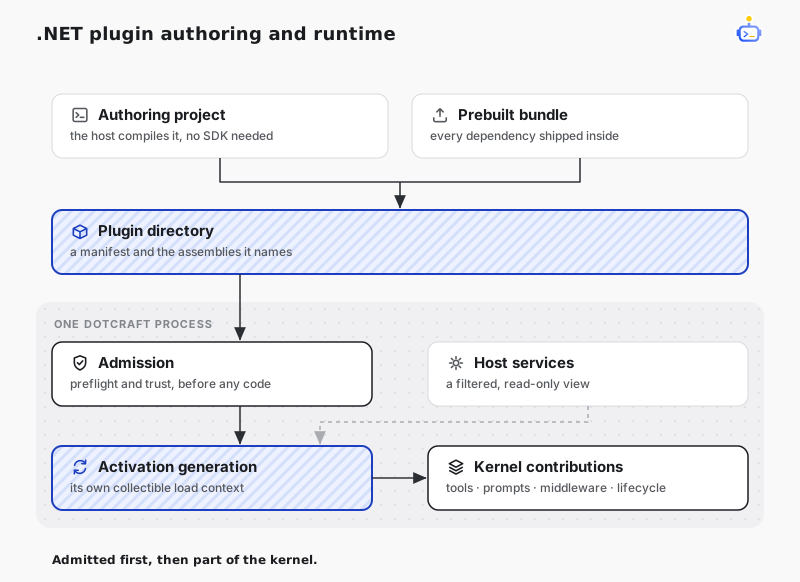
A .NET plugin runs inside the DotCraft process. Where an MCP server talks to DotCraft across a boundary, a .NET plugin composes the kernel from within: it contributes tools, prompt sections, middleware, and lifecycle observers through named contribution points, and it resolves host services to build those contributions out of DotCraft's own parts.
This page targets plugin authors. For the user-facing view of plugins, see Plugins & Tools; for the manifest fields every plugin shares, see Plugin Market.
CAUTION
A .NET plugin loads fully trusted code into the DotCraft process and receives that process's filesystem, network, credential, native interop, and OS authority. There is no managed sandbox and no permission model. Safety depends on which code you choose to build or trust, not on a runtime boundary. Use MCP when code needs a real trust boundary.
The runnable DotNetPluginSample contains two bundles, covers every public .NET contribution point, verifies the built result through the host's preflight and runtime, and includes Desktop presentation for one tool.
Create with DotCraft
Ask $plugin-creator to create a .NET plugin in the current workspace. It creates a persistent source project and a standard development bundle:
.craft/plugin-projects/<plugin-id>/
├── src/
└── plugin/
    ├── .craft-plugin/plugin.json
    └── lib/
The project has no .csproj and does not restore NuGet packages. The agent edits src/**/*.cs and the manifest, uses DotNetPlugin.Inspect for exact API signatures and documentation, then calls DotNetPlugin.Build. The build compiles against the public plugin API and BCL shipped by the running host, runs metadata preflight, publishes the bundle atomically, and activates it. None of that needs an external .NET SDK or network access.
A successful build qualifies the exact plugin id and fingerprint only in the current host process; it does not change dotnet-plugin-trust.json. Build the project again after restarting DotCraft. Rebuilding the active fingerprint from the same project is a no-op.
DotNetPlugin.Build runs the host's fixed tool generator before compilation, so source projects support [Tool], [GeneratedTool], and [ToolDeclaration] too. Generated files stay in memory; source projects cannot supply analyzers or generators. Generation errors are reported with phase: generate and leave the previous published bundle and active generation unchanged.
For a custom Harness host that supports source authoring, set <PreserveCompilationContext>true</PreserveCompilationContext> in the host project. Harness copies the required Core and Agents XML documentation into build and publish output. When publishing a single-file host, also set <IncludeAllContentForSelfExtract>true</IncludeAllContentForSelfExtract> so the compiler can read the extracted assemblies, documentation, and reference pack.
The Turn that performs the build keeps its frozen tool snapshot. New plugin tools become available on the next Turn, and the build does not invoke them. Source edits are applied only when the agent calls DotNetPlugin.Build.
Prepare a prebuilt bundle
A .NET plugin is an ordinary DotCraft plugin directory with a dotnet contribution. For an externally built plugin, include every managed and native dependency before installation. Discovery, installation, and activation do not restore NuGet packages, run MSBuild, or compile source.
acme.review-core/
├── .craft-plugin/
│   └── plugin.json
└── lib/
    ├── Acme.ReviewCore.Plugin.dll
    ├── Acme.ReviewCore.Plugin.deps.json
    ├── Acme.ReviewCore.Api.dll
    └── private dependencies
The entry assembly's .deps.json must sit beside it — it is how the load context resolves everything the bundle brings with it.
{
  "schemaVersion": 1,
  "id": "acme.review-core",
  "version": "1.0.0",
  "displayName": "Review Core",
  "description": "In-process review services.",
  "capabilities": ["dotnet"],
  "dotnet": {
    "minHostVersion": "0.5.0",
    "entryAssembly": "./lib/Acme.ReviewCore.Plugin.dll",
    "entryType": "Acme.ReviewCore.Plugin",
    "exportedApiAssemblies": ["./lib/Acme.ReviewCore.Api.dll"]
  },
  "dependencies": { "acme.review-base": "1.0.0" }
}| Field | Required | Meaning |
|---|---|---|
minHostVersion | yes | The oldest DotCraft host the plugin runs on, as MAJOR.MINOR.PATCH. |
entryAssembly | yes | The managed assembly carrying the entry type. |
entryType | yes | Full CLR name of a public, concrete, non-generic type with a public parameterless constructor. |
exportedApiAssemblies | no | Contract assemblies declared dependents may bind to. The entry assembly cannot be exported. |
dependencies | no | Minimum compatible provider versions. Valid only alongside dotnet. |
Plugin ids start with an ASCII letter or digit; subsequent characters may also be ., _, :, or -. version is mandatory whenever dotnet is present. Every path starts with ./, stays inside the plugin root, and names a file that already exists in the built bundle.
Reference DotCraft.Core, and do not ship it
The plugin API is DotCraft.Core itself, plus what it references transitively — DotCraft.Agents and Microsoft.Extensions.AI. There is no separate SDK assembly.
<ProjectReference Include="path/to/src/DotCraft.Core/DotCraft.Core.csproj" Private="false" />For a standalone project outside the DotCraft checkout, reference the released DotCraft.Harness package to obtain these APIs and the tool analyzer. When building against checkout project references, add DotCraft.Generators.csproj with OutputItemType="Analyzer" and ReferenceOutputAssembly="false". A reference to Core alone does not run the generator. Target the same host version, and keep only the plugin and its private dependency closure in the bundle.
The load context resolves every DotCraft assembly and its package closure by simple name against the copies already loaded in the host, ignoring the version a bundle ships. That is what keeps type identity single: a ChatMessage a middleware contribution rewrites is the same type the kernel dispatches on, even if the bundle carries its own Microsoft.Extensions.AI.Abstractions.dll. Shipping those assemblies only enlarges the bundle. Everything else resolves from the bundle's .deps.json and adjacent probing, confined to the bundle directory.
Bind to a host version
Because the whole public surface of the kernel is the plugin API, compatibility is bound to the host version rather than to an append-only contract.
minHostVersionis a hard gate. A host below it keeps the pluginblockedwithPluginHostVersionUnsatisfiedand runs none of its code.- A newer host loads the plugin best-effort, and reports nothing about the
DotCraft.Corethe bundle was compiled against. If that difference breaks anything, it breaks at member resolution on first use, not at load. - Recompile against each host minor version. One host minor is one compatibility target, and
minHostVersionis how a plugin declares which one it was built for.
Implement the entry point
Implement IDotCraftPlugin on one public type with a public parameterless constructor. The host constructs it once per activation generation.
using System.Collections.Generic;
using System.ComponentModel;
using System.Threading;
using System.Threading.Tasks;
using DotCraft.Contributions;
using DotCraft.Plugins;
using DotCraft.Tools;
using Microsoft.Extensions.AI;

namespace DotCraft.Plugin.AcmeReview;

public sealed class Plugin : IDotCraftPlugin
{
    public ValueTask ActivateAsync(
        IPluginActivationContext context,
        CancellationToken cancellationToken)
    {
        context.Contributions.Add<IToolSource>(new PluginTool());
        return ValueTask.CompletedTask;
    }
}

internal sealed class PluginTool : AIFunctionToolSource
{
    public override string SourceId => "acme-review";

    protected override IEnumerable<AIFunction> CreateFunctions(ToolPlanningContext context)
    {
        yield return DotCraft.GeneratedTools.Acme.ReviewCore.Plugin
            .GeneratedToolFunctions.PluginTool_Status(this);
    }

    [GeneratedTool(Name = "acme_review")]
    [Description("Reports whether Acme Review is active.")]
    public string Status() => "Acme Review is active.";

    protected override ToolPolicyHints GetPolicyHints(
        AIFunction function,
        ToolPlanningContext context) => new(ReadOnly: true);

    protected override ToolPresentationDescriptor? GetPresentation(
        AIFunction function,
        ToolPlanningContext context) => null;
}
The generated namespace above assumes the entry assembly is Acme.ReviewCore.Plugin.dll, matching the manifest. The source compiler also uses the manifest's entry assembly filename as its assembly name. The plugin explicitly returns no Core presentation descriptor; use a plugin-owned Desktop presentation contribution when needed.
The activation context carries both directions of the plugin model:
| Member | Purpose |
|---|---|
Contributions | The activation-only registration path. Every contribution names its contribution point and returns a generation-owned handle. |
Services | A filtered, read-only view of public host application services. |
Exports / Dependencies | Typed services across plugin boundaries. Activation-only. |
Lifetime | Owned resources, background work, and the Stopping token. |
ContentRoot / DataRoot / WorkspaceRoot | The generation's read-only shadow copy, the plugin's mutable data directory, and the workspace. |
Settings | This plugin's effective settings, snapshotted for the activation generation. |
Treat ContentRoot as read-only and put mutable state under DataRoot. The host resolves DataRoot to <UserDataPath>/plugins/<id>/data when UserDataPath is configured, and to <DataPath>/plugin-data/<id> otherwise. Hooks and LSP processes from the same plugin receive the same directory through DOTCRAFT_PLUGIN_DATA.
Make every Contributions.Add call from inside ActivateAsync. The host seals the registrar when activation commits, so later calls from background work are rejected. To change a generation's contribution set, change its inputs and let runtime reconciliation restart the generation.
Own resources through Lifetime, not through contributions
Teardown revokes contribution handles, signals Stopping, drains admitted calls and tracked work, and only then disposes raw contribution targets. Register shared resources with context.Lifetime.Own or OwnAsync. They outlive contribution targets, so contributions can borrow them without owning them.
Background work goes through context.Lifetime.Run. It starts after activation commits and is cancelled through Lifetime.Stopping when teardown begins. Raw threads, static event subscriptions, untracked tasks, and global caches can pin the collectible load context: routing still stops immediately, but memory is not reclaimed until the stray reference is released, often only at process restart.
Write typed tools
Plugin tools use the same generated method wrappers as built-in tools. Keep workspace configuration and services in constructors; let the generator handle JSON parameters and defaults. AIFunctionToolSource supplies registrations, and the host assigns the plugin's PluginNative identity and generation lifetime. You do not need to implement IToolRuntime or parse JsonObject by hand for ordinary typed tools.
Only tools that need live Thread, Turn, or call identity should request the context:
[GeneratedTool(Name = "calling_thread")]
[Description("Report the calling thread's identity.")]
public ToolExecutionResult CallingThread(
    ToolInvocationContext context,
    [Description("Include the call identifier.")] bool includeDetails = false,
    CancellationToken cancellationToken = default)
{
    cancellationToken.ThrowIfCancellationRequested();
    return ToolExecutionResult.Succeeded(includeDetails
        ? $"Invocation belongs to thread {context.ThreadId}, call {context.CallId}."
        : context.ThreadId);
}
Expose this method's generated factory through CreateFunctions as in the entry-point example. Context and cancellation are runtime-injected, not model parameters. Declare at most one non-nullable context, without a default, ref/in/out, or schema attributes. Directly invoking a generated function without host context fails before the method runs; the runtime does not synthesize identity from planning state.
ToolExecutionResult is optional: use a string or DTO for ordinary results. A declared ToolExecutionResult, Task<ToolExecutionResult>, or ValueTask<ToolExecutionResult> preserves success/failure semantics; a business failure is not wrapped in a successful JSON response. It has no inferred DTO output schema. Explicit results returned after catching cancellation remain intact, so a tool can report that execution may have started and replay is unsafe.
This does not widen the plugin boundary. On copy-out, the host keeps successful text and structured JSON, or failure text and error. It does not forward plugin-owned objects, rich AIContent, private result metadata, or execution directives. Invocation identity supports application-level ownership checks; it is not a sandbox for fully trusted plugin code. Keep the low-level IToolSource/IToolRuntime path for dynamic schemas and protocol bridges.
Access host services
context.Services is a filtered IServiceProvider view. Resolve public application services from it to compose behavior out of kernel parts:
using DotCraft.Sessions;

var sessions = (ISessionService?)context.Services.GetService(typeof(ISessionService))
    ?? throw new InvalidOperationException("ISessionService is unavailable.");
The provider is host-owned and read-only. A plugin cannot register, decorate, or replace container services. The view excludes the root provider, contribution registry, service-scope factories, host lifecycle, and plugin-runtime control plane. Never dispose a resolved service. Only what the plugin itself created needs disposal, and that goes through context.Lifetime.
Consumption carries the same version binding as the rest of the kernel surface: a service you resolve today is guaranteed by the host version you compiled against, not by an append-only promise. Release callbacks, event subscriptions, and other references to host services before the generation stops so the load context can unload.
Read your own settings
context.Settings is a snapshot of this plugin's effective schema-backed settings, captured when its generation activates. Declare "settings": "./settings.schema.json" in the manifest. The host validates schema defaults and both stored layers, then resolves defaults, personal settings, and workspace settings in that order. Objects merge recursively; arrays and scalars replace lower layers.
var limit = context.Settings.TryGetProperty("checklistLimit", out var value)
    && value.TryGetInt32(out var parsed) ? parsed : 3;
Use schema defaults for every field the plugin expects. A configuration mutation quiesces the current generation before writing and automatically reconciles the plugin and its required dependency closure afterward. A failed quiesce leaves the file unchanged; a failed write restores the original generation. A captured activation context is never mutated in place. If you deserialize to plugin-defined types, keep serializer options and metadata plugin-owned so the generation can unload.
For the complete contribution catalog, ordering, typed exports, trust, and generation lifecycle, see .NET Plugin API and lifecycle.
Related docs
- Desktop Plugins — add a Desktop surface to the same bundle.
- .NET Plugin architecture specification — the normative source behind this page.