
Channel modules
A Channel module packages a Channel adapter so DotCraft hosts such as Desktop can discover, configure, start, and stop it. The adapter still owns message routing and platform delivery. The module adds the host-facing metadata and lifecycle boundary around that adapter.
Adapter and module layers
The two layers serve one Channel implementation:
| Layer | Responsibility |
|---|---|
| Channel adapter | Connect to AppServer, resolve threads, run turns, handle approvals, and deliver platform messages. |
| Channel module | Describe the implementation, expose configuration metadata, create the adapter instance, and report lifecycle state to the host. |
Use ModuleChannelAdapter when an adapter needs module-aware configuration and lifecycle support. A host-loadable package then exposes the module contract from its root and includes a manifest.json for discovery.
Export the module contract
Export these values from the package root:
manifest: stable identity, transport, launcher, and capability metadatacreateModule(context): a factory that returns the running module boundaryconfigDescriptors: fields the host uses to validate and render configurationconfigGroups: optional ordered groups for those fields
The factory wraps the adapter rather than implementing a second Channel runtime:
import type { ModuleFactory } from "@dotcraft/channel";
import { MyChannelAdapter } from "./my-channel-adapter.js";

export const createModule: ModuleFactory = (context) => {
  const adapter = new MyChannelAdapter();

  return {
    start: () => adapter.startWithContext(context),
    stop: () => adapter.stop(),
    onStatusChange: (handler) => adapter.onStatusChange(handler),
    getStatus: () => adapter.getStatus(),
    getError: () => adapter.getError(),
  };
};
WorkspaceContext supplies workspaceRoot, craftPath, channelName, and moduleId. Use those values instead of the current working directory so the same module can run under different hosts.
Describe the module
Define the manifest with the public ModuleManifest type. moduleId selects one implementation, while channelName preserves the logical Channel identity shared by compatible variants.
import type { ModuleManifest } from "@dotcraft/channel";
import { CHANNEL_CONTRACT_VERSION } from "@dotcraft/channel/meta";

export const manifest: ModuleManifest = {
  moduleId: "acme-chat-standard",
  channelName: "acme-chat",
  displayName: "Acme Chat",
  packageName: "@acme/dotcraft-channel",
  configFileName: "acme-chat.json",
  supportedTransports: ["websocket"],
  requiresInteractiveSetup: false,
  capabilitySummary: {
    hasChannelTools: false,
    hasStructuredDelivery: false,
    requiresInteractiveSetup: false,
    capabilitySetMayVaryByEnvironment: false,
  },
  channelContractVersion: CHANNEL_CONTRACT_VERSION,
  supportedChannelProtocolVersions: ["0.2"],
  variant: "standard",
  launcher: {
    bin: "dotcraft-channel-acme",
    supportsWorkspaceFlag: true,
    supportsConfigOverrideFlag: true,
  },
};
Keep package imports on documented entry points. Do not import package-internal files or infer contract fields from a host's source layout.
Expose configuration
Hosts use configGroups and configDescriptors to build configuration UI without knowing platform-specific settings. Group ids must be non-empty and unique, and every descriptor with a group must reference a declared group.
Use descriptor fields consistently:
requiredcontrols validation.maskedanddataKind: "secret"protect sensitive input.displayLabel,description, and their localized forms provide user-facing text.optionsdescribes localized enum choices;allowCustomValuepermits an additional custom value.defaultValuesupplies an effective display value when no value is stored.
Displaying a default must not persist it. Save the field only after the user edits it.
Report lifecycle state
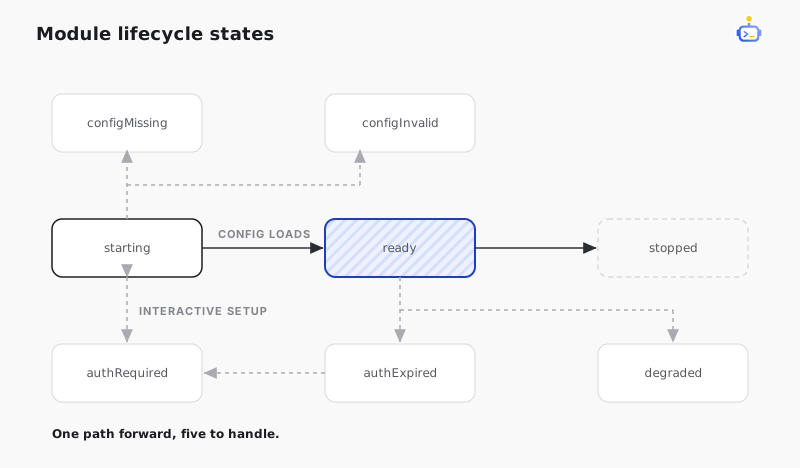
Register status handlers before calling start() so the host observes early transitions. A module reports one of the structured states defined by LifecycleStatus, including configuration and authentication states that require host interaction.
const instance = createModule(context);

instance.onStatusChange((status, error) => {
  console.log(manifest.moduleId, status, error);
});

await instance.start();
Call stop() to end the instance. Treat stopped as terminal for that instance and create a new instance before restarting it.
Package for host discovery
The installed module directory contains its package files and a manifest.json carrying the discovery metadata and configuration descriptors. Desktop scans its configured modules directory, groups compatible implementations by channelName, and selects a concrete variant by moduleId.
The package provides the launcher described by its manifest. Host discovery stays separate from the adapter's platform logic, while host selection, startup, and message delivery remain one lifecycle.
Related docs
- Channel adapters — implement message routing, AppServer interaction, and platform delivery.
- Channel configuration — configure installed Channels in DotCraft.