
Hub local coordination
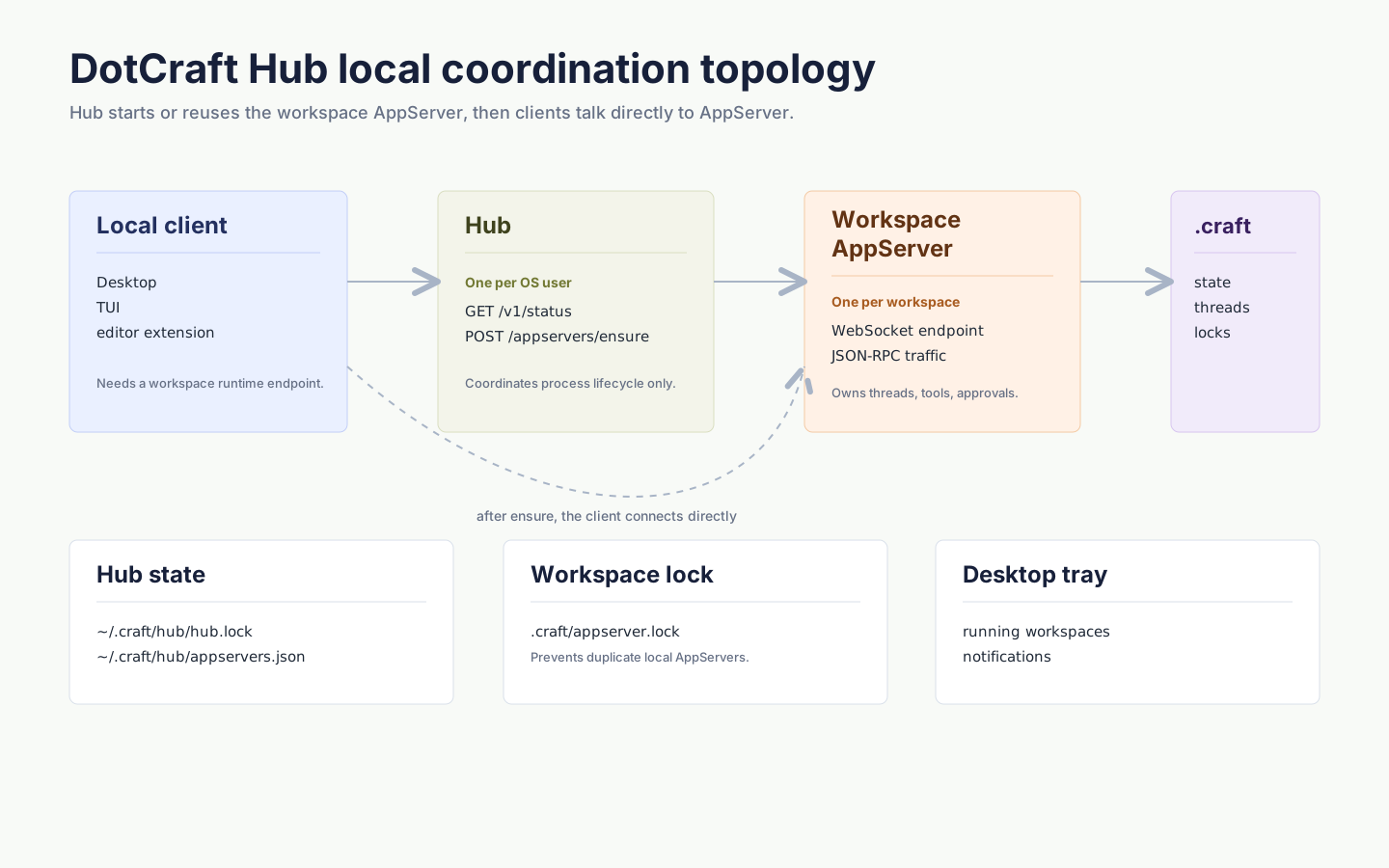
This page targets integrators and contributors; most users never touch Hub directly. Hub is DotCraft's local runtime coordinator. It runs per OS user and discovers, starts, reuses, and stops the AppServer process for each workspace. Desktop and CLI use Hub by default.
NOTE
Remote, CI, bots, or explicit AppServer protocol debugging go through AppServer mode.
Key properties
- One Hub per OS user
- One AppServer per workspace
- Hub does not handle conversation traffic or proxy the AppServer protocol
- A client only asks Hub during bootstrap: make sure this workspace's AppServer is available
- After bootstrap, the client connects directly to the returned AppServer WebSocket URL
When to start manually
You usually do not need to run dotcraft hub manually. For coordination debugging:
dotcraft hubHub starts a loopback management API and writes discovery metadata to ~/.craft/hub/hub.lock. It allocates local ports automatically; if startup fails because a port is busy, a permission is denied, or security software blocks loopback, restart Hub or Desktop to reallocate.
Local state
~/.craft/hub/
├── hub.lock                  # current Hub discovery: API URL, PID, start time, local token, version, binary path
├── appservers.json           # running AppServers, so a restarted Hub can find them again
├── projects.json             # the computer's projects: path and last-opened time
├── mobile.json               # phone access: on or off, paired phones and pairing code (hashes only), relay address and token
└── mobile-certificate.pfx    # certificate that paired phones pin
Each workspace also has:
<workspace>/.craft/appserver.lockIt records which AppServer process owns the workspace and prevents multiple local AppServers from running against the same workspace.
When Hub or AppServer finds a stale appserver.lock left by a dead process, it removes the lock and continues. If the lock points to a still-running AppServer with a healthy WebSocket endpoint, Hub reuses that endpoint instead of starting a duplicate process. When the lock points to a live AppServer that Hub cannot safely reuse, close the Desktop or CLI process holding that workspace, or stop the workspace runtime from the tray, then reopen it.
Phone access
When phone access is on in Settings → Connections → Phones, Hub also runs the mobile gateway: an HTTPS listener that paired phones reach over your local or private network. It accepts connections only from loopback and private network addresses, and phones trust only the certificate whose fingerprint they received when pairing. Two settings in the global ~/.craft/config.json control where it listens:
| Setting | Default | Purpose |
|---|---|---|
Hub.MobileHost | 0.0.0.0 | Address the gateway binds |
Hub.MobilePort | 47610 | Fixed gateway port. Paired phones store it, so changing it means pairing them again |
{
  "Hub": {
    "MobilePort": 47611
  }
}
If another program holds the port, turning phone access on fails and Hub does not try another port. Free the port, or set Hub.MobilePort and restart Hub. The gateway contract is defined by the DotCraft Mobile spec.
Access from anywhere
A relay lets paired phones reach the computer from other networks. Run it on a server that both the computer and the phone can reach, behind a reverse proxy that serves public HTTPS. The relay only forwards encrypted bytes: the phone still speaks TLS to the gateway with its pinned certificate and device credential, so the relay never sees a credential, a project, or a chat.
The Compose template in a DotCraft source checkout runs the relay with a Caddy proxy that obtains a certificate for your host name:
cp -r docker/relay /opt/dotcraft-relay
cd /opt/dotcraft-relay
cp .env.example .env
In .env, set RELAY_PUBLIC_HOST to the relay's DNS name and RELAY_TOKEN to a long random value, such as the output of openssl rand -hex 32. Ports 80 and 443 must reach the server so Caddy can obtain the certificate. Start the relay:
docker compose up -dIf the server already runs a reverse proxy, start only the relay with docker compose up -d relay and forward /r/*, including WebSocket upgrades, to 127.0.0.1:47620. To run it without Docker:
dotcraft relay serve --listen http://127.0.0.1:47620 --token <token>The token can come from the DOTCRAFT_RELAY_TOKEN environment variable instead of --token.
On the computer, open Settings → Connections → Phones → Access from anywhere and enter the relay address, such as https://relay.example.com, and the token. While phone access is on, Hub keeps an outbound connection to the relay and reconnects when it drops. New pairing codes include the relay. Phones paired earlier pick it up the next time they connect on the same network.
Desktop and the tray
Hub itself is a headless background coordinator, and the Desktop tray is its visual layer:
- Open or switch workspaces
- See recent and running workspaces
- Open Desktop or Dashboard
- Restart or stop Hub-managed workspace runtimes
- Receive system notifications forwarded through Hub (task completion, approvals, runtime state)
Exiting from the tray asks Hub to shut down, and Hub stops the workspace AppServers it manages.
For Desktop to open a workspace, dotcraft / dotcraft.exe must be on PATH, or the AppServer executable path must be set in Desktop settings.
Building a client
Use a DotCraft SDK for normal local clients. Its Hub API discovers or starts Hub, ensures the workspace AppServer, preserves structured errors, and then opens the AppServer connection. Implement Hub Protocol directly only for a custom transport, an unsupported language, or protocol debugging.
Related docs
- SDK quickstart — the recommended client path, with bootstrap already wrapped
- Unified Session Core — the Thread / Turn / Item model above Hub and AppServer