
Oratorio integration
This page targets DotCraft contributors. It explains the integration boundaries around the built-in Oratorio workflow.
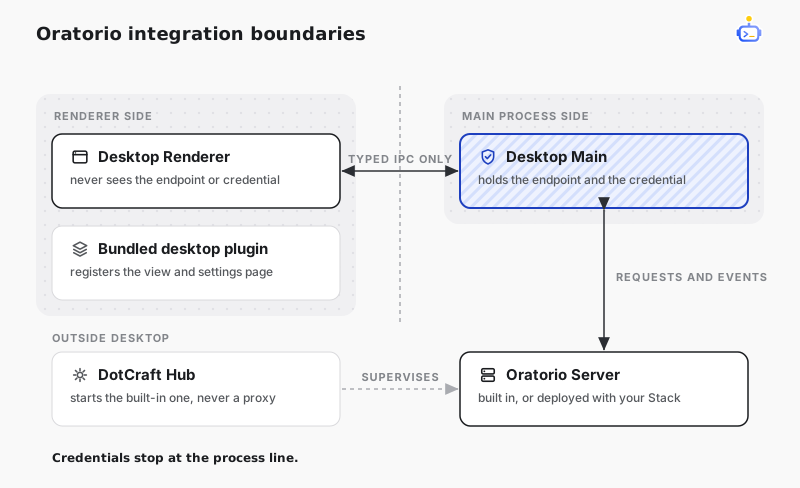
Component boundaries
| Component | Responsibility |
|---|---|
| Oratorio Server | Owns tasks, runs, drafts, source synchronization, worktrees, decisions, settings, and realtime events. |
| DotCraft Hub | Starts and supervises the registered user-level oratorio managed service. It does not proxy Oratorio business requests. |
| Desktop Main | Resolves local or remote service access, injects the bearer, validates allowed routes, and owns the realtime connection. |
| Desktop Renderer | Renders the Board, task detail, and Settings through typed IPC without receiving the endpoint or bearer. |
| Bundled Desktop Plugin | Registers the Oratorio view and Settings page through the public Desktop Plugin activation contract. |
Local Desktop asks Hub to ensure the bundled Server on first use. Remote Desktop resolves the Oratorio service alongside the selected DotCraft Stack. In both modes, Renderer requests cross the same Main-process boundary.
App connection handoffs are inspected in Main and require explicit user approval. After the user enables Oratorio for a thread, Main delivers the bind handoff directly to the managed service as technical activation and returns activation failures to the initiating flow. Renderer receives only a request ID and redacted summary for connection consent.
Develop and validate
Build the Server and run its focused tests from the repository root:
dotnet build src/DotCraft.Oratorio/DotCraft.Oratorio.csproj
dotnet test tests/DotCraft.Oratorio.Tests/DotCraft.Oratorio.Tests.csproj
Run Desktop checks from desktop/:
npm test
npm run build
Packaging publishes the self-contained Server to build/oratorio/ and stages it in Desktop resources. Run build.bat for a local Windows package. The repository's build-multiplatform workflow produces the same layout for every shipped platform.
Keep Oratorio domain behavior in the Server. Desktop view models may format data for display but must not recreate lifecycle, retry, recovery, Worktree, or decision rules.
Related docs
- Hub protocol — the interface Desktop uses to ensure the
oratoriomanaged service is running. - Build a Desktop Plugin — the activation contract the bundled plugin uses to register the Oratorio view.
- DotCraft App — the authority model behind the connect and bind handoffs Main forwards.